Game TestingGame TestingGame Testing

God of Highschool Game Testing

Overview

About the client

MNC Group is Indonesia’s leading media and entertainment powerhouse. With an unparalleled ecosystem spanning national television, digital media, and massive audience reach, MNC serves as the primary strategic gateway for international entertainment products entering the Indonesian market.

Game Intro

The project centers on a Gacha Turn-based RPG based on the legendary South Korean Webtoon/Manhwa, “The God of Highschool” (GOH). GOH features strategic team-building, high-fidelity skill animations, and a deep gacha system. Players must master elemental counters and character-specific “Charyeok” abilities to progress through both cinematic PvE campaigns and competitive PvP arenas.

Our Solution

We applied a rigorous methodology rooted in ISTQB standards and specialized iGaming protocols

  • Market Analysis & Culturalization QA
  • Deep Balancing Audit
  • Performance & Compatibility Matrix
  • Rapid Issue Documentation

Scope of Work & Team Structure

Scope of Work

  • Informed Go/No-Go Decision: Provided the MNC Group with a data-driven “Market Appeal” report, allowing them to evaluate the project’s ROI before a full-scale marketing blitz.
  • Modernized Stability: Identified and cleared legacy bugs that would have hindered the experience on modern OS versions (Android 14/iOS 17+).
  • Balanced Economy: Verified that the game’s monetization and difficulty curves were fair and sustainable for the target audience, protecting long-term retention.
  • Timeline Achievement: Delivered a 360-degree quality assessment within the strict 18-day window, enabling the client to hit their strategic market-timing goals.

    Team Structure

    • 1 QA Leader
    • 10 QA Engineers

    Business Impact

    • All Features are tested with the release on time and high quality without the blocker issue
    • For Market Analysis QA and Balancing QA, the team delivered results that met the client’s expectations.
    • The Fail rate is 0.41% for Functional QA and 2.59% for Compatibility QA
    • The total project effort delivered value exceeded expectations compared to the initial budget plan

    Game Testing

    Online Slot Game Testing

    Overview

    About the client

    Pulse 8 Studios is a boutique iGaming developer and an exclusive content partner for Games Global (formerly Microgaming), specializing in high-volatility, character-driven slot titles. Driven by an “innovation at the core” philosophy, the studio is recognized for blending complex mathematical models with high-fidelity visual effects.

    Game Intro

    The game is a high-volatility, 5×3 reel slot featuring a steampunk mining theme with three distinct “Special Wild” characters: Morphum, All-mine, and Rayne. Each character triggers unique multipliers and behavior, making the logic significantly more complex than a standard video slot.

    Our Solution

    We applied a rigorous methodology rooted in ISTQB standards and specialized iGaming protocols

    • Mathematical Model & RNG Verification
    • Character Interaction Matrix
    • Interrupt & Graceful Recovery Testing
    • Security & Anti-Exploits Audits

    Scope of Work & Team Structure

    • Functional test for all the game features
    • Non-functional tests for currencies and languages
    • Compatibility test for Android and IOS operating systems on 32 different mobile device types
    • Cloud Mobile Testing to increase device types tested

      Business Impact

      Successful Launch

      The game was delivered on schedule with a high level of technical stability, resulting in a smooth market entry.

      Enhanced Player Experience

      Provided a bug-free environment for the game’s complex mechanics, directly contributing to positive player sentiment and engagement.

      Operational Efficiency

      By identifying and resolving logic “traps” early in the development cycle, we reduced the need for expensive post-launch hotfixes.

      L5Technical Reliability

      Verified the integrity of the 243-way logic and feature-buy mechanics, ensuring the product functioned exactly as designed.

      Case StudyCase StudyCase StudyCase StudyCase StudyCase StudyManual TestingManual TestingManual TestingManual TestingManual Testing

      Online Game Testing for Plato

      Overview

      About the client

      Founded in 2014 by the creators of Yahoo! Games, Plato Team Inc. is a San Jose-based company dedicated to reinventing social interaction through a premier cross-platform messenger designed specifically for multiplayer gaming.

      Game Intro

      Plato is an all-in-one social gaming platform that seamlessly integrates a high-quality messenger with a library of over 50 multiplayer games. The app allows millions of users worldwide to chat and compete in real-time.

      Our Solution

      We provide a dedicated Functional QA suite designed to act as the final gatekeeper for every production release

      • Deep-Dive Feature Testing
      • Core Platform Validation
      • User Lifecycle
      • Social Interaction
      • Monetization Integrity
      • Rigorous Regression Testing
      • Manual Compatibility Pass

      Scope of Work & Team Structure

      Scope of Work

      • Functional testing​
      • Weak network testing
      • Compatibility and Adaptability testing

      Team Structure

      • 2 QA Engineers

      Business Impact

      Sustained App Store Reputation

      By catching functional regressions before they hit production, we help maintain the platform’s 4-star rating and positive user sentiment across 60,000+ reviews.

      Revenue Protection

      Our zero-tolerance approach to IAP testing ensures that the platform’s primary revenue stream is never interrupted by functional glitches.

      Launch Confidence

      The client can release new builds and features frequently, knowing that our regression testing has “hardened” the application against unexpected breakages.

      Operational Stability

      We ensure the platform remains “smooth in production,” allowing the client’s internal team to focus on development while we handle the heavy lifting of quality verification.

      Automated TestingAutomated TestingAutomated TestingCase Study

      MMORPG Game Testing

      Overview

      About the client

      The client is a top-tier global game development studio under one of Asia’s largest technology conglomerates. The project involved an ambitious AAA Open-World Survival (SOC) title built on Unreal Engine 4, designed for a simultaneous global launch across PC, iOS, and Android.

      Game Intro

      AAA open-world survival RPG (often categorized as SOC-Survival, Open World, Crafting). Launched globally in June 2023, it was designed as a cross-platform experience for PC, iOS, and Android, pushing the boundaries of what mobile hardware could handle using Unreal Engine 4.

      Challenges

      The transition from a regional development build to a global release presented four critical operational bottlenecks:

      Proprietary Tooling & Language Barriers

      Internal development tools were entirely in the developer’s native language, hindering environment setup and test data management.

      Extreme Hardware Fragmentation

      The game required seamless performance across a massive spectrum of hardware-from high-end PCs to budget smartphones-while ensuring 100% data synchronization.

      Linguistic & UI Complexity (LQA)

      Launching in multiple languages (EFIGS, CJK, etc.) created massive risks for UI clipping, contextual mistranslation, and cultural insensitivity within the sprawling game narrative.

      Massive Content Scope vs. Market Timing

      With a huge open world and a strict global launch window, the functional and linguistic test surface was enormous.

      Our Solution

      We implemented an Integrated Functional & Localization QA Strategy

      • Context-Aware LQA Audits
      • UI/UX Overflow Testing
      • Risk-Based Testing (RBT)
      • Risk-Based Testing (RBT)
      • Cross-Platform Performance Matrix

      Scope of Work & Team Structure

      Scope of Work

      • Functional testing​
      • Client performance testing​
      • Localization testing
      • Compatibility and Adaptability testing

      Team Structure

      • 1 QA Leader
      • 5 QA Engineers

      Business Impact

      Launch Integrity

      Delivered the project for global release on schedule without any technical delays.

      Market Reach

      Optimized performance for low-end hardware, allowing the client to capture a massive user base in emerging markets.

      Stability

      Achieved a 99.8% crash-free rate during the launch window, resulting in top-tier ratings on major App Stores.

      Future Readiness

      Provided a standardized suite of QA assets and tool guides to support long-term “Live-Ops” and seasonal content updates.

      Software TestingBlog

      User Acceptance Testing (UAT): Why It Matters for Modern Software Teams

      User acceptance testing (UAT) is the final stage that confirms whether a product is ready for real users and real business workflows. Even when a system passes functional and QA tests, it can still fail in practice if it doesn’t match how people actually work. When steps feel unclear or certain scenarios aren’t covered, users may struggle, adoption may slow, and teams may face unnecessary rework after launch.

      This article provides a clear overview of what UAT is, why it matters, and how it helps validate a product’s usability in real-world operations. It also walks through the common types of UAT and how each one contributes to ensuring the solution meets business and user expectations.

      By the end, technical teams will understand the role UAT plays in delivering a smooth, confident, and business-ready go-live.

      What is User Acceptance Testing? 

      User acceptance testing, or UAT, is the phase where all technical work meets real-world expectations. After developers and QA teams finish their checks, UAT allows actual end users or business stakeholders to evaluate whether the software supports business workflows, follows defined requirements, and functions correctly in practical scenarios.

      Unlike system or QA testing, which checks technical accuracy, UAT confirms business suitability by using realistic data and user-driven test scenarios. The goal is to identify any gaps between what was delivered and what the business expects, ensuring the product is ready for operational use and receiving final approval for deployment.

      Fundamentally, UAT is considered a form of black box testing, hence, testers must apply the core principles of black box testing to execute UAT effectively. 

      Zoom in Black Box Test Design Techniques

      UAT vs. QA: How they differ

      UAT and QA are both essential parts of the Software Development Lifecycle (SDLC), but they differ primarily in objective, who performs the testing, and the testing environment. UAT is actually the final phase of testing within the broader QA process. 

      Aspect User accepting testing Quality assurance
      Primary goal Validate that the software meets real-world business needs and provides a good user experience Prevent defects and ensure the software meets technical specifications and quality standards
      Participants Actual end-users, business stakeholders, or clients Typically by professional QA engineers or dedicated testing teams
      Focus – Usability, – User workflows, – Real-world needs – Internal quality, technical bugs, system failures- Correct and secure code 
      Timing At the very end of the development process, just before the software is released to production Throughout SDLC, from early stages to just before UAT
      Environment Production-like environment that mirrors real-world usage Usually in controlled testing or staging environments
      Test cases User-defined scenarios and real-world business use cases Predefined test cases based on technical requirements and specifications

      Dive deeper into test case design techniques in the QA process.

      In essence, QA ensures that the product is built correctly according to the technical requirements, while UAT ensures that the correct product is built to satisfy the customer’s actual business needs. Both methods are critical to delivering successful software. 

      6 Key Types of User Acceptance Testing

      When it comes to UAT, there’s no single approach that fits every project. Different types of UAT testing serve specific goals, from internal quality checks to regulatory compliance. Let’s zoom in. 

      UAT type Participants Primary objective Scope & key highlights
      Alpha testing QA teams or internal development teams Detect early defects and validate usability before real users access the product – Conducted at the earliest stage of acceptance testing- Focus on functional stability and user experience- Ensures the product is ready for external evaluation
      Beta testing  A small group of real users Validate product performance in real-world environments and uncover UX gaps – Identifies unexpected edge cases – Captures actionable feedback for final improvements- Helps optimize the product before full release 
      Business acceptance testing (BAT)  Business owners or business teams  Ensure the solution supports real business needs and workflow  – Confirm alignment with operational goals- Verifies that the system delivers measurable business value – Business-driven rather than technical or contractual 
      Contract acceptance testing (CAT) Clients or QA teams working under contractual terms Verify that all deliverables meet the contract’s functional and performance requirements  – Objective checkpoint before client sign-off – Ensures full compliance with contractual obligations – Helps reduce rework and avoid future disputes
      Regulatory acceptance testing (RAT) Compliance teams or regulatory experts Ensure adherence to legal, regulatory, and industry standards – Critical for regulated sectors such as finance, healthcare, and automotive- Protects organizations from compliance risks- Helps the system pass audits without delays 
      Operational acceptance testing (OAT) IT operations, infrastructure, or DevOps teams Confirm the system is ready for stable, long-term operation in a live environment  – Focuses on backup, recovery, failover, and maintenance readiness- Sometimes known as production readiness testing – Validates operational reliability after go-live 

      Why is UAT Important?

      From a business perspective 

      Bridges the gap between technical accuracy and business value

      A product can be bug-free and still fail if it doesn’t support business workflows. In software development, even the most rigorously tested applications can fail if they don’t meet real business needs. That’s where UAT comes in.

      While QA verifies whether the system behaves as designed, user acceptance testing validates whether it behaves as the business intended.

      In one Capgemini survey, 67% of software failures after release were caused by unmet user requirements, not technical defects. UAT closes that gap by having end users walk through real-world business scenarios before launch. This ensures that every process, from login to reporting, aligns with how users actually work in production.

      Improves user adoption and satisfaction

      When users are involved early in UAT testing, they feel a sense of ownership over the final product. By executing test cases in a realistic UAT environment, they can provide hands-on feedback about usability, clarity, and workflow logic.

      This feedback loop directly impacts adoption. A Forrester Total Economic Impact study found that validating experiences with user testing before launch improved customer satisfaction and drove retention gains (3.6% in Year 1, 7.2% in Year 2, and 10.8% in Year 3). By and large, UAT transforms testing from a technical checkpoint into a collaboration that ensures the product feels intuitive and reliable from day one.

      Increases transparency and trust across stakeholders

      UAT is not only a validation exercise but also a decision-making milestone. A well-defined UAT checklist (listing acceptance criteria, test cases, defect thresholds, and sign-off requirements) helps ensure alignment among QA teams, developers, and business owners.

      When stakeholders witness results from real test scenarios and user validations, they gain measurable confidence that the product is ready for production. 

      From a technical team perspective

      Provides concrete usability and workflow feedback

      The users’ complaints, such as “the system is hard to use,” are vague and difficult to address. However, during UAT, users perform real tasks end-to-end and can point out exactly where steps are confusing, labels are unclear, or flows are inefficient. This clarity turns subjective frustration into concrete, testable feedback that helps developers and QA translate into clear product improvements.

      Clarifies acceptance criteria

      A structured UAT phase with clearly documented acceptance criteria and defect thresholds gives technical teams a concrete definition of what “done” means. This disciplined workflow reduces last-minute surprises and shifting expectations, while ensuring everyone is working toward the same agreed standard and staying aligned with business stakeholders.

      Reduce Go-live Risk with UAT Services Provided by LQA

      A successful UAT process requires partnering with a testing provider who understands real user behavior, business workflows, and industry best practices. A well-executed UAT cycle helps organizations uncover usability gaps, validate end-to-end processes, and prevent costly post-release issues.

      As the first independent software testing in Vietnam, with 9 years of experience,  LQA stands out as a trusted partner in delivering comprehensive UAT services. Our experts work closely with businesses to design realistic test scenarios, coordinate user groups, and ensure the product meets both functional requirements and real-world expectations.

      In addition to UAT services, LQA provides a full range of software testing solutions, including manual testing, automation testing, web and mobile application testing, API testing, and more, empowering businesses to launch reliable, user-ready products with confidence.

      FAQs about UAT in Software Testing

      What is user acceptance testing?

      User acceptance testing (UAT) is the final phase of software testing where real users validate whether a system meets business needs and performs as expected in real-world conditions.

      How is UAT different from QA or functional testing?

      QA testing verifies that the system works as designed and detects technical bugs. UAT, on the other hand, verifies that the system works as the business intended, focusing on user workflows, business rules, and real operational value rather than pure functionality.

      Why is UAT important in software development?

      UAT ensures that the product aligns with business objectives before release. It reduces costly post-release defects, increases user adoption, builds stakeholder trust, and confirms deployment readiness. 

      Who should participate in UAT?

      UAT should involve end users, business analysts, and QA leads. Business users are critical since they understand real workflows and can validate whether the system supports day-to-day operations.

      What are the different types of UAT testing?

      The six main types are:

      • Alpha testing – early internal validation;
      • Beta testing – testing by real users before public release;
      • Business acceptance testing (BAT) – focuses on business goals;
      • Contract acceptance testing (CAT) – ensures contractual compliance;
      • Regulatory acceptance testing (RAT) – checks legal/regulatory adherence;
      • Operational acceptance testing (OAT) – confirms live environment readiness. 

      Final Thoughts 

      A well-executed UAT phase is one of the final and most essential steps before releasing any software product. Genuine validation depends on real users or experienced testers who understand the industry context, enabling them to identify issues that traditional testing approaches may overlook.

      To manage go-live risks and deliver a product that aligns with user expectations, many organizations turn to testing partners with strong domain knowledge and proven methodologies. LQA, the first independent software testing company in Vietnam, provides access to teams with deep experience across multiple industries, supporting UAT efforts with practical, context-aware insights.

      Ready to launch IT products with confidence? Contact LQA’s testing team.

      FinanceMobile App

      European Client – Cryptocurrency Wallet Development

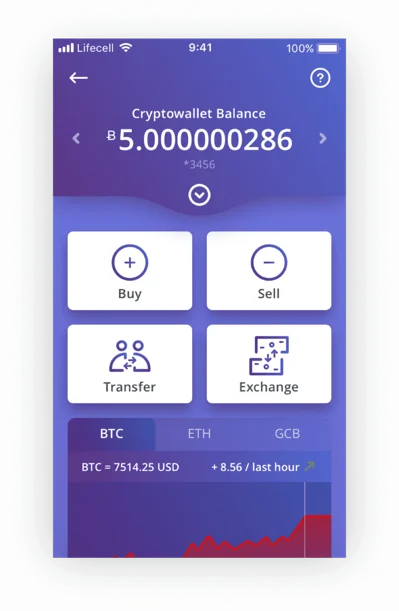
      Our client from Europe wanted to build a wallet for investing and storing digital assets.

      Client Introduction

      • Client: A European client
      • Domain: Banking & finance

      Business Challenge

      The client needed a team to develop a wallet to store different digital assets, such as bitcoin, ethereum.

      Our Solution

      Based on our client’s needs, LTS Group’s development team successfully built the cryptocurrency wallet with key functionalities as follows:

      • Storing bitcoin, ethereum, etc.
      • Exchange and transfer assets.
      • Secure with 2FA, fingerprint.
      Cryptocurrency Wallet Development for European Client

      Achievements

      In only 4 months, our team of 3 members successfully delivered the final wallet with 7 features.

      Ecommerce

      eCommerce Platform Selling IQOS Devices Testing

      Our client has an eCommerce platform that sells a line of heated tobacco and electronic cigarettes (IQOS) devices in the Japanese domestic market & other countries. This platform allows customers to purchase, replace, and upgrade their products and find out how to use the products.

      Client Introduction

      • Client: International
      • Domain: eCommerce

      Business Challenge

      Multiple promotions & marketing campaigns were planned and executed regularly. Thus, the client needed to conduct many different test cases to ensure the purchasing, transaction, and stock replenishment processes work properly during new product releases and when promotions were applied.

      Many payment methods were also supported, including:

      • Pay later
      • Pay by link (QR Code)
      • Pay by credit card
      • Cash on delivery (COD)
      Testing for E-Commerce Platform Selling IQOS Devices

      Our Solution

      Based on our client’s needs, LTS Group’s testing team carried out various tasks:

      • Products were managed by unique IDs through a complex CMS system
      • Promotions and campaigns were updated every week, which required configuration adjustment in the backend to display the correct purchase amount on the front-end.
      • Integration tests were executed daily
      • Sanity tests were executed bi-weekly

      Achievements

      We successfully executed 900 test cases and detected 95 bugs.

      Automotive

      ADAS & LiDAR Testing and Development for Client in EU

      In this case study, let’s discover how LTS Group successfully assisted a European automotive client, specializing in scalable vehicle architecture, to deliver high-quality ADAS & LiDAR testing and development as a cost-effective alternative to their previous vendor.

      Client Introduction

      Our client is a Tier 2 European automotive company focused on developing revolutionary vehicle architecture with full scalability to support diverse drive systems and advanced technology solutions.

      Business Challenge

      In an effort to reduce operational costs, the client was searching for a reliable vendor that could deliver high-quality results at a more competitive price point. After several rounds of evaluation, LTS Group was selected to take over their ADAS & LiDAR testing and development.

      Scope of Work

      • Braking system​
      • Steering​
      • Safety​ (ADAS)

      ​Typical Projects

      1. BSW, MCAL for Ambient Light system​

      Team size: 4​

      Duration: 1/2023 ~ 12/2023

      1. Manual Test for ADAS – UDS on CAN and ETH​

      Team size: 10​

      Duration: 2/2024 ~ 8/2024

      1. CICD for E-Park Lock, E-Shift Lock​

      Team size: 5​

      Duration: 2/2024 ~ 8/2024​

      Technologies & Tools​

      • BSW, MCAL, SIL​
      • Autosar, ASPICE LV2, SHA-256, Vector vFLASH​
      • C, CAPL, Davinci Configurator & Developer, Config MCAL on EB Tresos​
      • vTestStudio, vCast, Matlab, Simulink, Helix QAC, Boot Loader.​
      • Jenkins, Gitlab, Docker​

      Unit Testing vs Functional Testing: Navigating Key Differences

      The difference between unit testing vs functional testing primarily lies in their nature and scope. Unit testing is a testing level focused on individual components, while functional testing is a type of testing that evaluates the system’s overall behavior.

      Before comparing these approaches, it’s crucial to understand that unit testing and functional testing are not mutually exclusive. Unit testing is a subset of functional testing, and the unit testing phase includes functional testing activities at the component level. These methods are complementary and can run in parallel.

      Both unit testing and functional testing aim to ensure software quality by validating functionalities and acting as early detectors of issues, preventing them from escalating.

      Distinguishing unit testing vs functional testing is not about choosing which is better, but about gaining a more accurate, comprehensive view of the testing layers throughout the software development life cycle. The ultimate goal is to combine unit testing and functional testing to achieve the best possible testing outcomes.

      Let’s focus on this goal and dive deeper into analyzing the nature, principles, and best practices of unit testing vs functional testing!


      Unit Testing vs Functional Testing: Key Differences

      Aspects Unit testing Functional testing
      Definition Unit testing is a software testing level in which each individual unit or component of code is tested to validate its correctness. Functional testing is a software testing type that evaluates the entire software application to verify that each function operates according to requirement specifications.
      Scope Tests individual units or components of code. Tests the functionality of the entire application.
      Granularity Tests are small and isolated, focusing on a single function or module. Tests are broader, covering multiple functions/modules and their interactions.
      Objective Validates the behavior of a specific unit, ensuring it works as expected in isolation. Validates end-to-end functionality from a user’s perspective, ensuring the application meets requirements.
      Speed Faster execution as tests are smaller and targeted. Slower execution due to broader scope and more complex scenarios.
      Execution method Can be manual or automated testing. Typically automated.
      Feedback Immediate feedback on individual code changes, aiding in rapid development. Feedback on overall functionality and user experience, identifying potential issues before release.
      Coverage Focuses on code coverage within a unit, ensuring all code paths are tested. Focuses on ensuring all features work as expected, covering various user interactions.
      Stubs & Drivers Not typically used. Often require stubs and drivers for components not yet developed
      Setup Requires minimal setup, often utilizing mocks or stubs to isolate units. Requires comprehensive setup to replicate real-world environments, including databases, servers, and configurations.
      Maintenance Require updates when code changes occur, ensuring tests reflect current code behavior. May need updates as requirements change, ensuring tests align with updated functionality.
      Debugging Helps in identifying and fixing bugs early in the development process. Helps in identifying integration and user interface issues, improving overall application stability.
      When to run Generally executed after unit and integration tests. Frequently executed, usually after any modification in code.


      Functional Testing Overview

      What is functional testing?

      Functional testing is a type of software application testing that examines the functionality of a software application or system. This process focuses on assessing if the software app functions as intended and meets the business expectations.

      The purpose of functional testing is to validate the application’s features, capabilities, and interactions with different components. It is the process of testing the software app’s input and output, user interactions, data manipulation, and the system’s response to various scenarios and conditions.

      Types of functional testing:

      • Unit test
      • Smoke test
      • Sanity test
      • Integration test
      • System test
      • Regression test
      • User acceptance test

      Advantages & disadvantages 

      Functional testing is a crucial aspect of every software development plan. Besides its obvious benefits, it shows some drawbacks as well. Here are some key advantages and disadvantages of functional tests that businesses should take into account:

      Advantages Disadvantages
      Ensures requirement adherence: Functional test is specifically designed to verify that the software’s functionality aligns with the user and business’s needs and requirements. This means that every future, input, and output is examined against the expectations set out in the requirements. Time-consuming: Implementing comprehensive functional test cases for all user requirements requires significant effort and time investment. This involves writing, maintaining, and executing detailed functional tests.
      User-focused validation: Functional test focuses on ensuring the final product is user-friendly and meets customer satisfaction. This type of test is created based on user stories, use cases, and specific functionalities that the users expect, ensuring that the software does what the users need it to do. Incomplete coverage: Functional testing may not cover all possible functional scenarios, resulting in missed defects and bugs. This is because it focuses on testing specific functionalities as defined by requirements, which might not include all edges.
      Early defect detection: This is a significant benefit of functional testing because it allows for the identification and resolution of the software’s defects from the beginning. This helps reduce the development cost and effort required to fix them later. Resource intensive: Functional testing can require significant resources, including time, personnel, and tools, to perform thoroughly. This can be especially challenging for smaller teams with limited resources.
      Supports automation test: Functional tests can be automated, increasing testing efficiency, and allowing for frequent and consistent testing throughout development. Maintenance overhead: Maintaining functional test cases can be burdensome, especially in agile environments with frequent changes. Test cases must be updated regularly to reflect changes in the requirements and functionalities.
      Facilitates regression testing: Functional tests are useful for regression testing. It helps ensure that new changes or updates do not adversely affect the existing functionalities. Dependency on clear requirements: The effectiveness of functional testing depends heavily on the availability and clarity of requirements. Ambiguous or incomplete requirements can lead to ineffective testing and missed defects.


      When to perform functional testing?

      Here are signs indicating when businesses should use functional testing:

      • When preparing to release new software versions or updates: Functional test ensures that new features work as intended and existing functionalities remain unaffected, maintaining the software’s reliability and user satisfaction.
      • Whenever there are changes to the software’s requirements or specifications: Functional testing helps validate that the software still meets the updated criteria, preventing regression issues and ensuring alignment with stakeholder expectations.
      • Before integrating third-party systems or components into the software: Functional testing verifies that the integration works correctly and does not disrupt the overall functionality of the system, ensuring smooth interactions between different parts of the software ecosystem.
      • When implementing changes or enhancements to the user interface (UI): Functional testing ensures that the UI changes are implemented correctly and do not introduce usability issues or interfere with user interactions, maintaining a positive user experience.
      • After fixing defects or bugs identified during previous testing phases: Functional testing validates that the fixes are effective and do not introduce new issues, ensuring that the software remains stable and reliable after bug resolution.
      • During the final stages of software development before deployment: Functional testing serves as a comprehensive validation of the entire system, from end to end, ensuring that all functionalities work together seamlessly and meet the intended requirements before release.

      Functional testing is indeed essential for the above situations. It is uniquely suited to address the above signs thanks to its focus on validating the software’s functional behavior and adherence to requirements.


      Popular frameworks and tools in functional tests

      Here’s a list of top functional testing tools and frameworks that the QA team can use:

      • Selenium: This is one of the most popular open-source automation testing frameworks for web applications. It supports multiple programming languages such as Java, Python, C#, and more.
      • Cypress: This modern JavaScript-based testing framework is specifically designed for web apps. It offers an all-in-one testing solution with features like a built-in assertion library, real-time browser testing, and easy setup.
      • Playwright: It is an open-source automation tool developed by Microsoft, used for testing web apps across different browsers (Chrome, Firefox, Chromium, Microsoft Edge, and WebKit).
      • Appium: This is an open-source automation tool used for testing mobile applications on various platforms such as iOS, Android, and Windows.
      • Soap UI: SoapUI is a widely used API testing tool for testing SOAP and RESTful web services. It allows testers to create, execute, and automate tests for web services, including functional testing, performance testing, and security testing.
      • WatirC:  Watir (Web Application Testing in Ruby) is an open-source automation framework for web applications, developed using the Ruby programming language. It supports cross-browser testing and integrates with various testing tools and libraries.

      Depending on the specific needs of the project and the preferences of the testing team, testers can choose the most suitable framework or tool to ensure effective functional testing.


      Unit Testing Overview

      What is unit testing?

      Unit testing is one of the software application testing levels. It focuses on testing individual units or components of the software in isolation. 

      This functional testing type verifies the correctness of each unit’s behavior and functionality, ensuring that each part of the software works as intended.

      This process is most useful during development to detect and fix defects early in the coding phase. By writing code in small, functional units and creating a corresponding unit test for each one, developers can maintain high code quality.

      These unit tests are written as code and run automatically whenever changes are made to the software. If a test fails, it quickly identifies the specific area of the code with a bug or error, facilitating faster debugging and more efficient development.


      What is a unit test?

      A unit test is a block of code designed to validate the accuracy of a smaller, isolated block of application code, usually a function or method. Its goal is to ensure that the block of code performs as expected, based on the developer’s intended logic.

      A single block of code may also have multiple unit tests, known as test cases. A complete set of test cases covers the full expected behavior of the code block.


      Advantages & disadvantages

      Since unit testing is a type of functional testing, it possesses all of the functional testing pros and cons like early bug detection, improved code quality, yet time-consuming, and incomplete test coverage.

      Besides that, here are some distinct advantages and disadvantages of unit tests that businesses should take into account:

      Advantages Disadvantages
      Unit tests are fast: We only need to build a small unit to test it, and the tests also tend to be rather small. In fact, one-tenth of a second is considered slow for unit tests. Setup complexity: The initial setup of unit testing frameworks, including configuring mocks and dependencies, can be intricate and time-consuming.
      Unit tests are reliable: Simple systems and small units in general tend to suffer much less from flakiness. Furthermore, best practices for unit testing – in particular practices related to hermetic tests – will remove flakiness entirely. Integration challenges: Integrating individually tested units into the broader system architecture may present complexities due to dependencies and environmental disparities.
      Unit tests isolate failures: Even if a product contains millions of lines of code if a unit test fails, you only need to search that small unit under test to find the bug. Potential test redundancy: Overlapping test coverage among unit tests can lead to redundancy, complicating maintenance and potentially obscuring genuine defects.


      When to perform unit testing?

      Here are suitable situations when unit testing proves more beneficial than other testing methods:

      • During the early stages of development: It is essential to implement unit tests at the beginning of the development life cycle. Unit testing allows for identifying and addressing defects at the individual component level, reducing the likelihood of defects propagating to higher levels and minimizing rework later in the development process.
      • When code changes are made frequently: Unit testing provides rapid feedback on the impact of these changes, helping developers catch regressions early and maintain code integrity throughout the development lifecycle.
      • When testing complex or critical components of the software: Unit testing ensures that each software’s component behaves as expected in isolation, allowing for thorough validation and reducing the risk of errors in critical functionality.
      • When continuous integration/delivery (CI/CD) is required: Integrating unit tests into CI/CD pipelines automates the testing process, enabling developers to catch and fix issues early in the development cycle and ensuring that only high-quality code is deployed to production. While other types of testing may also be integrated into CI/CD pipelines, unit tests are essential for validating individual units and detecting regressions quickly.

      Popular frameworks and tools in unit tests

      Here’s a list of top unit testing tools and frameworks that the QA team can use:

      • JUnit: JUnit is one of the most widely used unit testing frameworks for Java applications. It provides annotations and assertions to write and execute tests easily.
      • Jasmine: Jasmine is a behavior-driven development (BDD) framework for testing JavaScript code. It provides an easy-to-understand syntax for defining tests and assertions, making it suitable for front-end and back-end testing in JavaScript environments.
      • TestNG: TestNG is a Java testing framework, inspired by JUnit and NUnit. It offers additional features beyond JUnit, such as support for parameterized tests, test grouping, and parallel test execution, making it a popular choice for Java developers.
      • PHPUnit: PHPUnit is a unit-testing framework for PHP applications. It offers a comprehensive set of assertion methods and features for testing PHP code.
      • Mocha: Mocha is a flexible and feature-rich JavaScript testing framework for Node.js applications. It supports asynchronous testing and various reporting formats.


      Differentiating Factors of Functional Testing vs Unit Testing

      The differences between unit vs functional testing are fundamental, lying in their testing scope and levels. 

      Unit Testing is concentrated on individual units or components of code, ensuring that each part functions correctly in isolation.

      On the other hand, functional testing focuses on verifying the overall functionality of the software application, ensuring it meets specified business requirements and user expectations. Functional tests encompass broader scenarios, validating end-to-end functionality from the user’s perspective to ensure the software behaves as intended in a real-world environment.


      Key Similarities of Unit Testing and Functional Testing

      Despite their distinct approaches, unit testing and functional testing are akin to companions with mutual objectives. Both techniques prioritize ensuring the software’s utmost reliability and excellence. They function as early detectors, identifying issues before they escalate.

      Additionally, unit testing and functional testing share some similar advantages and disadvantages. The primary advantage of both is the early detection of defects, which helps reduce the cost and effort required to fix issues later in the development cycle. Both also contribute to higher code quality and reliability, providing confidence in the software’s stability.

      However, they share the disadvantage of requiring significant initial effort to write comprehensive test cases, which can be time-consuming. Maintenance of these tests can also be challenging, especially when the codebase evolves, necessitating updates to the tests to ensure they remain relevant and effective.

      Despite these challenges, the benefits they offer in terms of ensuring robust, high-quality software make both unit testing and functional testing indispensable in modern software development practices.


      Keep Balance of both Functional Testing and Unit Testing

      There is no absolute balance between functional vs unit testing. Because the testing implementers do not need to choose between these two types of tests; QA experts can and should perform them in parallel. As clarified at the beginning of the article, unit testing vs functional testing are not mutually exclusive but rather complementary and often overlap.

      Unit tests typically target specific features at the module or class level, whereas functional tests evaluate use-case scenarios from the user interface to the end of processing.

      For example, in an e-commerce web app, a critical function is product searching, which includes searching across all categories and using custom filters. During unit testing, developers, who have access to the backend code (a white-box testing technique), test individual modules: Developer A might test the search-all-categories module, while Developer B tests the search-by-custom-filter module. This is unit testing.

      When developers examine functionalities such as searching, choosing filters, and sorting results, they are conducting functional testing at a unit level. However, the functional test covers broader testing, including testing levels other than unit tests, which are integration tests and system tests (end-to-end testing). 

      Continuing with the e-commerce example, integration testing verifies that the search-all-categories module and the search-by-custom-filter module work well together. System testing evaluates the entire workflow, from account creation, logging in, searching for products, and adding products to the cart, to payment, ensuring a seamless and logical user flow.

      To achieve comprehensive testing coverage, from individual components to the system as a whole, and ensure flawless testing outcomes, businesses should combine not only unit testing vs functional testing but these 3 levels of functional tests. This aligns closely with Agile developments, enhancing software quality while maintaining adaptability and speed.

      Relying exclusively on functional testing without a well-balanced stratification strategy, or over-relying solely on unit testing, can lead to significant consequences. These include missing critical defects, difficulties in debugging, longer feedback loops, and higher costs for fixing bugs. 

      Therefore, the optimal balance is the strategic use of functional testing at different levels, including unit testing, to ensure thorough and effective testing outcomes.

      Here are some best practices to navigate unit testing vs functional testing and other test levels of functional test:


      Stick to the testing objectives 

      Every software development project has three fundamental objectives: correctness of features, clean and maintainable code, and a productive workflow:

      • Correctness of features:  Ensures that the software meets both functional and non-functional requirements, delivering the intended outcomes accurately and reliably.
      • Clean and maintainable code: Aims to create a codebase that is readable, flexible, and scalable, reducing technical debt and ensuring long-term sustainability.
      • Productive workflow: Focuses on fostering effective team dynamics, enhancing efficiency, and shortening development cycles to streamline processes and increase the likelihood of project success.


      Understand all the testing types and levels thoroughly

      Having a comprehensive understanding of each testing type and level is crucial for the QA team to plan effective testing plans and utilize each approach’s strengths at the appropriate time.

      Let’s find out the most fundamental knowledge of each functional testing level in the following table:

      Aspects Unit tests Integration tests End-to-end tests (system tests)
      Focus Single functionality and small units of code Interaction between different modules or external systems The entire application as end users would experience it
      Purpose Ensure new changes do not break existing functionality; maintain code quality Verify the system’s overall coherence and functionality at critical stages Validate the entire application’s workflow under real-world conditions
      Number Numerous Fewer Fewest
      Complexity Low Medium High
      Scope Detailed and granular Moderate Broad
      Execution time Quick Slower Longest
      Frequency of execution Frequently, ideally part of automated continuous integration Less frequently than unit tests, at key points during the development cycle At significant milestones, such as before releases
      Cost Low Medium – more expensive than unit tests Higher than both unit and integration tests
      Examples Testing a single function or method Testing data flow between two modules Testing a user logging in and completing a transaction


      To achieve the right balance among all testing types, the testing pyramid is an excellent method. The pyramid graphic below depicts the three essential layers of functional testing in a typical software development life cycle:

      As shown, unit tests form the base of the testing pyramid, acting as the backbone of the software application testing process. As you move up the pyramid, the tests cover broader scopes and become more complex. Conducting frequent and thorough unit testing at the foundation level significantly reduces the risk of undetected bugs and issues.

      Google recommends an ideal split of 70/20/10 for a balanced testing strategy: 70% unit tests, 20% integration tests, and 10% end-to-end functional tests. While these exact proportions may vary for different teams, the foundational pyramid structure serves as a consistent guide.


      Understand the true value of tests 

      The greatest value a software product team can offer end-users is not merely identifying bugs, but ensuring those bugs are resolved. To fix a bug, it must first be detected, ideally through a test designed to catch it.

      However, value is only truly added when the bug is fixed. Therefore, when evaluating any testing strategy, it’s not enough to consider how well it identifies bugs. It’s equally important to assess how effectively it enables developers to fix and prevent bugs.


      Build the right feedback loop

      Tests establish a feedback loop that informs developers whether the product is functioning correctly. An ideal feedback loop is characterized by speed, reliability, and the ability to isolate failures.

      • Speed: Fast feedback allows for quicker fixes, and with a fast enough loop, developers can even run tests before committing changes.
      • Reliability: Reliable tests are crucial. Spending hours debugging only to find out it was a flaky test erodes developers’ trust in the test suite.
      • Isolation of failures: Finding the specific lines of code causing a bug in a product with millions of lines is akin to searching for a needle in a haystack. Isolating failures helps developers pinpoint and address issues effectively.

      To create this ideal feedback loop, focus on smaller, more manageable components. Unit tests, which isolate and test small parts of the product, are particularly effective in creating an optimal feedback loop.


      Getting solutions from experts

      Effectively combining and optimizing different levels of functional testing requires precise professional knowledge of each test type and extensive functional testing experience.

      Building and training an in-house QA team demands significant time, effort, and cost. As a result, many businesses opt to outsource to software testing companies for the following benefits:

      • Quick access to a vast pool of QA experts with extensive experience and professional knowledge in all types of functional testing.
      • Cost savings by reducing expenses on infrastructure, recruitment, and training.
      • Accelerated time to market by minimizing the time and effort required for hiring and training.
      • An optimized and flawless testing process, thanks to the expertise of the outsourced team.

      Engaging a specialized software QA and testing firm enhances functional and unit testing, ensuring comprehensive evaluation and optimal testing performance.

      With over 8 years of experience as a pioneering independent software QA provider in Vietnam, LQA stands out as a leading IT quality and security assurance organization. We offer a wide range of software QA and testing services, and software development solutions to meet our client’s diverse needs.

      At LQA, we stay current with the latest industry-leading tools and functional testing methodologies.

      Key features of LQA’s functional test solution:

      • Comprehensive software QA solutions: consultation, strategy, execution, and ongoing support.
      • A bug rate of less than 3% for devices, mobile, and web applications.
      • Quick delivery facilitated by a large team of experienced testers.
      • An optimal price-to-quality ratio, leveraging cost savings and the expertise of Vietnamese IT professionals.
      • Tailored solutions based on industry-specific knowledge.
      • Maximum security assured through a Non-Disclosure Agreement (NDA) and stringent security procedures during database access.

      Connect with LQA’s professionals to enhance the functional testing experience, ensuring outstanding software quality, bug-free applications, quick project delivery, cost-effective solutions, industry-specific precision, and maximum security.


      Frequently Asked Questions About Unit Tests and Functional Tests

      What is unit testing?

      Unit testing is a software testing level where individual units or components of a software application are tested in isolation. The purpose is to validate that each unit functions correctly as per the design specifications.


      What is functional testing?

      Functional testing is a type of software testing that evaluates the overall functionality of a software application by testing its features against specified requirements. It involves testing the application’s behavior and functionality from an end-user perspective. Major functional testing levels include: unit testing, integration testing, and system testing (end-to-end testing)


      What is the difference between unit test and functional test?

      The main difference between unit testing vs functional testing lies in their scope and focus. Unit testing is focused on testing individual components or units of the software application in isolation, typically at the code level. On the other hand, functional testing evaluates the behavior and functionality of the application as a whole, typically from the end user’s perspective, and encompasses testing various features and functionalities of the application.


      Final Thoughts About Functional Tests vs Unit tests

      In conclusion, unit testing and functional testing are not mutually exclusive but rather complementary. While unit testing focuses on individual components, functional testing evaluates the system’s overall behavior. Achieving an optimal balance between unit test vs functional test methods involves performing them in parallel to ensure thorough and effective testing outcomes.

      Our article has served as a comprehensive guide to understanding the differences and nuances between unit tests vs functional tests.

      Effectively combining and optimizing different levels of testing, including functional test vs unit test requires precise professional knowledge and extensive experience in functional testing.

      Engaging a specialized software QA and testing firm, such as LQA, can enhance unit testing vs functional testing, ensuring comprehensive evaluation and optimal testing performance. For further assistance and to enhance your testing experience, we encourage you to connect with LQA’s experts.

      BlogBlogMobile AppSoftware TestingSoftware Testing

      How to Perform Native App Testing: A Complete Walkthrough

      Native apps are known for their high performance, seamless integration with device features, and superior user experience compared to hybrid or web apps. But even the most well-designed native app can fail if it isn’t thoroughly tested. Bugs, compatibility issues, or performance lags can lead to poor reviews and user drop-off.

      In this article, we’ll walk businesses through the purpose and methodologies of native app testing, explore different types of tests, and outline the key criteria to look for in a trusted native app testing partner.

      By the end, companies will gain the insights needed to manage external testing teams with confidence and drive better app outcomes.

      Now, let’s start!

      What Is Native App Testing?

      Native app testing is the process of evaluating the functionality, performance, and user experience of an app that is specifically developed for a particular operating system, such as iOS or Android, to make sure it functions correctly and delivers a high-quality user experience on its intended platforms. These apps are referred to as “native” because they are designed to take full advantage of the features and capabilities of a specific OS.

      what is native app testing

      Definition of native app testing

      The purpose of native app testing is to determine whether native applications work correctly on the platform for which they are intended, evaluating their functionality, performance, usability, and security.

      Through robust testing, this minimizes the risk of critical issues and enhances the app’s success in a competitive app market.

      Key Types of Native App Testing

      types of native app testing

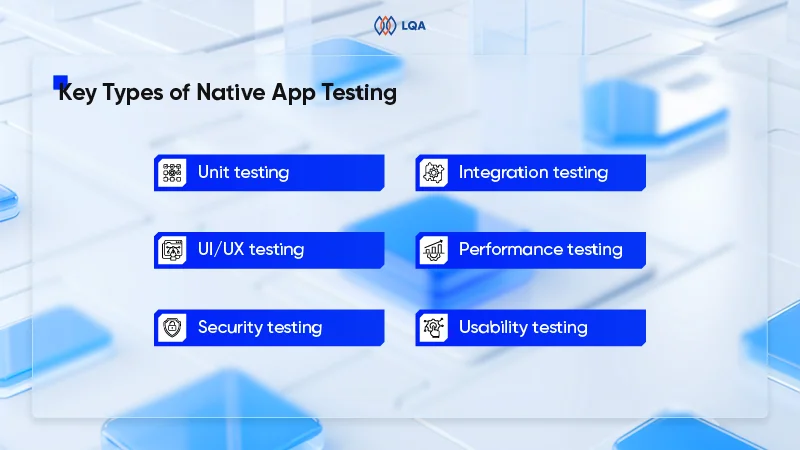
      Key types of native app testing

      Unit testing

      • Purpose: Verifies that individual functions or components of the application work correctly in isolation.
      • Why it matters: Detecting and fixing issues at the unit level helps reduce downstream bugs and improves code stability early in the development cycle.

      Integration testing

      • Purpose: Checks how different modules of the app work together – like APIs, databases, and front-end components.
      •  Why it matters: It helps identify communication issues between components, preventing system failures that can disrupt core user flows.

      UI/UX testing

      • Purpose: Evaluates how the app looks and feels to users – layouts, buttons, animations, and screen responsiveness.
      • Why it matters: A consistent and intuitive interface enhances user satisfaction and directly impacts adoption and retention rates.

      Performance testing

      • Purpose: Tests speed, responsiveness, and stability under different network conditions and device loads.
      • Why it matters: Ensuring smooth performance minimizes app crashes and load delays, both of which are key factors in maintaining user engagement.

      Security testing

      • Purpose: Assesses how well the app protects sensitive data and resists unauthorized access or breaches.
      • Why it matters: Addressing security gaps is essential to protect sensitive information, meet compliance requirements, and maintain user trust.

      Usability testing

      • Purpose: Gathers real feedback from users to identify friction points, confusing flows, or overlooked design flaws.
      • Why it matters: Feedback from usability testing guides design improvements and ensures that the app aligns with user expectations and behaviors.

      Learn more: Software application testing: Different types & how to do?

      Choosing the Right Approach to Native App Testing: In-House, Outsourced, or Hybrid?

      One of the most strategic decisions in native app development is determining how testing will be handled. The approach taken can significantly affect not only time-to-market but also product quality, development efficiency, and long-term scalability.

      approach to native app testing

      Choose the right approach to native app testing

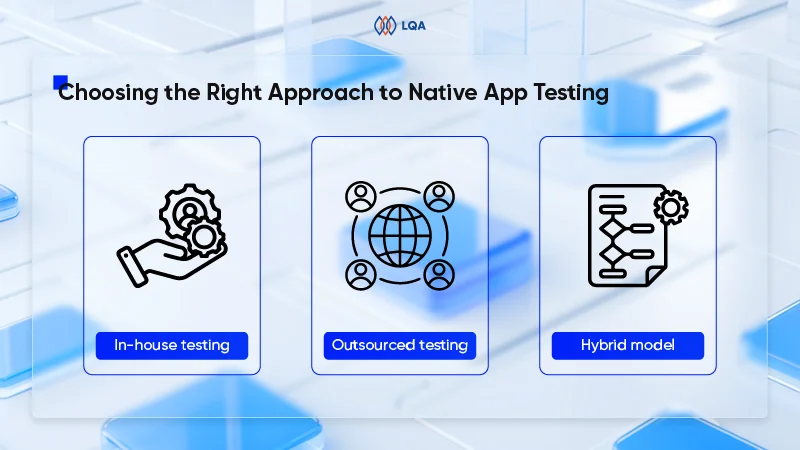
      In-house testing

      In-house testing involves building a dedicated QA team within the organization. This approach offers deep integration between testers and developers, fostering immediate feedback loops and domain knowledge retention.

      Maintaining in-house teams makes sense for enterprises or tech-first startups planning frequent updates and long-term support.

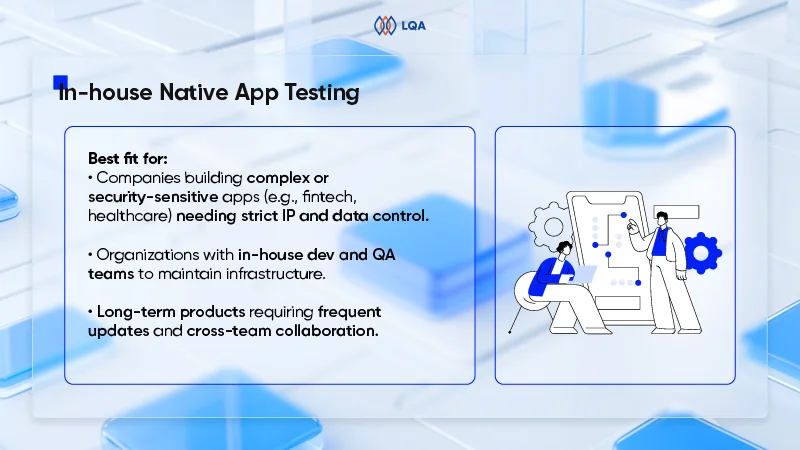
      Best fit for:

      • Companies developing complex or security-sensitive apps (e.g., fintech, healthcare) require strict control over IP and data.
      • Organizations with established development and QA teams capable of building and maintaining internal infrastructure.
      • Long-term products with frequent feature updates and the need for cross-functional collaboration between teams.

      in-house testing

      In-house testing

      Challenges:

      • High cost of QA talent acquisition and retention, particularly for senior test engineers with mobile expertise.
      • Requires significant upfront investment in devices, testing labs, and automation tools.
      • May face resource bottlenecks during high-demand development cycles unless teams are over-provisioned.

      Outsourced testing

      With outsourced testing, businesses partner with QA vendors to handle testing either partially or entirely.

      This model not only reduces operational burden but also gives businesses quick access to experienced testers, broad device coverage, and advanced tools. In fact, 57% of executives cite cost reduction as the primary reason for outsourcing, particularly through staff augmentation for routine IT tasks.

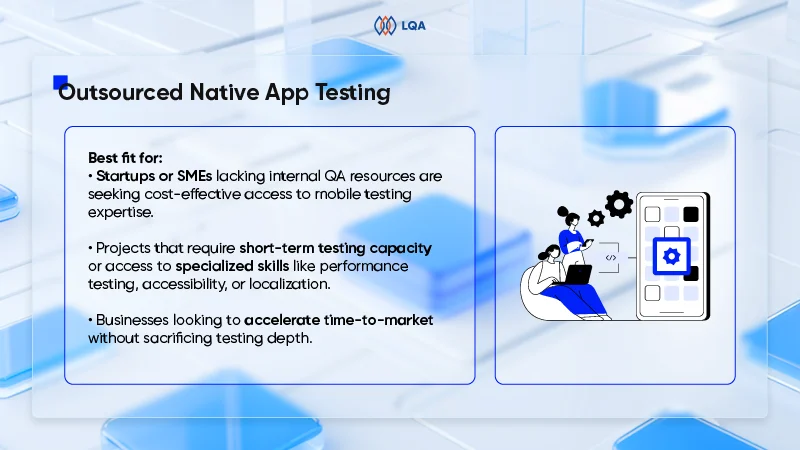
      Best fit for:

      • Startups or SMEs lacking internal QA resources are seeking cost-effective access to mobile testing expertise.
      • Projects that require short-term testing capacity or access to specialized skills like performance testing, accessibility, or localization.
      • Businesses looking to accelerate time-to-market without sacrificing testing depth.

      Challenges:

      • Reduced visibility and control over daily test execution and issue resolution timelines.
      • Coordination challenges due to time zone or cultural differences (especially in offshore models).
      • Requires due diligence to ensure vendor quality, security compliance, and confidentiality (e.g., NDAs, secure environments).

      outsourced testing

      Outsourced testing

      Hybrid model

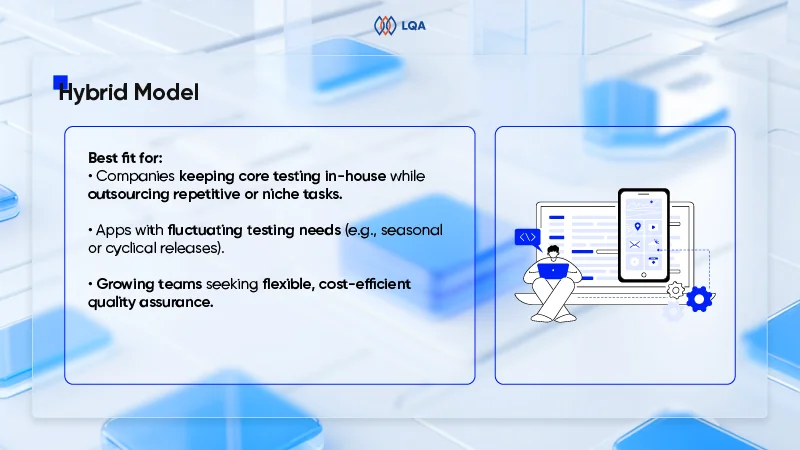
      The hybrid approach for testing allows companies to retain strategic oversight while extending QA capabilities through external partners. In this setup, internal QA handles core feature testing and critical flows, while external teams take care of regression, performance, or multi-device testing.

      Best fit for:

      • Organizations that want to retain strategic control over core testing (e.g., test design, critical modules) while outsourcing repetitive or specialized tasks.
      • Apps with variable testing workloads, such as cyclical releases or seasonal feature spikes.
      • Companies scaling up who need to balance cost and flexibility without compromising on quality.

      Challenges:

      • Needs strong project management and alignment mechanisms to coordinate internal and external teams.
      • Risk of inconsistent quality standards unless test plans, tools, and reporting are well integrated.
      • May involve longer onboarding to align both sides on tools, workflows, and business logic.

      hybrid model

      Hybrid model

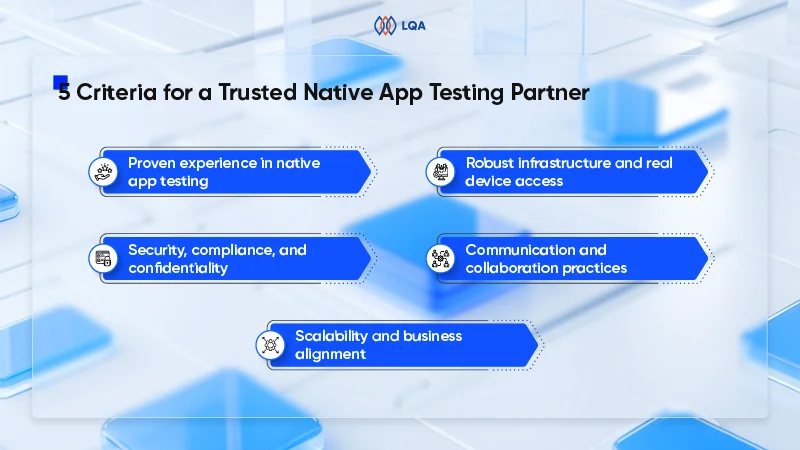
      5 Must-Have Criteria for a Trusted Native App Testing Partner

      While every business has its own unique needs, there are key qualities that any reliable native app testing partner should consistently deliver. Below, we break down the 5 essential criteria that an effective software testing partner must meet and explain why they matter.

      trusted native app testing partner

      Choose a trusted native app testing partner

      Proven experience in native app testing

      A testing partner’s experience should extend beyond general QA into deep, hands-on expertise in native mobile environments. Native app testing demands unique familiarity with OS-level APIs, device hardware integration, and platform-specific performance constraints, whether it’s iOS/Android for mobile or Windows/macOS for desktop.

      • For mobile, this means understanding how apps behave under different OS versions, permission models, battery usage constraints, and device-specific behaviors (e.g., Samsung vs. Pixel).
      • For desktop, experience with native frameworks like Win32, Cocoa, or Swift is critical, especially for apps relying on GPU usage, file system access, or local caching.

      Businesses should see case studies or proof points in your industry or use case, such as finance, healthcare, or e-commerce, where reliability, compliance, or UX is critical.

      Certifications like ISTQB, ASTQB-Mobile, or Google Developer Certifications reinforce credibility, especially when combined with real-world results .

      Robust infrastructure and real device access

      A trusted testing partner must offer access to a wide range of real devices and system environments that reflect the business’s actual user base across both mobile and desktop platforms. This includes varying operating systems, screen sizes, hardware specs, and network conditions. Unlike limited simulations, testing on real devices ensures accurate performance insights and reduces post-launch issues.

      Security, compliance, and confidentiality

      Given the sensitive nature of app data, the native app testing partner must adhere to strict security standards and compliance frameworks (e.g., ISO 27001, SOC 2, GDPR).

      More than just certification, this means implementing security-conscious testing environments that prevent data leaks, applying techniques like data masking or anonymization during production-like tests, and enforcing strict protocols such as signed NDAs, role-based access, and secure handling of test assets and code.

      It’s also important to note that native desktop apps often interact more deeply with a system’s file structure or network stack than mobile apps do, which increases the surface area for security vulnerabilities.

      Communication and collaboration practices

      Clear, consistent communication is essential when working with an external testing partner. Businesses should expect regular updates on progress, test results, and issues so they can stay informed and make timely decisions. The partner should follow a structured process for planning, executing, and retesting and be responsive when priorities shift.

      They also need to work smoothly within companies’ existing tools and workflows, whether that’s Jira for tracking or Slack for quick updates. Good collaboration helps avoid delays, improves visibility, and keeps your product moving forward efficiently.

      Scalability and business alignment

      An effective testing partner must offer the ability to scale resources in line with evolving product demands, whether ramping up for major releases or optimizing during low-activity phases. Flexible scaling guarantees efficient use of time and budget without compromising test coverage.

      Equally important is the partner’s alignment with broader business objectives. Testing processes should reflect the development pace, release cadence, and quality benchmarks of the product. A well-aligned partner contributes not only to immediate project goals but also to long-term product success and market readiness.

      Best Practices for Managing An External Native App Testing Team

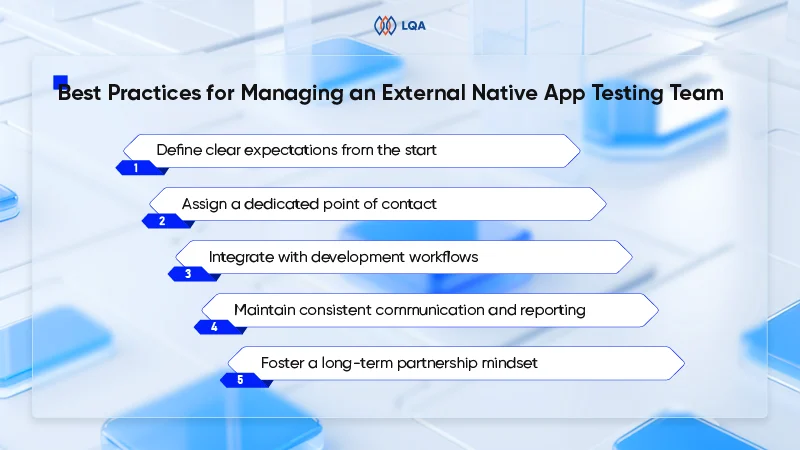
      For businesses exploring outsourced native app testing, effective team management is key to turning that investment into measurable outcomes. The 5 practices below help establish alignment, reduce friction, and unlock real value from the partnership.

      manage an external native app testing team

      Manage an external native app testing team

      Define clear expectations from the start

      A productive partnership begins with a clearly defined scope of work. Outline key performance indicators (KPIs), testing coverage objectives, timelines, and preferred communication channels from the outset.

      Make sure the external testing team understands the product’s business goals, user profiles, and high-risk areas, whether it’s data sensitivity, user load, or platform-specific edge cases. Early alignment helps eliminate confusion, reduces the risk of missed expectations, and makes it easier to track progress against measurable outcomes.

      Assign a dedicated point of contact

      Appointing a liaison on both sides helps reduce miscommunication and speeds up decision-making. This role is responsible for managing test feedback loops, flagging blockers, and facilitating coordination across internal and external teams.

      Integrate with development workflows

      Embedding QA professionals within Agile teams enhances collaboration and accelerates issue resolution. When testers are involved from the outset, they can identify defects earlier, reducing costly rework and ensuring development stays on track.

      In today’s multi-platform environment, where apps must perform reliably across operating systems, devices, and browsers, integrating QA into Agile sprints transforms compatibility testing into a continuous effort. Rather than treating it as a final-stage checklist, teams can proactively detect and resolve issues such as layout breaks on specific devices or OS-related performance lags.

      Maintain consistent communication and reporting

      Regular updates between the internal team and the external testing partner help avoid misunderstandings and keep projects on track. Weekly syncs or sprint reviews ensure that testing progress, bug status, and priorities are clearly understood.

      Use structured reports and dashboards to show key metrics like test coverage, defect severity, and retesting status. As a result, businesses get to assess product quality quickly without wading through technical detail.

      Connecting the external team to tools already in use, such as Jira, Slack, or Microsoft Teams, helps keep communication smooth. Such integration improves collaboration and speeds up release cycles.

      Foster a long-term partnership mindset

      Onboard the external testing team with the same thoroughness as internal teams. Provide access to product documentation, user personas, and business goals. When testers understand the broader context, they can identify issues that impact user experience and business outcomes more effectively. This strategic partnership fosters a proactive approach to quality, leading to more robust and user-centric products.

      Check out the comprehensive test plan template for the upcoming projects.

      How Long Does It Take To Thoroughly Test A Native App?

      Thoroughly testing a native mobile application is a multifaceted endeavor. Timelines vary significantly based on:

      • App complexity (simple MVP vs. feature-rich platform)
      • Platforms supported (iOS, Android, or both)
      • Manual vs. automation mix
      • Number of devices and testing cycles

      how long does it take to test a native app

      How long does it take to test a native app?

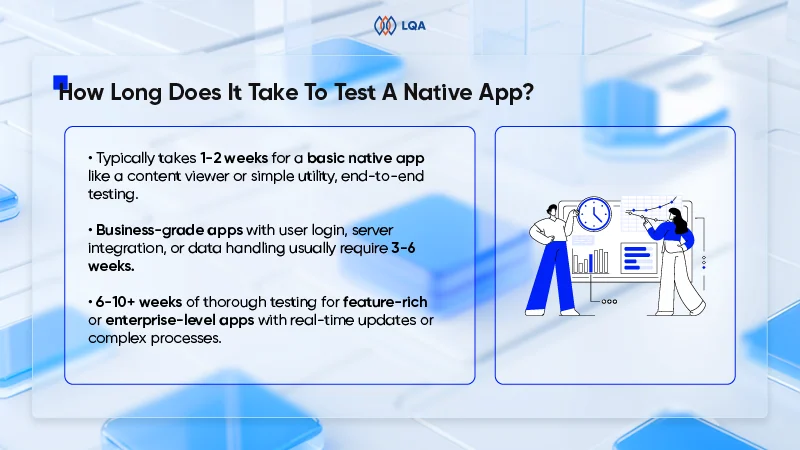
      For a basic native app, such as a content viewer or utility tool with limited interactivity, end-to-end testing might take between 1 and 2 weeks, focusing primarily on functionality, UI, and device compatibility.

      However, most business-grade applications – those involving user authentication, server integration, data input/output, or performance-sensitive features – typically require from 3 to 6 weeks of testing effort.

      For feature-rich or enterprise-level native apps, particularly those that involve real-time updates, background processes, or complex data transactions, testing can stretch from 6 to 10 weeks or more.

      This is especially true when multi-platform coverage (iOS, Android, desktop) and a wide range of devices and OS versions are required. Native apps on mobile often need to account for fragmented hardware ecosystems, while native desktop apps may require deeper testing of system-level access, file handling, or offline modes.

      Ultimately, the real question is not just “how long,” but how early and how strategically QA is integrated. Investing upfront in test strategy, automation, and risk-based prioritization often results in faster releases and lower post-launch costs, making the testing timeline not just a cost center but a business enabler.

      FAQs About Native App Testing

      1. What is native app testing, and how is it different from web or hybrid testing?

      Native app testing focuses on apps built specifically for a platform (iOS, Android, Windows) using platform-native code. These apps interact more directly with device hardware and OS features, so testing must cover areas like performance, battery usage, offline behavior, and hardware integration. In contrast, web and hybrid apps run through browsers or webviews and don’t require the same depth of device-level testing.

      1. How do I know if outsourcing native app testing is right for my business?

      Outsourcing is a good choice when internal QA resources are limited or when there’s a need for broader device coverage, faster turnaround, or specialized skills like security or localization testing. It helps reduce time-to-market while controlling costs, especially during scaling or high-volume release cycles.

      1. How much does it cost to outsource native app testing?

      While specific figures for outsourcing native app testing are not universally standardized, industry insights suggest that software testing expenses typically account for 15% to 25% of the total project budget. For instance, if the total budget for developing a native app is estimated at $100,000, the testing phase could reasonably account for $15,000 to $25,000 of that budget. This range encompasses various testing activities, including functional, performance, security, and compatibility testing.

      Final Thoughts on Native App Testing 

      By understanding what native app testing entails, weighing the pros and cons of different approaches, and applying best practices when working with external testing teams, businesses can make smart decisions. More importantly, companies will be better equipped to decide if outsourcing is the right path and how to do it in a way that maximizes efficiency.

      Ready to get started? 

      LQA’s professionals are standing by to help make application testing a snap, with the know-how businesses can rely on to go from ideation to app store.

      With a team of experts and proven software testing services, we help you accelerate delivery, ensure quality, and get more value from your testing efforts.
      Contact us today to get the ball rolling!

      native app testing partner