
Category: Manual Testing

IT Outsourcing

What Is Penetration Testing? | A Comprehensive Guide

Understanding your strengths, vulnerabilities, and where your team should allocate time is crucial in the realm of cybersecurity. However, determining these factors and prioritizing tasks can be challenging. So, conducting penetration testing is a highly effective approach to gaining clarity.

Penetration testing is a solid basis for any security team. It excels at pinpointing what to focus on and proposing initiatives for your team’s future endeavors. So, what exactly is pen testing, and why is it so important? The following article will provide further insights.

What is Penetration Testing?

A penetration test (or pentest), is a sanctioned simulation of an attack carried out on a computer system to assess its security. Penetration testers employ identical tools, methods, and procedures as actual attackers to discover and illustrate the detrimental effects of system vulnerabilities.

These tests typically simulate diverse attack types that pose potential risks to a business. They evaluate the system’s ability to resist attacks from authorized and unauthorized sources, as well as various system roles. With appropriate parameters, a pen test can delve into any system facet.

Why is Penetration Testing Important?
What Is Penetration Testing? | A Comprehensive Guide

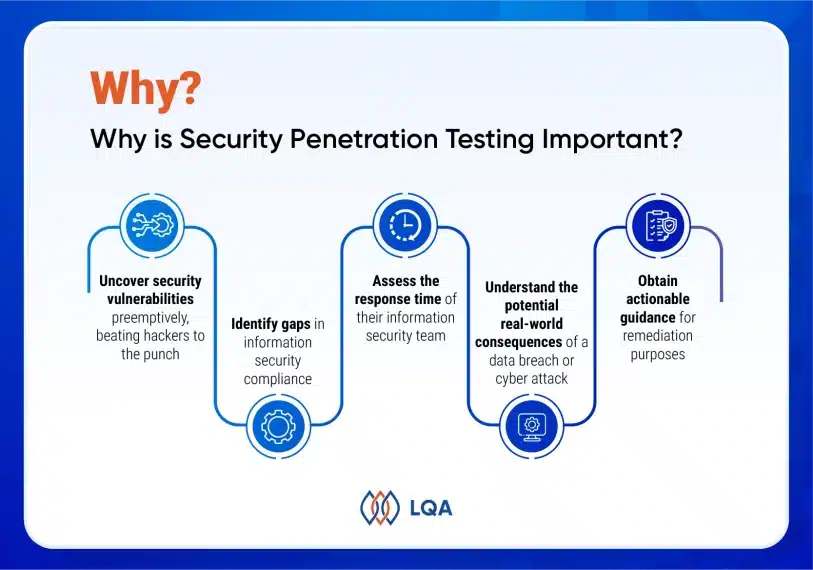
A penetration test holds a strong significance in ensuring network security. This testing methodology enables businesses to accomplish the following objectives:

  • Uncover security vulnerabilities preemptively, beating hackers to the punch.
  • Identify gaps in information security compliance.
  • Assess the response time of the information security team, gauging how quickly  to detect breaches and minimize the impact.
  • Understand the potential real-world consequences of a data breach or cyber attack.
  • Obtain actionable guidance for remediation purposes.

Penetration testing empowers security experts to methodically assess the security of multi-tier network architectures, custom applications, web services, and other IT components.

Penatration testing services and tools provide swift visibility into high-risk areas, letting businesses build security budgeting.

Comprehensive testing of an organization’s entire IT system, a web app or a mobile app is crucial for safeguarding critical data from cyber hackers and enhancing the IT department’s responsiveness during potential attacks.

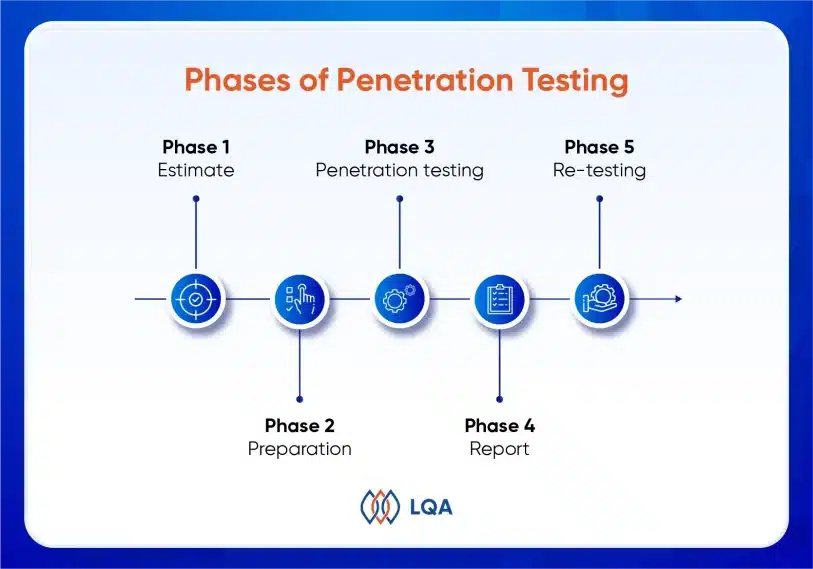
5 Phases of Penetration Testing

Penetration testers replicate the tactics employed by determined adversaries. At LQA, we adhere to a comprehensive plan that encompasses the following penetration testing process:

Phase 1 – Estimation

In the first pen testing process, we need to understand the exact number of items in scope, such as

  • HTTP requests in web application and API,
  • screens & main functions in Android / iOS application,
  • server and network devices,
  • IP addresses in systems.

Then, we build a plan based on the function severity. The ranking on a scale of A to S will be used as a criterion for customers to select items to test from the estimate list.

Phase 2 – Preparation

In this phase, we need to prepare some things before testing, including:

  • Web application information: Site name, host, system, cloud services, penetration testing type (remote, onsite), period time, environment testing.
  • Access restriction: Restricting access with IP address, basic authentication, we also need some special configured access settings.
  • Account information: Multiple permission settings, multiple accounts (username and password).
  • Various process: Assessment of functions associated with various processes and external systems.
  • Validation: Confirm other important information before testing.

Phase 3 – Penetration testing

In this phase, LQA’s testing team will:

  • Schedule penetration testing
  • Implement manual and automated testing
  • Analyze and evaluate detected vulnerability
  • Analyze and evaluate the case of threats and impacts when the vulnerability is exploited
What Is Penetration Testing? | A Comprehensive Guide

Phase 4 – Report

In the report phase, we will:

  • Send daily quick report for high-risk vulnerability detected.
  • Write a summary and technical report, then deliver the final report.

Phase 5 – Re-testing

In the last phase, LQA’s testing team will re-test the vulnerabilities after remediating programs.

After completing a successful pen-test, an ethical hacker collaborates with the target organization’s information security team to share their findings.

Typically, these findings are categorized with severity ratings, enabling the prioritization of remediation efforts. Issues with the highest ratings are addressed first to ensure effective resolution.

A business uses these findings as a foundation for conducting additional investigations, assessments, and remediation to enhance its security posture.

At this stage, decision-makers and stakeholders become actively involved, and the IT or security team establishes deadlines to ensure prompt resolution of all identified security issues.

Pen Testing Approaches

Penetration testing includes a trio of primary approaches, each equipping pen testers with specific levels of information required to execute their attacks effectively.

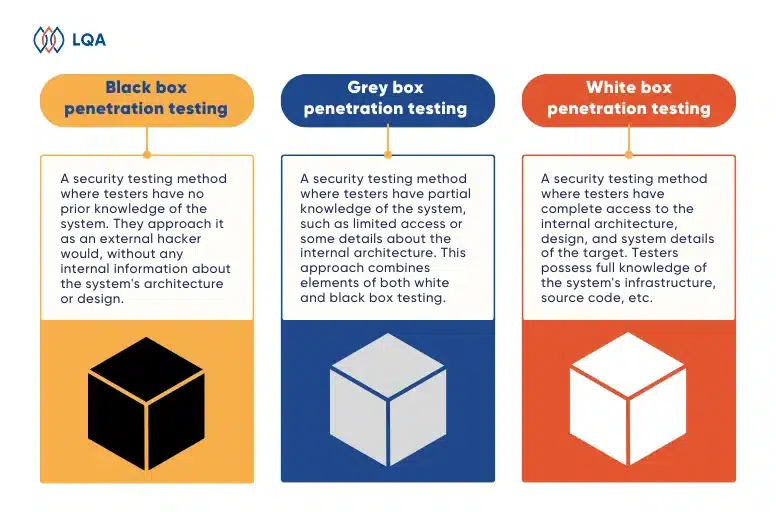
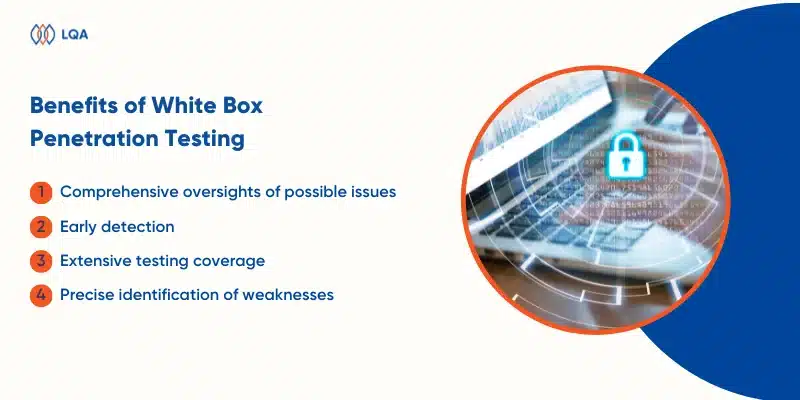
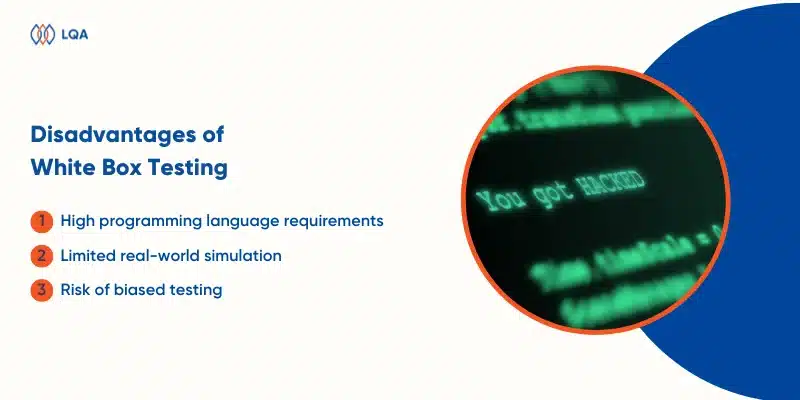
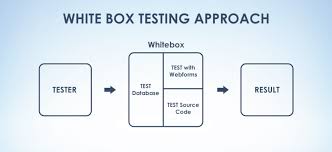
  • White box testing: In white box testing, the customer furnishes comprehensive system information, including accounts at various access levels. This ensures that the testing expert can band encompass system’s functionalities.
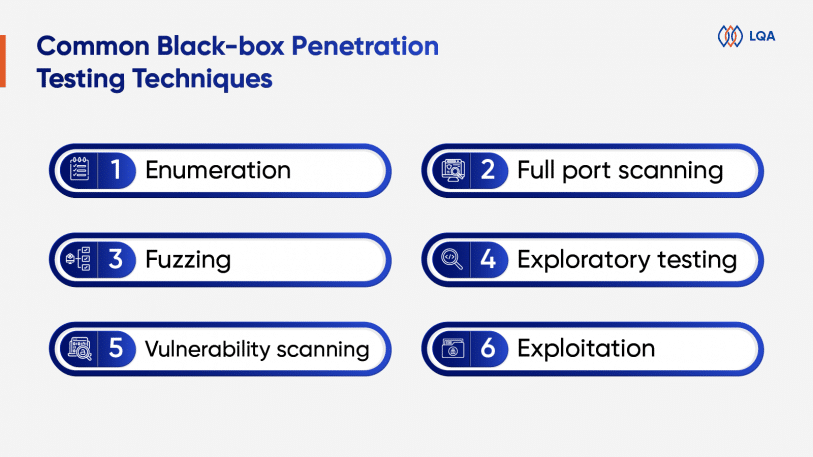
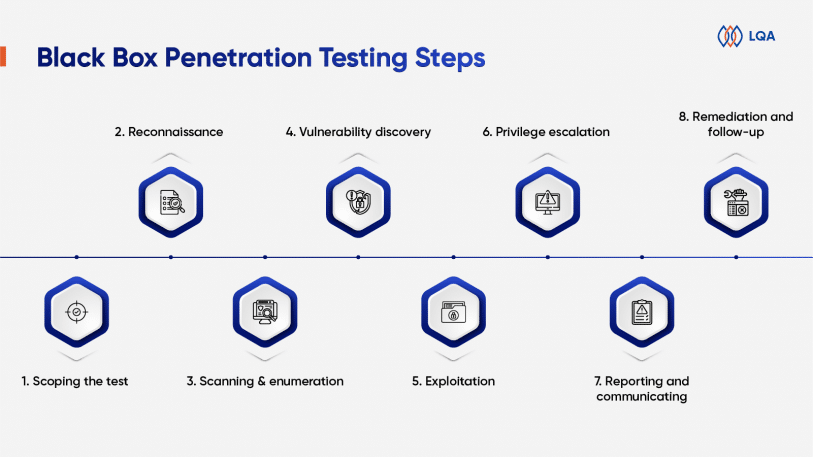
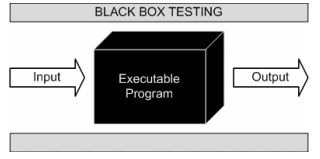
  • Black box testing: Black box penetration testing is a form of behavioral and functional testing in which testers are intentionally kept unaware of the system’s inner workings. Organizations commonly engage ethical hackers for black box testing, as it simulates real-world attacks and provides insights into the system’s vulnerabilities.
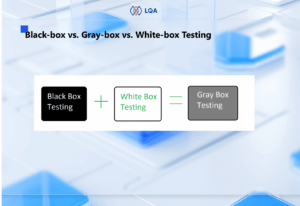
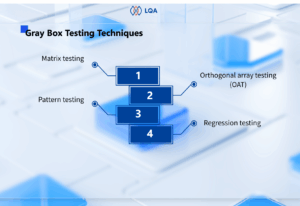
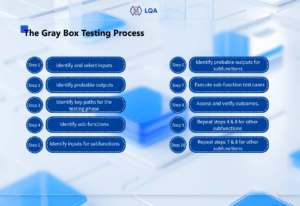
  • Gray box testing: Gray box testing combines white box and black box testing techniques. Testers are granted limited knowledge of the system, including low-level credentials, logical flow charts, and network maps. The primary objective of gray box testing is to identify potential code and functionality issues in the system.

>> Read more:

Best software testing methods to ensure top-quality applications

What Should Good Penetration Testing Include?

To ensure a robust the pen test engagement, business should conduct a thorough assessment of an organization’s attack surface.

This assessment aims to identify all conceivable entry points into the network, encompassing unsecured ports, unpatched vulnerabilities, misconfigured systems, and weak passwords.

By addressing these critical aspects, organizations can fortify their defenses against potential security breaches.

After the identification of potential entry points, the penetration tester proceeds to exploit them to gain network access. Once inside, pentesters meticulously examine the network for sensitive information, including customer data, financial records, and proprietary company secrets.

Furthermore, the tester endeavors to escalate privileges to obtain complete control over the network.

How Often Should Pen Tests Be Performed?

The frequency of conducting penetration testing varies based on several factors, yet most security experts advise performing it at least annually. This regular assessment aids in the detection of emerging vulnerabilities, including zero-day threats, ensuring proactive mitigation measures can be promptly implemented.

When planning the schedule for penetration testing, organizations should focus on the following key considerations:

  • Cyber-attack risks: Organizations with increased exposure to potential financial and reputational damage, should prioritize regular security testing to proactively prevent cyber-attacks.
  • Budget: The frequency of pen testing should align with the available budget and its flexibility. Larger companies may have the resources to conduct annual tests, while smaller businesses might opt for biennial assessments due to budget constraints.
  • Regulatory requirements: Certain industries, such as banking and healthcare, have specific regulations mandating regular penetration testing. Compliance with these regulations should guide the frequency and timing of security assessments in those organizations.

Apart from regular scheduled penetration testing, organizations should also consider conducting security tests in response to the following aspects:

  • Incorporating new network infrastructure or appliances into the network.
  • Implementing upgrades to existing applications and equipment.
  • Installing security patches.
  • Establishing new office locations.
  • Modifying end-user policies.

What are The Best Penetration Testing Tools?

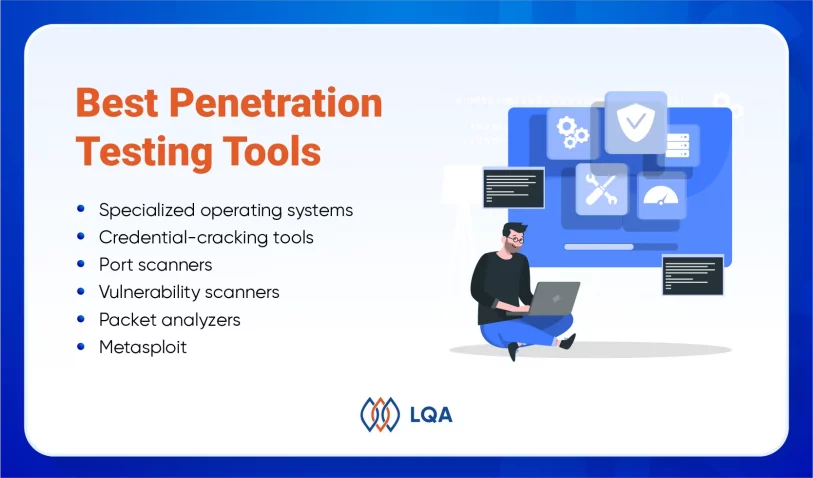
Penetration testers employ a diverse range of tools to execute reconnaissance, identify vulnerabilities, and streamline essential aspects of the penetration testing process. Here are several widely used tools:
What Is Penetration Testing? | A Comprehensive Guide

  • Specialized operating systems: Penetration testers rely on specialized operating systems tailored to penetration testing and ethical hacking. 

Among these, Kali Linux stands out as the preferred choice. This open-source Linux distribution comes equipped with an array of built-in pen testing tools, including Nmap, Wireshark, and Metasploit.

  • Credential-cracking tools: In the pursuit of uncovering passwords, penetration testers leverage credential-cracking tools. These software applications employ various techniques such as encryption-breaking or launching brute-force attacks.

By using bots or scripts, these tools systematically generate and test potential passwords until a successful match is found. Prominent examples encompass Medusa, Hydra, Hashcat, and John the Ripper.

  • Port scanners: These tools enable pen testers to remotely examine devices for open and accessible ports, which can serve as potential entry points into a network. While Nmap remains the most popular port scanner, other commonly used options include Masscan and ZMap.
  • Vulnerability scanners: These scanning tools are designed to identify known vulnerabilities in systems, enabling pen testers to swiftly pinpoint potential weaknesses and entryways into a target. Notable examples of vulnerability scanners include Nessus, Core Impact, and Netsparker.

Web vulnerability scanners include a specialized category of tools within the broader realm of vulnerability scanning. These scanners specifically evaluate web applications and websites to identify potential vulnerabilities. Notable examples in this domain include Burp Suite and OWASP’s Zed Attack Proxy (ZAP).

  • Packet analyzers: Also referred to as packet sniffers, empower penetration testers to analyze network traffic by capturing and examining individual packets.

These tools provide insights into the origin, destination, and, in some cases, content of transmitted data. Prominent packet analyzers include Wireshark and tcpdump, widely recognized for their effectiveness in this domain.

  • Metasploit: On the other hand, serves as a comprehensive penetration testing framework encompassing a multitude of functionalities. Its most significant attribute lies in its ability to automate cyber attacks.

Equipped with a comprehensive library of prewritten exploit codes and payloads, Metasploit empowers penetration testers to select an exploit, assign a payload to deliver to the target system, and delegate the remaining tasks to the framework itself.

Penetration Testing Case Study

Below are two outstanding LQA’s penetration testing case studies you can refer to:

SaaS penetration testing

SaaS penetration testing

Overview

The product is a SaaS service software system that uses the Microsoft Azure cloud based on business management.

Its features aim at the user experience and business development system for small and medium enterprises.

Project information

  • Country: USA
  • Domain: ERP
  • Framework: .NET, Vue
  • Tools Involved: Burp Suite Professional

What we did

Our objective was to assess the security of the web applications by conducting a thorough penetration test aligned with the OWASP Top 10. This helped us identify and mitigate vulnerabilities to enhance the security posture.

Findings

  • Privilege Escalation
  • Account Takeover
  • Stored XSS
  • File Upload Vulnerabilities
  • Information Leakage

Achievements

We found 12 vulnerabilities, fixed 100% of severe issues, and did 1400 APIs tested.

Dental clinic management system penetration testing
Dental clinic management system penetration testing

Overview

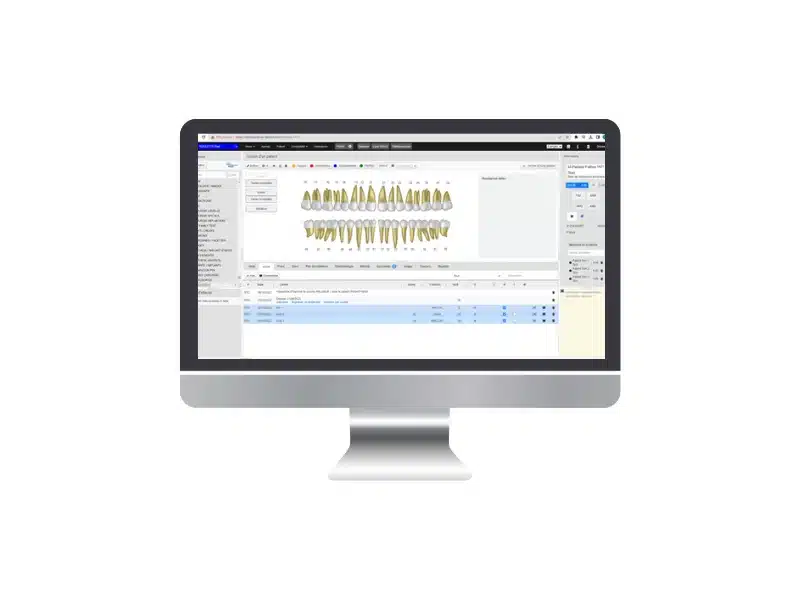
Our client has a dental clinic management system to make appointments, bookings, check exam results, invoicing, etc.

However, their system, which was built a decade ago on outdated PHP, lacked optimized performance, sustainability, and security. So, they needed an experienced vendor to upgrade their technology stack to ensure easier maintenance and future development.

Project information

  • Country: France
  • Domain: Healthcare
  • Framework: NodeJS, React
  • Tools Involved: Burp Suite Professional

What we did

Based on our client’s requirements, we needed to assess the security of the web applications by conducting a thorough penetration test aligned with the OWASP Top 10. This helped to identify and mitigate vulnerabilities to enhance its security posture.

Findings

  • SQL Injection
  • Access Control Issues
  • Weak Authentication Mechanism
  • Information Leakage

Achievements

We found 8 vulnerabilities, fixed 100% severe issues, and did 390 APIs tested.

FAQ

How often should I run a penetration testing?

The optimal frequency of conducting penetration tests varies for each company, contingent upon factors such as the nature of its operations and its appeal to potential attackers.

In the case of highly sensitive activities, you should conduct penetration tests regularly, ideally several times per year. This approach ensures that the latest attack methods are thoroughly tested and safeguards against emerging threats.

For activities of lower sensitivity, you should perform a penetration test for each new version release or whenever significant features are added. This targeted approach focuses on assessing the security of specific updates or additions, thereby maintaining an adequate level of protection.

By tailoring the frequency of penetration tests to the unique characteristics and risk profile of each company, organizations can proactively address potential vulnerabilities and bolster their overall security posture.

I don’t have sensitive data, why would I be attacked?

No website is immune to cyberattacks, even those that may not possess sensitive data.

Hackers can have varied motivations, ranging from honing their skills and knowledge, to exploiting compromised servers for hosting malicious websites, generating profits, or even simply seeking amusement.

Among the most frequently targeted websites are those built on the WordPress platform. These sites often face automated attacks on a massive scale, targeting tens of thousands of websites.

The victims of such attacks are not specifically singled out, but rather fall victim to the widespread and indiscriminate nature of these automated campaigns.

How much does a pentest cost?

The required time and budget for testing depend on the scope and level of thoroughness desired.

If comprehensive and exhaustive testing is sought, it is natural if you expect a longer duration and, consequently, a higher financial investment.

You can contact LQA to have further discussion and detailed quotation.

What is the most important step in a penetration testing?

The estimation phase holds significant importance in a penetration test as it serves as the foundation for gathering crucial information about the target. This stage is particularly critical since having a comprehensive understanding of the target significantly simplifies the gaining access process.

What are the risks of penetration testing?

Improperly executed penetration tests can potentially result in significant damage, leading to adverse consequences. For instance, servers may experience crashes, essential data might be corrupted or compromised, and the overall aftermath could be a criminal hack.

>> Read more:

Conclusion

In light of the continuously advancing and sophisticated nature of cyberattacks, we can’t overstate the significance of regular penetration testing in organizations. These tests play a vital role in identifying vulnerabilities, patching security loopholes, and validating the effectiveness of cyber controls.

By conducting pen testing methodology, organizations adopt a proactive approach to fortifying their infrastructure, software applications, and even their personnel against potential threats.

This proactive stance motivates the development of robust and continuous security measures that can adapt to the ever-changing cyber threat landscape, ensuring the organization remains resilient in the face of evolving challenges.

Leveraging the expertise of LQA, companies can establish a comprehensive defense against both recognized and unforeseen threats. By enlisting their support, you can proactively prevent, identify, and mitigate potential risks.

If you are eager to implement penetration testing, we encourage you to reach out to LQA. Contact us today for further discussion!

Automated TestingAutomated TestingAutomated TestingAutomated TestingAutomated TestingAutomated TestingAutomated TestingAutomated TestingAutomated Testing

Security Testing And What You Might Not Know

Pretend that you wake up and find out your bank account emptied, your social media accounts compromised, and your personal information exposed on the dark web.

Sadly, this nightmare unfolds for countless persons each year due to cyberattacks.

But what if there was a way to thwart these attacks before they even occur? That’s when security testing comes to life.

In this article, let’s discover what is security testing, its types, its fundamental principles, and invaluable best practices. Brace yourself for an immersive journey into the world of safeguarding digital landscapes.

What Is Security Testing?

This is security testing definition: Security testing assesses software vulnerabilities and gauges the impact of malevolent or unforeseen inputs on its functionality.

By subjecting systems to rigorous security testing, organizations obtain crucial evidence regarding the safety, reliability, and resilience of their software, ensuring that unauthorized inputs are not accepted.

Software security testing falls under the umbrella of non-functional testing, it’s different from the functional testing that evaluates the proper functioning of software features (“what” the software does).

In contrast, non-functional testing concentrates on verifying whether the application’s design and configuration are effective and secure.

Benefits Of Security Testing

Some benefits of security testing – an aspect of software testing include:

Benefits Of Security Testing

Benefits Of Security Testing


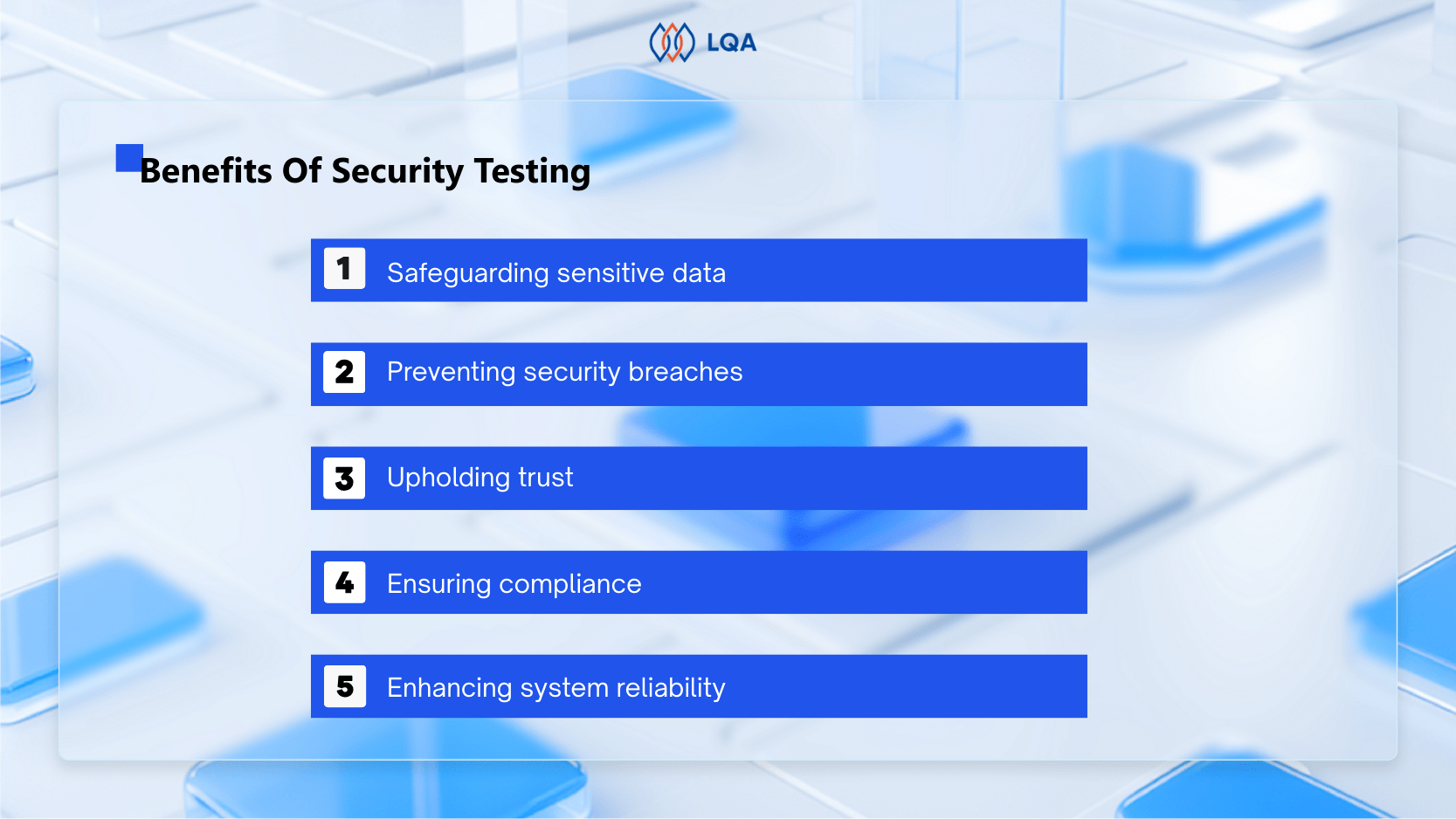
  • Safeguarding sensitive data: Through meticulous evaluation, security testing shields confidential and sensitive information from unauthorized access, disclosure, or theft, providing a robust defense against potential breaches.
  • Preventing security breaches: By unearthing vulnerabilities and weaknesses in the system, security testing acts as a proactive measure, thwarting security breaches and unauthorized intrusions that could compromise sensitive data’s sanctity.
  • Upholding trust: Security testing plays a pivotal role in cultivating and preserving the trust of customers, clients, and users. By affirming the system’s security and safeguarding its information, it establishes a solid foundation of trustworthiness.
  • Ensuring compliance: Various industries and organizations operate under stringent regulatory frameworks that mandate specific security measures. Security testing ensures adherence to these regulations, demonstrating compliance and mitigating potential risks and penalties.
  • Enhancing system reliability: Security testing identifies and rectifies security weaknesses that may trigger system failures or crashes. By bolstering system resilience, it enhances overall reliability and minimizes disruptions.

In general, security testing assumes a crucial role in protecting sensitive data, upholding trust, meeting compliance requirements, and elevating system reliability.

Main Types Of Security Testing

Now, let’s embark on some security testing types in the realm of software testing. By skillfully combining these security testing methodologies, you can fortify your software, safeguarding it against potential cyber-attacks and ensuring a robust security posture.

Main Types Of Security Testing

Main Types Of Security Testing

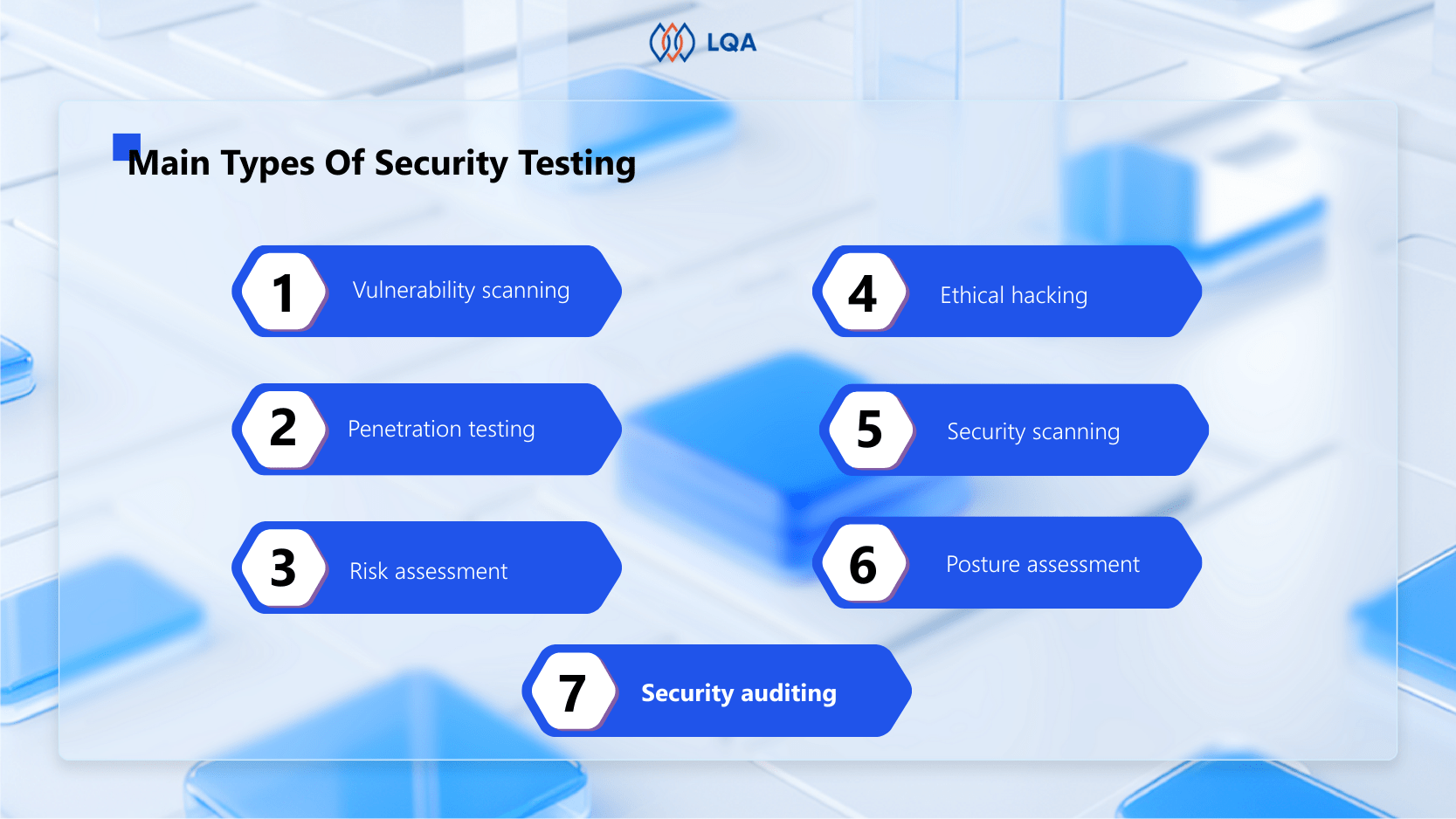
  • Vulnerability scanning

One of the prominent security testing types is vulnerability scanning. It entails scrutinizing your software for known vulnerabilities or weaknesses. This method employs automated security testing tools to uncover potential security flaws, such as outdated software components, weak passwords, or insecure network configurations. By identifying these weaknesses in advance, vulnerability scanning helps preemptively address security gaps before malicious actors can exploit them.

  • Penetration testing

Or “pen testing,” penetration testing simulates real-world attacks on your software to uncover vulnerabilities and weaknesses. Ethical hackers or security professionals replicate the tactics employed by potential attackers, aiming to exploit security loopholes.

This security testing type focuses on scrutinizing authentication and authorization flaws, network configuration vulnerabilities (e.g., open ports, unencrypted traffic), and application logic flaws that arise from how your software handles user inputs or executes specific actions.

  • Risk assessment

Risk assessment involves a meticulous examination of potential threats to your software, evaluating both their likelihood and potential negative impacts. This security testing approach encompasses analyzing the software’s architecture, design, and implementation to identify security risks, such as data breaches, denial-of-service (DoS) attacks, or malware and viruses.

Through risk assessment, you can better understand the vulnerabilities and receive recommendations to enhance your software’s security, empowering you to proactively tackle potential issues.

  • Ethical hacking

Ethical hacking is similar to penetration testing as it involves emulating real-world attacks on your software. However, ethical hacking offers a distinct advantage by uncovering vulnerabilities that may elude other security testing approaches.

This security testing type includes assessing risks associated with phishing attacks, social engineering exploits, and physical security breaches. By engaging in ethical hacking, you can obtain a more comprehensive evaluation of your software’s security, including a broader spectrum of attack scenarios.

  • Security scanning

Security scanning leverages automated tools to scrutinize software for potential security vulnerabilities. These tools for security testing can range from software-based to hardware-based scanners, proficient in detecting an extensive array of security issues.

Examples of such vulnerabilities include SQL injection, cross-site scripting (XSS), and buffer overflow attacks. Moreover, security scanning aids in adhering to industry standards and regulations governing software security.

While security scanning serves as a valuable tool for identifying potential security weaknesses, it should not be solely relied upon. This is because security scanning tools may not capture all software vulnerabilities and can produce false positives or negatives.

Therefore, you should complement security scanning with other impactful security testing methodology, such as penetration testing and risk assessment. By amalgamating these approaches, you can attain a holistic and comprehensive evaluation of your software’s security posture.

  • Posture assessment

A meticulous evaluation of your software’s overall security posture is conducted through posture assessment. This form of security testing entails a thorough review of your software’s security policies and procedures, intending to identify any vulnerabilities or loopholes.

During the posture assessment, experienced security experts examine your access controls and software endpoints, providing valuable insights to help prevent targeted malicious attacks on your software.

The assessment catalyzes invaluable best practices in both operational and tactical aspects, ensuring that your organization’s security posture remains resilient and impervious to potential weaknesses, whether originating from IT service providers or third parties.

Moreover, posture assessment carries a review of your software’s incident response plan. This ensures the presence of appropriate procedures to effectively respond to security incidents.

Testing your ability to detect and respond to security breaches, and evaluating your capacity to recover from a security breach, are integral components of this assessment.

By conducting a comprehensive security posture assessment, you can proactively identify areas for improvement, fortify your defenses, and establish robust incident response mechanisms, thus safeguarding your software and mitigating potential security risks.

  • Security auditing

Security auditing entails a comprehensive assessment of the design, implementation, and operational processes of your software to identify any gaps in your security controls.

When conducting security audits, you should initiate the process by clearly defining the scope, objective, and outlining the purpose, goals, and anticipated audit outcomes.

The next step involves collecting pertinent information about the software’s architecture, design, and implementation to pinpoint potential areas of weakness.

This can be achieved through a meticulous review of the software’s documentation, engaging in interviews with key stakeholders, and complementing the process with vulnerability scans and penetration testing.

Throughout the auditing process, identify and prioritize potential security weaknesses, vulnerabilities, and gaps in security controls. Based on the audit results, there will be some comprehensive recommendations to address the identified threats and enhance your security controls.

Security Testing Tools

Below are some software security testing tools

Static application security testing (SAST)

SAST tools perform an analysis of the source code in its static state. The primary objective of SAST is to detect potential vulnerabilities that can be exploited, offering a comprehensive report comprising detailed findings and corresponding recommendations.

By utilizing SAST, you can proactively identify and address various issues within the source code. These issues may include inadequate input validation, numerical errors, path traversals, and race conditions.

While SAST primarily focuses on source code analysis, you can apply it to compiled code, albeit with the use of binary analyzers.

Dynamic application security testing (DAST)

DAST tools specialize in scrutinizing applications while they are actively running. Their main objective is to identify potential vulnerabilities that can be exploited, employing a diverse array of attacks.

DAST tools frequently utilize fuzzing techniques, bombarding the application with numerous known invalid errors and unexpected test cases. This intensive approach means uncovering specific conditions in which the application may be susceptible to exploitation.

DAST checks cover a broad spectrum of components, including scripting, sessions, data injection, authentication, interfaces, responses, and requests. By running DAST assessments, you can gain insights into the security posture of these critical aspects, ensuring the robustness and resilience of your application.

Interactive application security testing (IAST)

IAST tools leverage a synergistic blend of static and dynamic testing methodologies, forming a powerful hybrid testing process. The primary objective is to determine whether known vulnerabilities present in the source code can be exploited during runtime.

By incorporating both static and dynamic analysis, IAST tools can minimize false positives, enhancing the accuracy of vulnerability detection.

IAST tools employ a combination of advanced attack scenarios, using pre-collected information about the data flow and application flow. Through iterative cycles of dynamic analysis, these tools continuously gather insights about the application’s behavior and response to various test cases.

This dynamic learning process enables the IAST tool to refine its understanding of the application’s vulnerabilities and may even generate new test cases to gain further insights.

By harnessing the capabilities of IAST tools, organizations can conduct comprehensive and intelligent testing, ensuring a more precise assessment of their application’s security posture during runtime.

Software composition analysis (SCA)

Software Component Analysis (SCA) is a cutting-edge technology designed to oversee and fortify open-source components in software systems. It empowers development teams to efficiently monitor and evaluate the utilization of open-source components in their projects.

SCA tools possess the capability to identify all pertinent components, including their supporting libraries, direct and indirect dependencies. Within each component, these tools can pinpoint vulnerabilities and recommend appropriate remediation measures.

By conducting thorough scanning, SCA generates a comprehensive Bill of Materials (BOM), presenting a detailed inventory of the software assets employed in the project.

Security Testing’s Key Principles

When engaging in any form of IT sec testing, whether it is web security testing, application security testing, data security testing, or others, you must adhere to the following fundamental principles.

  • Confidentiality

Access control covers a set of regulations designed to ensure that information is accessible and handled solely by authorized entities. By implementing robust security measures, organizations can safeguard private and confidential information, preventing unauthorized access or exposure to inappropriate parties.

Essentially, access is restricted to authorized personnel, ensuring the confidentiality and integrity of sensitive data.

  • Integrity

Data integrity revolves around upholding trust, consistency, and accuracy of information. Its primary objective is to facilitate the secure and accurate transfer of data from the sender to the intended receiver.

By implementing data integrity measures, organizations ensure that data remains unaltered by unauthorized entities, preserving its integrity throughout its lifecycle.


  • Authentication

User authentication is a vital process that verifies individuals’ identity, establishing confidence in their access to systems or information. It ensures that users can trust the authenticity and reliability of information received from a recognized and trusted source.

  • Authorization

Role-based authorization is a system where a user is granted specific access rights based on their designated role. This security testing principal ensures that users are authorized to perform tasks and access resources that align with their assigned roles and responsibilities.

  • Availability

Information availability involves ensuring that data is readily accessible when needed by authorized individuals. This entails maintaining hardware infrastructure, promptly addressing hardware repairs, ensuring the smooth functioning of operating software, and safeguarding all data to prevent any disruptions in availability.

  • Non – Repudiation

“Repudiation” means rejecting or denying something. Non-repudiation ensures that the creator or sender of a message or document cannot later deny its originality or authenticity, guaranteeing its undeniable origin and validity.

  • CIA or AIC 

Confidentiality, integrity, and availability (CIA) form the cornerstone of an information security model used to establish robust policies in organizations.

Test Scenarios for Security Testing

Here are a few illustrative software security test scenarios to provide you with a glimpse of potential test cases:

  • Validate password encryption to ensure secure storage.
  • Verify the system’s ability to block unauthorized users from accessing the application or system.
  • Assess the handling of cookies and session timeouts in the application.
  • Evaluate the prevention of browser back button functionality on financial websites.

Note that these are merely sample scenarios, and a comprehensive security testing strategy would have a broader range of test cases tailored to your specific requirements.

Approaches To Follow While Doing Security Testing

Security testing holds various methodologies, which are as follows:

Black Box Testing

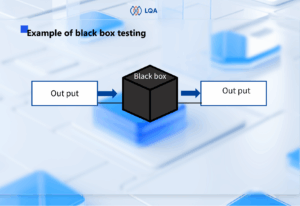
Black box testing involves evaluating the security of a system from an external perspective, without knowledge of its internal workings or response generation processes.

The system is treated as an opaque entity, with only inputs and outputs observable. In certain cases, the tester intentionally disregards the internal structure, even if it’s understandable.

Black box testing ensures a clear separation between the tester and the code creator. It compels the tester to approach the software from an outsider’s standpoint, simulating how an attacker might perceive and exploit it.

The social and technical detachment between testing and software development empowers the tester to challenge the creator by manipulating the application in ways the developer may not have anticipated.

White Box Testing

White box testing involves the creation of test cases and conducting tests based on the software’s source code. Unlike black box or gray box testing (where the tester possesses limited knowledge about the code structure), in white box testing, the tester has a thorough understanding of the code’s structure.

This technique also means clear, transparent, or glass box testing due to its emphasis on code observability.

White box testing primarily focuses on examining the internal workings and software components of an application to assess its design and structure from within. Testing teams can employ this technique for conducting system, integration, and unit tests.

Gray Box Testing

Gray box testing performs a fusion of white box and black box testing methodologies.

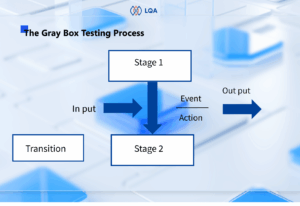
While black box testing entails working with a test object of unknown internal structure and white box testing requires full knowledge of the application’s internal workings, gray box testing involves the tester having a partial understanding of the system’s internal structure.

Testers in gray box testing rely on a limited comprehension of the underlying architecture and code to design their tests. The test object is thus considered semi-transparent or “gray.”

This approach combines the targeted code examination of white box testing with the innovative and diverse approaches of black box testing, such as functional and regression testing. Gray box testers can simultaneously evaluate both the software’s user interface and internal mechanisms.

How To Perform Security Testing Successfully?

Implementing effective computer security testing is essential for early detection and mitigation of vulnerabilities in your software development lifecycle. To ensure precise and accurate security testing in software testing, you should follow the best practices that guarantee a comprehensive, efficient, and effective process.

The following key practices can assist you in achieving these objectives:

Be proactive, not reactive

Take a proactive approach to security testing and avoid waiting until an attack occur. Regularly conduct comprehensive testing of your systems to quickly identify and resolve vulnerabilities before they can be exploited by attackers.

Use a range of automated security testing tools to scan your systems periodically, ensuring thorough vulnerability assessments. If needed, don’t hesitate to seek assistance from specialized vendors that can conduct penetration tests on your systems.

Adopt an attacker’s mindset and consider the most probable methods through which your systems could be breached. By understanding these potential vulnerabilities, you can concentrate your efforts on fortifying those specific areas.

Identify the security requirements

Before initiating security testing, establish the security requirements specific to your software. This ensures that the testing process focuses on the most critical security concerns.

To identify these requirements, begin by reviewing pertinent security policies and regulatory standards applicable to your software. These may include industry-specific regulations like HIPAA or PCI DSS, as well as broader security standards such as ISO 27001 or NIST SP 800-53.

By adhering to these guidelines, you can effectively align your security testing with the relevant industry and regulatory frameworks.

Proceed by evaluating the software’s risk profile to ascertain the potential consequences and likelihood of various security threats and attacks. This evaluation may involve undertaking a threat modeling exercise or a comprehensive risk assessment to identify and prioritize security risks effectively.

Subsequently, define precise security requirements that align with the identified risks and relevant regulations and standards. These requirements should possess clarity, measurability, and testability.

They should comprehensively address different dimensions of security, including confidentiality, integrity, availability, and non-repudiation. By establishing such requirements, you can ensure a robust and focused approach to safeguarding your software.

Use a variety of tools and techniques

To obtain a comprehensive understanding of your system’s security posture, you should employ a diverse range of testing methods. Relying on a single approach is insufficient to capture all vulnerabilities.

To identify security weaknesses in your application, you can use a combination of SAST (Static Application Security Testing), DAST (Dynamic Application Security Testing), and penetration testing.

SAST tools scrutinize source code for vulnerabilities, while DAST tools scan running applications to uncover potential weaknesses. Additionally, penetration testers simulate attacks on your application, helping to find and address security vulnerabilities through a proactive approach.

By leveraging these varied testing methods, you can enhance your systems’ overall security.

Design security tests

Aligning with the established security requirements, formulate security tests focus on uncovering previously unidentified vulnerabilities and weaknesses. To create these tests, identify the specific types of security tests pertinent to your software, as previously discussed. Subsequently, determine the scope and objectives for each test.

Construct test cases and scenarios that replicate real-world attacks. Consider the potential consequences and likelihood of each vulnerability, and prioritize testing endeavors accordingly based on risk assessment.

Conclude by documenting the test plan and sharing it with stakeholders for feedback and approval. Incorporate revisions to the plan based on received feedback, ensuring its readiness for execution.

Execute security tests

During the execution of security tests, don’t forget to meticulously adhere to the devised plan to ensure precise and thorough testing. Take diligent note of any encountered issues throughout the testing phase, and document them for subsequent analysis.

Employ a systematic approach to guarantee all tests completion, leaving no vulnerabilities overlooked.

To streamline the workflow during security testing, contemplate the utilization of automated security testing tools. These tools facilitate the testing process and generate comprehensive reports on identified vulnerabilities and weaknesses. By leveraging such tools, you can save time and maintain consistency in test execution.

Furthermore, involve your development teams and security experts in the testing process to ensure comprehensive coverage of potential issues. Their expertise and collaboration will contribute to addressing any identified concerns effectively.

Analyze the results

A thorough analysis of security test results is a vital aspect of the software security testing process. This entails carefully checking the collected testing data to find out any potential security concerns that require attention.

To carry out an effective analysis of security test results, you should document the testing outcomes with precision and comprehensiveness. This documentation serves as a foundation for in-depth examination and evaluation of the identified security issues.

Comprehensive documentation should encompass extensive information regarding the conducted tests, obtained results, and any discovered issues or vulnerabilities throughout the testing phase.

This documentation plays a vital role in assessing the severity and prioritization of each identified concern, as well as devising a robust plan for their resolution.

In addition, actively seek feedback from industry professionals, as their expertise and insights can contribute to the development of effective strategies for addressing the identified vulnerabilities. Collaborating with these experts ensures a well-informed and strategic approach to resolving the security issues at hand.

Address and fix the vulnerabilities

Upon identification of potential vulnerabilities, you should promptly address them to establish robust software security. When addressing these vulnerabilities, you should determine prioritization by their severity and potential impact on the software’s security.

Critical vulnerabilities demand immediate attention, followed by those of medium and low severity. Developing a comprehensive remediation plan that have all identified vulnerabilities and includes a timeline for completion is quite important.

Furthermore, ensure the use of secure coding practices while resolving vulnerabilities. Implement measures like input validation and output sanitization to prevent similar vulnerabilities in the future.

By adopting these practices, you protect the software’s resilience against potential security risks.

Focus on the high-risk areas

Vulnerabilities are various, with certain ones posing greater risks to your systems. Hence, you should concentrate your testing endeavors on higher risk level areas.

Using a risk assessment tool can address these high-risk areas within your systems. Armed with this knowledge, you can allocate your efforts accordingly and prioritize testing in those specific areas.

However, remember to not overlook the low-risk areas. Attackers can exploit even vulnerabilities with lower risk levels if they are skillfully combined. Therefore, comprehensive testing should include all areas, ensuring a thorough evaluation of potential vulnerabilities.

Automate the process

Efficiently automating security testing is vital, considering the time and cost implications associated with manual security testing.

One effective approach is to leverage CI/CD pipelines, which automate the entire testing process. These pipelines facilitate the seamless building, testing, and deployment of software applications.

By integrating security testing tools into your CI/CD pipeline, you can automatically scan both your code and running applications for potential vulnerabilities. This automation significantly streamlines the testing process, enhancing efficiency and effectiveness.

Retest

After addressing the vulnerabilities, you should conduct retesting the software to verify the effectiveness of the fixes. This step will prevent the inadvertent creation of new vulnerabilities during the remediation process.

During the retesting phase, adhere to the established testing plan and procedures from the previous testing phase. Whenever possible, maintain consistency by employing the same testing tool.

It is worth noting that retesting should not be limited to software fixes alone; perform it after any modifications or updates to the software. By conducting thorough retesting, you ensure the continued security and stability of the software after changes or improvements.

Report

Communicate the results of security testing to stakeholders, ensuring their awareness of any potential security concerns, and the corresponding measures taken to mitigate them.

To create impactful security testing reports, employ clear and concise language that avoids excessive technical jargon.

In addition, you should also add a comprehensive summary of findings in the report. This summary provides an overview of the testing process, highlights key findings, and offers recommendations for remediation.

This summary serves as a valuable starting point for further discussions and decision-making among stakeholders.

Incorporating supporting evidence such as screenshots, log files, and vulnerability reports enhances the credibility of the report and enables stakeholders to grasp the severity of vulnerabilities.

These tangible pieces of evidence bolster the report’s credibility and aid stakeholders in comprehending the significance of identified vulnerabilities.

Lastly, ensure the inclusion of actionable recommendations that stakeholders can implement as part of their security measures. These practical suggestions empower stakeholders to take concrete steps in detecting the highlighted security concerns.

FAQ

What is security testing?

Security testing involves the meticulous identification and elimination of software weaknesses that could potentially ruin a company’s infrastructure system. By proactively addressing these vulnerabilities, we can brace the software’s resilience against attacks.

How is security testing different from software testing?

Distinguishing itself from other software testing practices, security testing focuses on uncovering vulnerabilities that hackers can exploit to infiltrate systems. Unlike other testing methodologies that primarily target functional deficiencies, security testing specifically aims to safeguard against unauthorized access and potential breaches.

Can security testing be automated?

Absolutely, automation is indeed possible. A diverse range of tools exists specifically designed to scan and detect vulnerabilities in code, web applications, and networks.

These tools play a significant role in enhancing system and application security by swiftly identifying and resolving vulnerabilities, thereby thwarting potential exploitation by attackers.

Nevertheless, you should acknowledge that automated tests cannot entirely replace manual testing. Manual testing identifies and addresses vulnerabilities that automated tools may overlook.

The combination of both automated and manual testing ensures an extensive approach to security testing, minimizing the risk of undetected vulnerabilities.

> Read more: 

Difference between QA and security testing

QA testing primarily focuses on verifying that software adheres to its functional requirements and performs as intended. QA testers approach software testing from the perspective of an average user, ensuring its usability and meeting user expectations.

On the other hand, security testing focuses on proactively identifying and resolving vulnerabilities in software that could be exploited by malicious attackers. Security testers adopt the mindset of a potential adversary, simulating attack scenarios to uncover weaknesses and fortify the software’s security.

QA testing cannot substitute for security testing. Even if software successfully passes all QA tests, it may still harbor undetected security vulnerabilities.

Therefore, conducting thorough security testing is essential to identify and rectify these vulnerabilities before the software is released to the public, ensuring a robust and secure product.

Conclusion

In the realm of software engineering, safeguarding data is important, making system security testing indispensable. Among the various testing practices, security testing takes precedence as it guarantees the confidentiality of personal information.

In this testing approach, one assumes the role of an attacker, meticulously examining the system to unveil any security vulnerabilities.

However, conducting such tests manually consumes substantial resources in terms of time, finances, and personnel. Therefore, transitioning to automated testing is a prudent way forward.

In case you want to find an efficient software testing service provider, don’t hesitate to contact us:

Software Testing

Non Functional Testing – Everything You Need To Know

Non functional testing and functional testing are both vital to ensure that your product operates as intended. Non functional testing examines aspects that go beyond functionality. It guarantees a superior level of product quality, performance, and usability, which can improve user satisfaction.

Within this blog post, we will provide a comprehensive definition of non functional testing. Furthermore, we will explore a range of examples showcasing non functional tests, shedding light on the specific areas they assess.

Additionally, we will guide you on the most effective approach to aligning non functional testing with your business objectives and user requirements, enabling your business to deliver a remarkable product that fulfills both functional and non functional testing expectations.

What Is Non Functional Testing?

Non functional testing is a critical software testing methodology that assesses an application’s non functional components, encompassing usability, performance, scalability, reliability, security, compatibility, and more.

→ Take a look at: LQA’s software testing services

Non functional testing focuses on ensuring the overall product quality rather than merely examining its features. You have to understand the significant impact that non functional testing has on a product.

Non Functional Testing - Everything You Need To Know

In the realm of software development, non functional testing has equal importance to functional testing. Without it, a system may exhibit flawless performance in a controlled environment and encounter significant failures when confronted with real-world conditions.

Why Use Non Functional Testing?

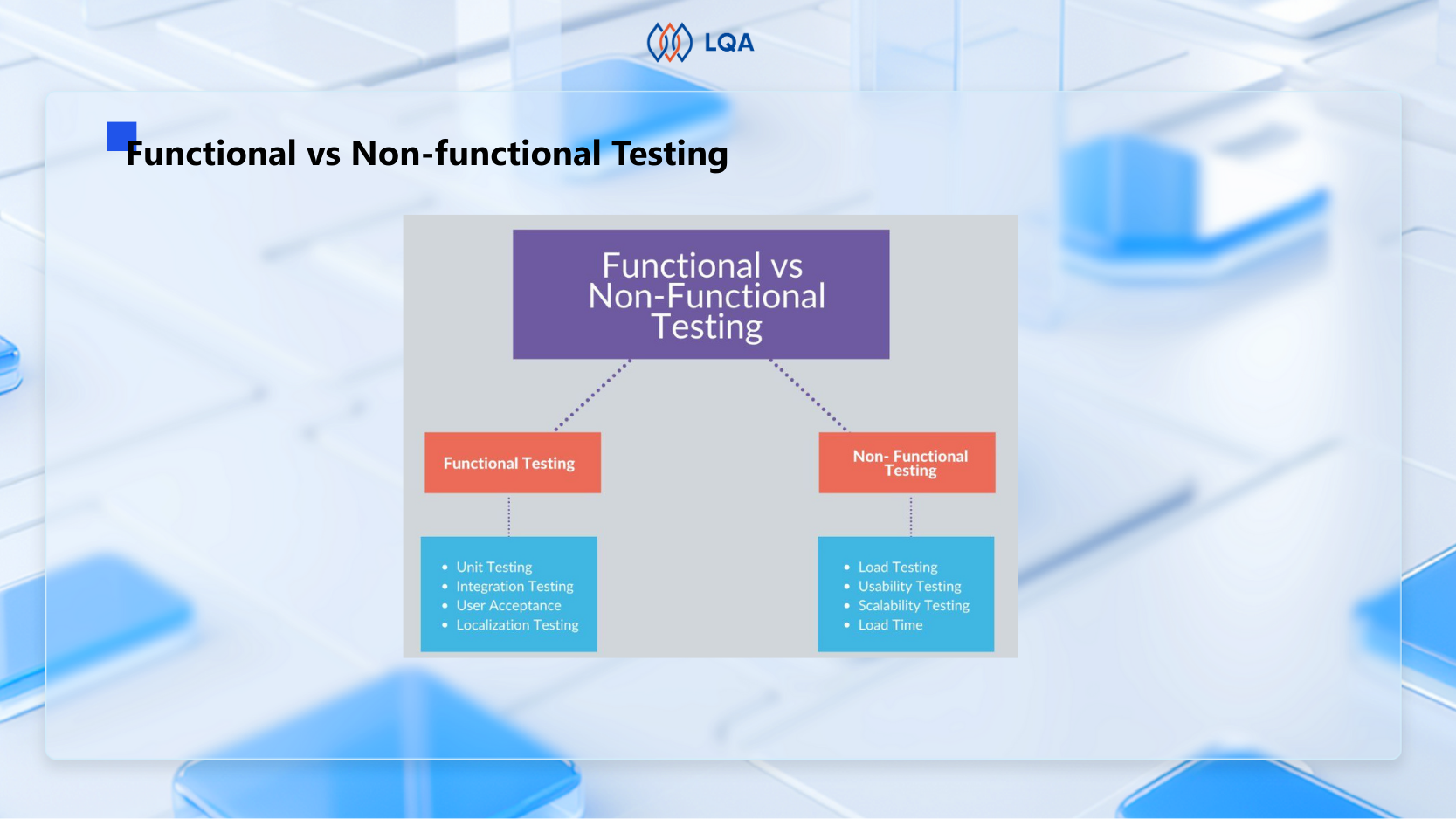
Functional and non functional testing are both crucial for any software. Functional testing ensures the correct functioning of internal features, while non functional testing evaluates how well the software performs in the external environment.

Non functional testing plays a vital role in examining various aspects such as performance, stability, responsiveness, portability, and more. It involves assessing the software’s installation, setup, and execution.

By gathering measurements and metrics, non functional testing facilitates internal research and development efforts. It provides valuable insights into the software’s behavior and the technologies employed. Moreover, it helps mitigate production risks and reduces associated software costs.

Non Functional Testing Characteristics

The essential traits of non functional testing include:

  • Non functional testing necessitates quantifiable metrics. Therefore, using subjective terms such as “good,” “better,” or “best” is not appropriate for this type of testing.
  • During the initial stages of the requirement process, it may be challenging to ascertain precise figures.
  • Giving priority to the requirements holds immense significance in non functional testing.

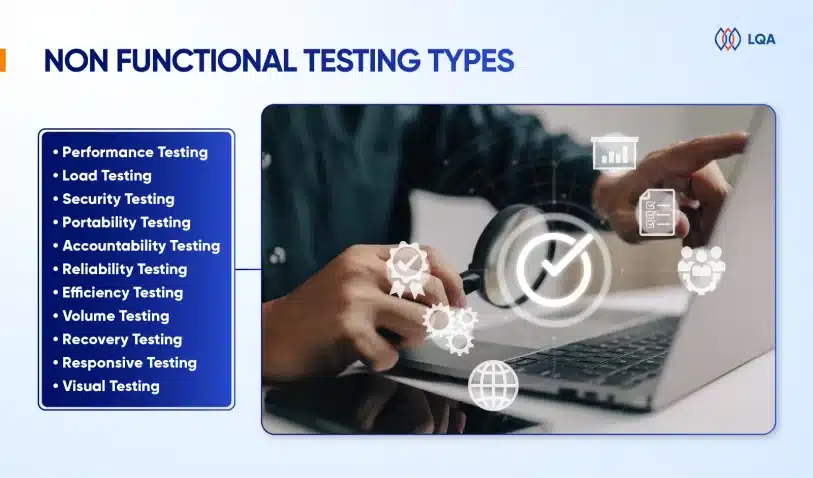
Non Functional Testing Types

The following are the prevalent types of non functional testing:

1. Performance testing

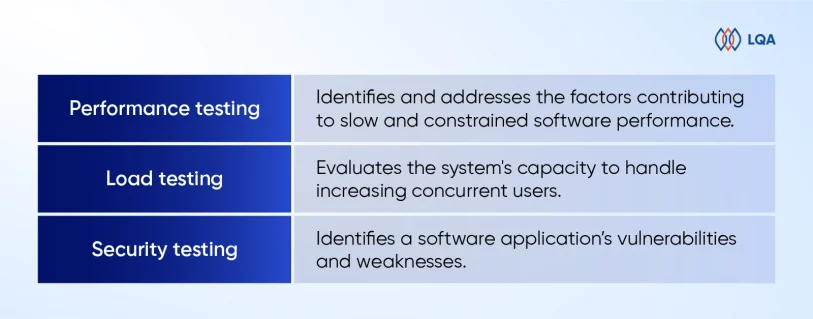
Performance testing aims to identify and address the factors that contribute to slow and constrained software performance. The software must exhibit fast response times, ensuring an efficient user experience.

To conduct effective performance testing, businesses should establish a well-defined and specific set of requirements regarding the desired speed. Without clear specifications, it’s hard to determine whether the test results indicate success or failure.

For instance, if 1000 users access an application together, the load time should not exceed 5 seconds.

Tools used: LoadRunner, Apache JMeter, WebLOAD.

2. Load testing

We use load testing to evaluate the system’s capacity to handle increasing concurrent users. It specifically assesses the system’s loading capability and its ability to cope with higher user loads. By simulating real-world scenarios, load testing helps identify potential bottlenecks and performance issues under heavy usage.

To gauge a website’s speed and performance, you can run a quick website speed test, which provides insights into the website’s speed scores. This helps measure the website’s responsiveness and overall user experience.

Tools used: Neoload, Load Multiplier.

3. Security testing

Security testing is employed to identify a software application’s vulnerabilities and weaknesses. This type of testing involves examining the system’s design and adopting the mindset of a potential attacker.

By scrutinizing the application’s code, and potential attack vectors, security testers can pinpoint areas where an attack is most likely to occur. This knowledge is then used to create targeted and effective test cases that assess the application’s resilience against potential security breaches.

Tools Used: ImmuniWeb, Vega, Wapiti

Non Functional Testing - Everything You Need To Know

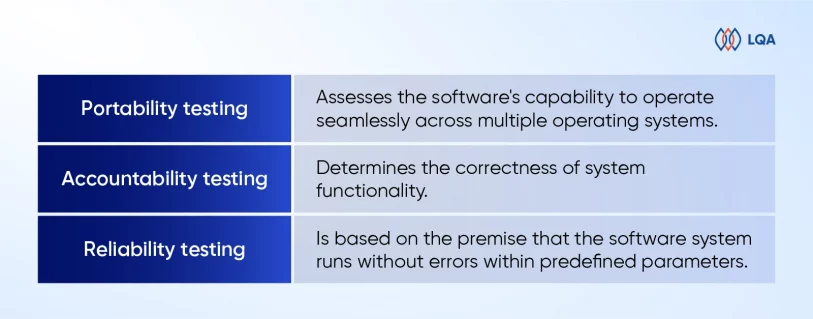
4. Portability testing

Portability testing focuses on assessing the software’s capability to operate seamlessly across multiple operating systems without encountering any bugs or compatibility issues.

Additionally, this testing also examines the software’s functionality when deployed on the same operating system but with different hardware configurations. By conducting portability testing, one can ensure that the software performs consistently and reliably across various environments, enhancing its usability and flexibility.

Tools Used: SQLMap.

5. Accountability testing

Accountability testing plays a crucial role in determining the correctness of system functionality. The primary objective is to ensure that each function in the system consistently produces the expected outcome for which it was designed.

If the system generates the desired results, it passes the accountability test; however, if it fails to do so, it indicates a potential flaw or malfunction in the system’s functionality.

By conducting thorough accountability testing, one can effectively assess and validate the system’s performance and its ability to meet the intended objectives.

Tools Used: Mentimeter.

6. Reliability testing

Reliability testing is based on the premise that the software system runs without errors within predefined parameters. It involves running the system for a specified duration and several processes to assess its reliability.

The reliability test is considered unsuccessful if the system fails under predetermined circumstances.

For instance, in the case of a website, all web pages and links should be dependable and function reliably. If the system exhibits issues or malfunctions, such as broken links or errors, during the reliability test, it indicates a failure to meet the expected reliability standards.

By conducting reliability testing, one can evaluate the system’s ability to consistently operate as intended and identify any potential weaknesses or areas for improvement in terms of reliability and error-free performance.

Tools Used: Test-retest, Inter-rater.

Non Functional Testing - Everything You Need To Know

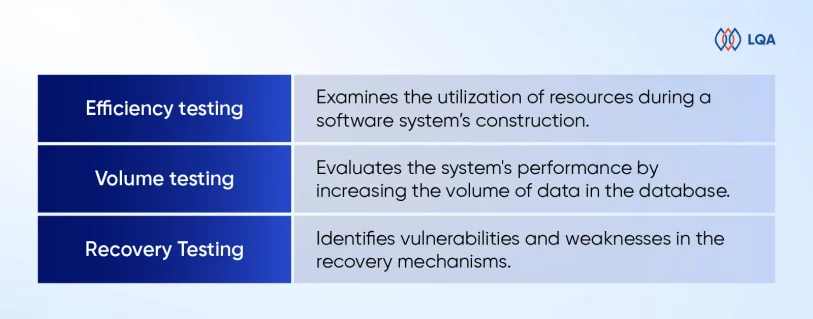
7. Efficiency testing

Efficiency testing examines the utilization of resources during a software system’s construction, assessing both the actual resources employed and the ones required. This type of testing aims to determine the efficiency and optimization of resource usage throughout the software development process.

By analyzing resource consumption, such as CPU usage, memory utilization, or network bandwidth, efficiency testing provides insights into the software system’s resource requirements and helps identify potential areas for improvement in resource allocation and utilization.

Tools Used: WebLOAD, LoadNinja.

8. Volume testing

Volume testing, also referred to as flood testing, is a type of software testing that entails subjecting the software to a substantial amount of data. Its purpose is to evaluate the system’s performance by increasing the volume of data in the database.

By simulating scenarios with a large and often excessive amount of data, volume testing helps assess the system’s ability to handle and process such data loads without compromising its performance or stability.

This type of testing ensures that the software can effectively manage and scale with growing data volumes, thus preventing any potential bottlenecks or performance issues.

Tools Used: HammerDB, JdbcSlim.

9. Recovery Testing

Recovery testing assesses an application’s resilience in recovering from crashes, hardware failures, and similar issues.

By intentionally breaking the software through simulated scenarios, recovery testing aids in identifying vulnerabilities and weaknesses in the recovery mechanisms. This type of testing helps make sure that the application can gracefully handle unexpected failures, quickly restore functionality, and minimize any potential data loss or system downtime.

Tools Used: Box Backup, Bacula.

Non Functional Testing - Everything You Need To Know

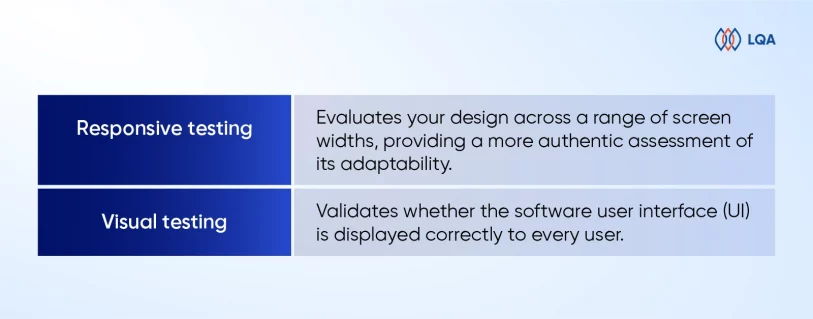
10. Responsive testing

Responsive testing enables you to evaluate your design across a range of screen widths, providing a more authentic assessment of its adaptability rather than relying solely on predetermined screen sizes.

By utilizing specialized tools, you can test your website’s responsiveness by adjusting the screen width dynamically after entering the website’s URL.

This allows you to observe how your user interface adapts and adjusts in real-time to accommodate different screen sizes.

The primary objective of evaluating responsive websites is to ensure a seamless and friendly user experience across various digital devices. By conducting responsive testing, we can ensure that websites and applications deliver a smooth and consistent experience to users, regardless of the device they are using.

Tools Used: Responsinator, Screenfly, Google DevTools Device Mode.

11. Visual testing

One way to address issues is using visual testing (or visual UI testing). This type of testing focuses on validating whether the software user interface (UI) is displayed correctly to every user.

Visual tests meticulously examine each element on a web page to ensure they have the proper shape, size, and placement as intended. By comparing the application’s visible output to the expected design outcomes, visual testing helps identify “visual bugs” that may exist, separate from functional bugs that affect the software’s overall functionality.

In essence, visual testing plays a crucial role in detecting any discrepancies or issues related to a page or screen’s appearance and presentation.

Tools Used: Percy, PhantomCSS, FBSnapshotTestCase, Gemini, Needle (Uses Python).

Non Functional Testing - Everything You Need To Know

→ Read more:

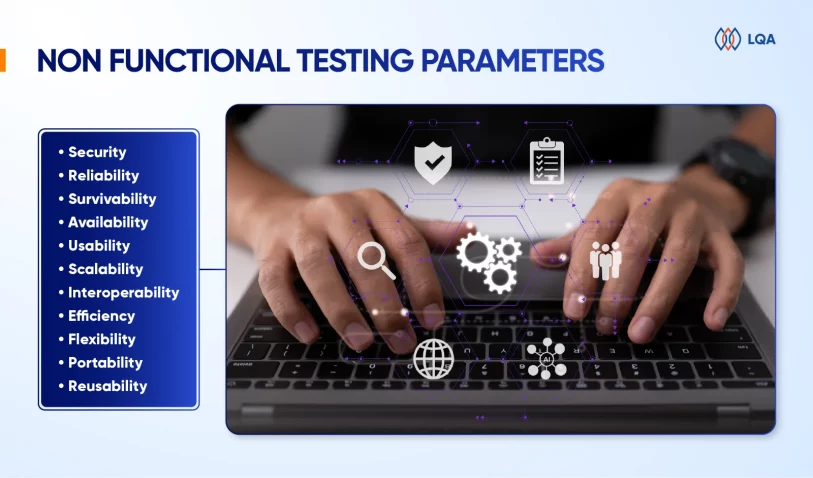
Non Functional Testing Parameters

Let’s delve into these parameters and examine them in detail:

Non Functional Testing - Everything You Need To Know

  • Security: The security parameter establishes the level of protection a system has against both intended and unintended attacks originating from internal or external sources. Security testing is conducted to assess and verify this protection.
  • Reliability: The reliability parameter examines a system’s capability to perform its intended functions consistently, without any failures over a specific duration. Using reliability testing to evaluate and validate this ability.
  • Survivability: The survivability parameter determines a product’s capacity to maintain its operation and recover from failures or disruptions. We use recovery testing to assess and validate this ability.
  • Availability: The availability parameter determines the level of reliability and consistency a user can expect from a system and its functionalities during operation. We use stability testing to measure and evaluate this parameter.
  • Usability: The usability parameter gauges the user’s ease of interaction with a product, including learning, operating, and input/output preparation. Usability testing is employed to evaluate this aspect and ensure optimal user experience.
  • Scalability: Scalability assesses a system’s capability to adjust its performance in response to varying workloads without compromising its effectiveness. Scalability testing is used to evaluate this ability and ensure optimal performance.
  • Interoperability: The interoperability parameter determines a system’s capacity to interface with other software systems smoothly. Interoperability testing is conducted to verify this ability and ensure smooth integration.
  • Efficiency: Efficiency measures the software system’s ability to handle volume, capacity, and response time effectively.
  • Flexibility: Flexibility refers to the application’s continuous operation across a wide range of hardware and software configurations. For instance, most applications have specific minimum RAM and CPU requirements to ensure proper functionality.
  • Portability: Portability refers to the ease with which an application can transit from one hardware or software environment to another.
  • Reusability: Reusability denotes a component or module in a software system that can be utilized in multiple applications.

Best Practices Of Non Functional Testing

To achieve effective non functional testing, you should take certain best practices into account. 

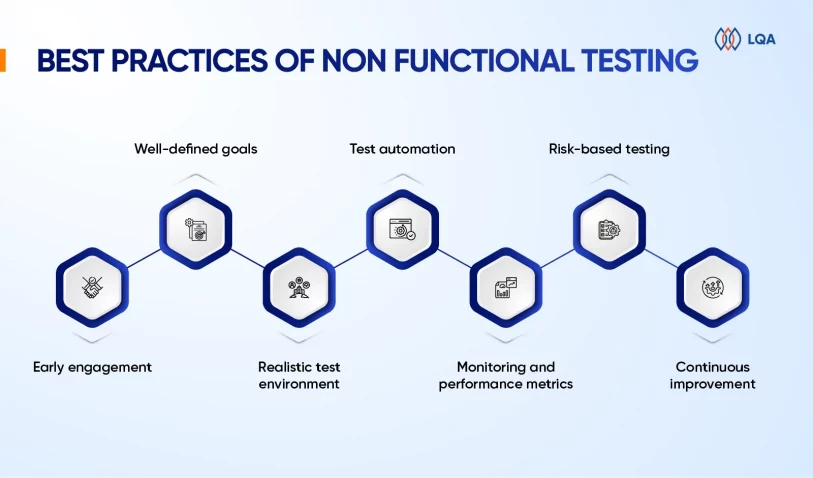
  • Early engagement: Engage in non functional test activities starting from the early phases of the software development life cycle (SDLC). Collaborate closely with stakeholders, architects, and developers to comprehend non functional requirements and incorporate them into the system design.
  • Well-defined goals: Establish precise and measurable objectives for non functional testing. Set clear targets for performance, security, usability, and other non functional aspects to guide the testing process and provide a basis for evaluation.
  • Realistic test environment: Set up a test environment that resembles the production environment. Use representative hardware, software, network configurations, and data volumes to ensure accurate analysis of performance and behavior.
  • Test automation: Employ test automation tools and frameworks to streamline and expedite non functional testing. Automation facilitates the simulation of user loads, generation of consistent test data, and execution of repetitive tasks, resulting in more efficient and dependable testing.

Non Functional Testing - Everything You Need To Know

→ Don’t miss: 10 BEST Automation Testing Companies Worldwide in 2023

  • Monitoring and performance metrics: Implement robust monitoring mechanisms throughout testing to capture performance metrics such as response times, resource utilization, throughput, and error rates. These metrics provide valuable insights into system behavior, aid in identifying bottlenecks, and facilitate performance analysis.
  • Risk-based testing: Prioritize non functional test cases based on risk analysis and their impact on business operations. Give attention to critical functionalities, high-risk areas, and cases that are likely to lead to performance degradation, security vulnerabilities, or usability issues.
  • Continuous improvement: Foster a culture of ongoing improvement by leveraging insights from testing experiences and incorporating feedback into subsequent iterations. Capture lessons learned, update documentation, and refine testing strategies based on the knowledge gained during non functional testing.

These practices represent only a fraction of the existing methods for efficient non functional testing. By adhering to them, organizations can conduct effective non functional testing to ensure optimal performance, security, usability, and other non functional attributes of their software systems.

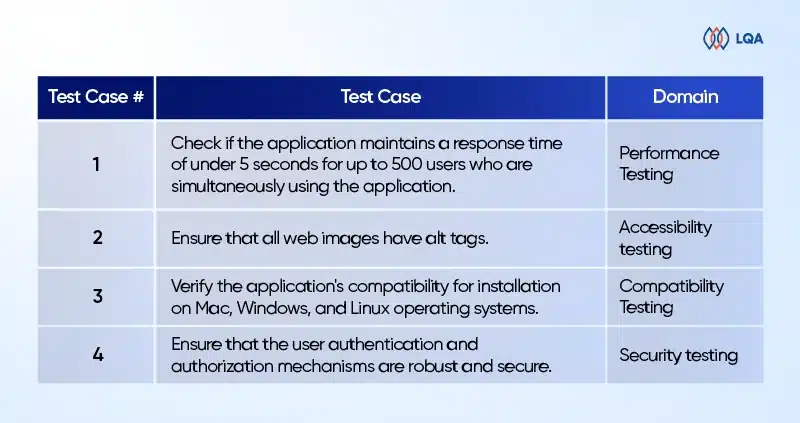
Examples Of Non Functional Testing

To gain a better understanding of this concept, let’s explore some examples of non functional testing across different types. The table below illustrates a range of non functional test cases specifically for web applications.

Non Functional Testing - Everything You Need To Know

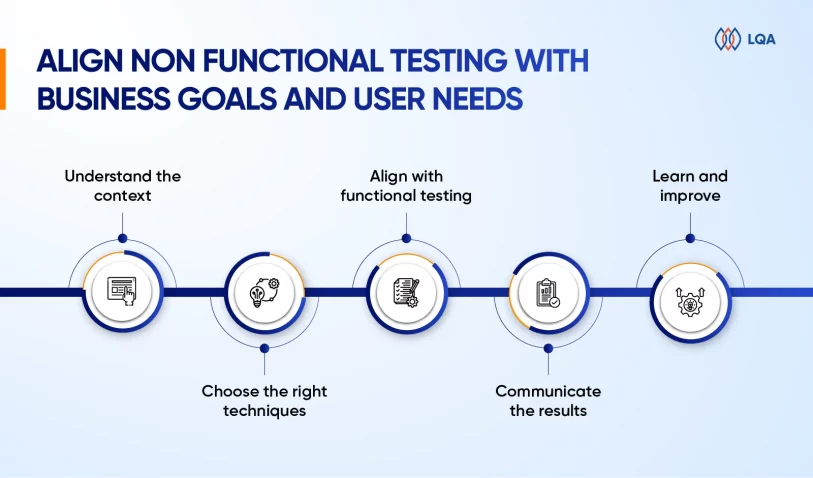
How To Align Non Functional Testing With Business Goals And User Needs?

Here are some valuable tips to seamlessly align non functional testing with your business objectives and user requirements.

Understand the context

Before commencing non functional testing, you should comprehend the project context, your intended audience, and your business goals.

What are your users’ and clients’ expectations and demands? What are your domain’s and environment’s risks and challenges? Which standards and regulations apply to your software?

Addressing these queries will assist in defining the scope, criteria, and priorities for your non functional testing.

Choose the right techniques

Non functional testing is not a one-size-fits-all approach. Depending on the context, different techniques and tools may be required to measure and evaluate the non functional aspects of your software.

For instance, we use load testing, stress testing, and endurance testing to assess system performance under varying levels of demand. Usability testing, accessibility testing, and user experience testing can be utilized to evaluate user satisfaction and convenience.

Security testing, penetration testing, and vulnerability testing can help identify and mitigate potential threats and breaches. Maintainability testing, portability testing, and compatibility testing ensure software adaptability and interoperability.

Non Functional Testing - Everything You Need To Know

Align with functional testing

Non functional testing should not be treated as a standalone or separate activity from functional testing. Instead, it should be integrated and harmonized with functional testing throughout the software development life cycle.

This approach ensures the relevance, consistency, and comprehensiveness of nonfunctional testing while avoiding duplication, confusion, and conflicts with functional testing.

For instance, leveraging test automation allows for efficient and effective execution of both functional and non functional testing.

Additionally, incorporating non functional requirements and specifications into test cases and code through test-driven development, or behavior-driven development further enhances the integration of non functional aspects.

Communicate the results

Non functional testing goes beyond simply identifying and addressing defects. It also offers valuable insights and feedback to stakeholders and users. Therefore, you should communicate the results of non functional testing in a clear, concise, and persuasive manner.

You can apply various methods and formats to present and report non functional testing results, including graphs, charts, dashboards, metrics, or narratives. Additionally, different channels and platforms can be used to share and discuss these results, such as emails, meetings, demos, or blogs.

The key is to emphasize the benefits and impacts of non functional testing on business goals and user requirements.

Learn and improve

Non functional testing is not a one-off or stagnant endeavor. It’s an ongoing and dynamic process that necessitates continual learning and improvement. Regular and frequent monitoring and measurement of software performance and quality are essential.

→ Read more:

Furthermore, you should review and update non functional testing strategies and techniques in response to the evolving needs and expectations of stakeholders and users. You can apply range of sources and methods, such as surveys, interviews, reviews, or analytics to collect and analyze feedback and data.

Additionally, leveraging various tools and frameworks, such as DevOps, Agile, or Lean, can provide support and enhance non functional testing efforts.

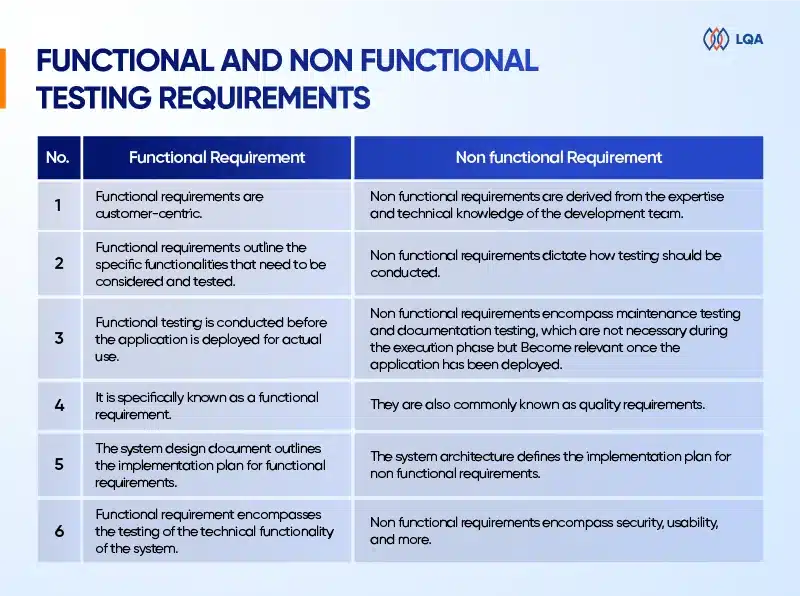
Differences Between Functional And Non Functional Testing Requirements

Let take a quick look at some differences between nonfunctional testing and functional testing:

Non Functional Testing - Everything You Need To Know

FAQ

What is functional vs non functional testing?

Functional testing ensures that the application works as intended. In contrast, non functional testing evaluates the application’s efficiency, performance, security, scalability, reliability, and portability.

What are non functional testing examples?

Non functional testing focuses on evaluating the non functional aspects of the product. To gain a clearer understanding, consider the following examples:

  • Validate that the application’s dashboard loads within 5 seconds upon login.
  • Ensure that email notifications are dispatched within 3 minutes.
  • Verify that the application supports concurrent login by 500 users simultaneously.

What are the challenges of non functional testing?

Below are several risks related to non functional testing:

  • Risk #1: Performance bottlenecks.
  • Risk #2: Security vulnerabilities.
  • Risk #3: Subpar user experience.
  • Risk #4: Compatibility issues.
  • Risk #5: Scalability challenges.

What will happen if non functional requirements are ignored?

Neglecting non functional requirements (NFRs) can significantly affect the adoption of the system, leading to various consequences.

These include the system’s inability to scale up to meet customer demands, sluggish performance resulting in unresponsiveness, security breaches compromising confidential data, and system unavailability during critical periods. Those directly impact business operations.

What is the main goal of non functional testing?

The objective of non functional testing is to enhance the usability, effectiveness, maintainability, and portability of the product. This testing process helps mitigate the manufacturing risk associated with the non functional aspects of the product.

Final Thoughts On Non Functional Testing

Non functional testing plays a crucial role in guaranteeing the overall quality and success of software systems. It extends beyond functional requirements and concentrates on pivotal aspects such as performance, security, usability, scalability, and reliability.

By conducting comprehensive non functional testing, organizations can effectively mitigate risks, elevate user satisfaction, adhere to industry standards, and optimize costs.

At LQA, we have the excellent expertise, specialized skills, and knowledge to conduct comprehensive assessments and evaluations of non-functional attributes.

Our team is highly proficient in utilizing specialized tools and techniques, enabling them to proactively identify and address potential issues.

With our proficiency in performance testing, security testing, usability testing, and compliance testing, we are adept at uncovering hidden problems, optimizing system performance, enhancing security measures, and ensuring a seamless user experience.

Our ultimate goal is to provide clients with high-quality software systems that meet performance expectations, prioritize user satisfaction, safeguard against security threats, and comply with industry standards.

If you are eager to improve the quality and reliability of your software systems, we encourage you to reach out to LQA. Contact us today to discuss your testing requirements and elevate your software to new heights.


Software TestingSoftware TestingSoftware TestingSoftware TestingSoftware TestingSoftware TestingSoftware TestingSoftware TestingSoftware Testing

Black Box Testing: Fundamentals, Techniques, and Guide

Black box testing is a popular software testing methodology. It mainly focuses on the input and output of software applications and doesn’t care about the internal code structure of the software.

In this blog, LQA will give you a fundamental guide to black box testing, covering its mechanism, types, techniques, process, and differences from white box testing and gray box testing.

Let’s dive in!

Black Box Testing Fundamentals

What is black box testing?

Black box testing is a software testing methodology in which testers know what the software is supposed to do but don’t know the internal code structure of the software.

Hence, black box test cases are built around specifications and requirements, such as how the application is expected to behave.

Black box testing can be applied to both functional and non-functional testing at every level of software testing: unit, integration, system, and acceptance. Its major objective is to evaluate the software’s functionality, identify errors, and ensure that it meets specified requirements

Example of black box testing

Consider an e-commerce web app. As a black box tester, you check if the app’s login functionality works as expected by entering valid and invalid credentials and verifying the system’s response.

Below is an example of black box test cases to test the login function of the app, in which T = true and F = false.

Example of black box testing

Black box testing tools

Depending on the specific test types, we have different black box testing tools, such as:

  • Functional testing: Selenium, JUnit
  • Performance testing: Apache JMeter, LoadRunner
  • Security testing: OWASP ZAP, Burp Suite
  • Usability testing: UserTesting, Crazy Eg

Pros and cons of black box testing

So, what are the advantages and limitations of black box testing?

Pros of black box testing

The advantages of black box testing include simplicity, realistic evaluation, user focus, early bug detection, and unbiased tests. Here are why:

  • Simplicity: Black box testing doesn’t require knowledge of internal code, allowing a quick and easy start compared to white box testing and gray box testing.
  • Realistic evaluation: Black box testers focus on the output of the software application and how the software works in reality.
  • User focus: Black box testers evaluate software functionality as users, from a user perspective, hence increasing the likelihood of user acceptance.
  • Early testing: Black box test cases can be designed right after the completion of specifications and executed in the early stages of software development, allowing for early detection of functional issues.
  • Unbiased tests: Black box testers provide an unbiased, fresh perspective as they lack knowledge of the internal workings of the app.

Cons of black box testing

Black box testing also has some drawbacks, such as:

  • Dependence on documentation: Black box testing test case design relies heavily on accurate and comprehensive specifications, which may not always be available or up-to-date.
  • Limited code coverage: Black box testing may miss certain code paths and internal logic, reducing the depth of testing coverage.
  • Inefficiency for complex systems: It may not effectively pinpoint intricate code-related issues in complex software architectures, due to its inability to directly access and analyze the internal code structure.
  • Potential for redundancy: Tests can be redundant if already run by the software designer and developers.

Types of Black Box Testing

Black box testing is applied to 3 major test types: functional testing, non-functional testing, and regression testing.

Functional testing

Functional testing ensures that the software functions as intended. It tests features like input validation, user interface, and data manipulation.

Some common types of functional testing include smoke testing, sanity testing, integration testing, system testing, and regression testing.

Black box testing in functional testing involves creating test cases based on external specifications, executing them to validate functionality, and ensuring that the software meets specified requirements without knowing the internal code.

Non-functional testing

Non-functional testing focuses on aspects other than functionality, including performance, security, usability, and reliability.

In other words, while functional testing checks if the software performs a specific action, non-functional testing checks how the software performs that action under different conditions.

In non-functional testing, black box tests can assess whether the software:

  • is user-friendly
  • performs well under various loads
  • is compatible with different browsers, devices, and environments
  • remains secure against common threats and vulnerabilities

Regression testing

Testers can use black box testing techniques in regression tests to verify whether new changes affect the existing functioning of the system.

Regression testing is often done when there are modifications to a system, such as developing a new function, fixing a bug, or maintenance. In apps with frequent updates, regression testing is often automated for optimal efficiency.

Also read: Software testing basics, principles, skills, phase

Black Box Testing Techniques

There are many black box testing techniques that apply to different logics within software applications. Here are the 5 major techniques.

Black box testing technique Description
Boundary value analysis (BVA) Test the boundaries between partitions.
Equivalence class partitioning Divide the input domains into equivalent classes and test one input from each class.
Decision table based testing Used when the output responds to varied combinations of input.
State transition testing Verify system behavior during state changes.
Error guessing Use testers’ intuition and experience to “guess” errors.

All the above black box testing methods can be done without knowing the internal workings of the system, hence are called black box testing. Let’s dig into them!

1. Boundary value analysis (BVA)

Boundary value analysis, short for BVA, is a black-box testing technique to test the boundaries between partitions instead of testing multiple values in the equivalence region. In BVA, testers assume that if it is true for boundary values, it is true for the whole equivalence region.

Example of BVA: 

Let’s say you’re testing a system where valid age values are between 20 and 50.

  • Test with the minimum boundary value (20). It should be valid.
  • Test with the maximum boundary value (50). It should be valid.
  • Test just below the lower boundary (19). It should be invalid.
  • Test just above the upper boundary (51). It should be invalid.

2. Equivalence class partitioning

In equivalence class partitioning, also known as equivalent partitioning, testers divide all possible inputs into various equivalence data classes (or data groups) and test only one example input from each class, assuming that data in each class behaves the same.

Example of equivalent partitioning:

Imagine you’re testing a system where valid usernames are within 5 – 20 text-only characters. You divide the inputs into 5 groups as below.

Valid input group Example input Invalid input group Example input
Inputs between 5-20 text characters 10 text characters Inputs below 5 characters 3 text characters
Inputs above 20 characters 25 text characters
Empty input (Leave blank)
Inputs contain non-text characters 10 characters contain text and numbers


Then, you pick one representative input from each group to test. For instance, if you input 10 text characters, it should be valid. But if you input 4 characters, it should be invalid.

3. Decision table based testing

Decision table, also called a cause-effect table, is a software testing technique based on cause-effect relationships. It is used to test system behavior in which the output depends on a combination of inputs, for instance:

  • Combination of inputs: all blanks/specific blanks in the log-in section are filled in by a user.
  • System behavior: navigate the user to the homepage.

Example of decision table testing: 

An app allows users to log in only when the username, password, and captcha are correct. We have the below table that represents all possible scenarios to test, in which T = true and F = false.

Example of decision table testing

4. State transition testing

In state transition black-box testing, changes in the input make changes to the state of the system and trigger different outputs. In this technique, testers execute valid and invalid cases belonging to a sequence of events to evaluate the system’s behavior.

Example of state transition testing: 

An e-commerce app will lock a user’s account if he/she enters the wrong password 3 times in a row. This means the user will be able to log in if he/she enters the correct password on the 1st, 2nd, 3rd try. Each time the password is entered correctly, the state is transitioned into “Access accepted”. Otherwise, the state turns into “Account locked” after the 3rd time entering the wrong password.

The state transition diagram below represents a sequence of events to test.

5. Error guessing

In error guessing, you rely on testers’ intuition and experience to anticipate and uncover possible errors or error-prone situations in the software, particularly in situations where formal test cases may be insufficient.

In error guessing, the test cases could be based on:

  • Previous experience in testing related/similar software products.
  • Understanding of the system to be tested.
  • Knowledge of common errors in such applications.
  • Prioritized functions in the requirement specification documents (to not miss them).

Black Box vs. White Box vs. Gray Box Testing

Black box, white box, and grey box testing make up the three software testing methodologies to test an app as an outsider, an insider, and a partial insider. While black box testing and white box testing are opposite concepts, gray box testing stands in between the two.

Black Box vs. White Box vs. Gray Box Testing

Let’s dive into a detailed comparison between black box, white box and gray box testing.

Black box testing Gray box testing White box testing
Minimal to no knowledge of internal details Partial knowledge of internal details Full knowledge of internal details
Low-level granularity Medium-level granularity High-level granularity
Focuses on testing the functionality of the software Uncover defects, vulnerabilities, and ensure proper functioning of the software Test the internal logic, code structure, and implementation details of the software
Evaluates a product from the user’s perspective Considers both the user’s perspective and developer’s perspective Evaluation happens from the developer’s perspective
Is often done by end-users, testers and also developers Can be done by developers, testers, and end-users Is generally done by developers and testers
Test cases are designed on the functional specifications Test cases are created based on both functional specifications and some internal knowledge Test cases are designed based on the internal code and structure
Tend to consume the least time among the 3 methods Tend to consume medium time among the 3 methods Tend to consume the most time among the 3 methods
Technique:

  • Boundary value analysis
  • Equivalence class partitioning
  • Decision table testing
  • State transition testing
  • Error guessing
Technique:

  • Matrix testing
  • Orthogonal array testing
  • Pattern testing
  • Regression testing
Technique:

  • Statement coverage
  • Branch coverage
  • Path coverage
  • Condition coverage
  • Decision/Condition coverage


How To Perform Black Box Testing?

A standard black box testing process takes place as below:

  • Examine the requirements and specifications of the software
  • Define the testing scope, objectives, and create a test plan
  • Develop test cases based on specifications and user scenarios, including choosing valid inputs, invalid inputs, and expected output for each input.
  • Execute the test cases, entering inputs, observing outputs, and comparing real outputs with expected outputs.
  • Document any discrepancies or defects found during testing.
  • Re-run tests after fixes or changes to ensure existing functionality remains intact.

Frequently Asked Questions about Black Box Testing

1. What are the types of black box testing?

Black box testing is suitable for three primary types of tests: functional testing, non-functional testing, and regression testing.

2. Is black box testing illegal?

No, black box testing is not illegal. It is a legitimate and widely used software testing method where testers assess the functionality of a system without knowing its internal code.

However, it’s crucial to conduct black box testing on systems you have permission to test, respecting ethical and legal boundaries. Unauthorized testing on systems or networks without proper consent is considered illegal and can result in legal consequences.

3. Why might companies prefer black box testing over white box testing?

Black box testing is user-focused and doesn’t require knowledge of internal code. Hence, it is often simpler to start and more cost-effective to carry out compared to white box testing and gray box testing. That’s why companies may prefer black-box testing over white-box testing.

Black Box Testing with LQA

As the pioneering independent software testing company in Vietnam, Lotus Quality Assurance (LQA) stands out as a prominent software quality assurance firm with a wide range of software testing services, covering black box, gray box, and white box testing.

Are you looking for experts in conducting black box testing services? Don’t hesitate to contact LQA’s software testing team.

Related resources:


What is Functional Testing? Types and Comprehensive Guide

In today’s ever-evolving software development landscape, functional testing is critical to ensuring that software satisfies its intended specifications and functions seamlessly. Beyond only finding bugs, functional testing examines how well each component works together to contribute to the overall success of the application. 

In this article, we will guide you through the comprehensive exploration of functional test, including its benefits, methodology, and how to complete a successful functional test project. Let’s get cracking!

What is Functional Testing Definition?

Functional test is a type of software testing that examines the function of a software application or system. Its main goal is to ensure that the system functions in a way that meets the business demands and conforms to the stated functional criteria.

This involves evaluating the software’s user interactions, data manipulation, input and output from the software, and how it reacts to various scenarios and conditions.

Functional vs Non-functional Testing: Key Differences

What is functional testing and non functional testing?

Functional and non functional testing are both popular and essential software testing types that help verify if a software’s features work correctly and assess aspects like performance and security for overall reliability.

The differences between functional and non-functional testing lie in their respective focuses. Functional tests focus on verifying if the required functions are met, whereas non-functional tests evaluate non-function aspects of any software such as performance, stability, efficiency, usability, visuals, etc.

Functional testing and non functional testing: Key differences

Functional testing and non functional testing: Key differences

Put simply, functional test tries to answer if the software’s important functions are operating, while non-functional tests care more about how the operations occur.


What are the differences between functional and non-functional testing?

Let’s explore the key differences between functional and non-functional testing in the table below:

Aspect Functional testing Non-functional testing
Objective To evaluate if the software app meets functional requirements and operates as intended To assess non-functional aspects such as usability, security, performance, and more
Test coverage Typically concentrates on particular features or functions Covers a larger range of attributes beyond functionality
Examples User acceptance testing, unit testing,  functional system testing, integration testing Security testing, usability testing, compatibility testing, performance testing
Test criteria Criteria for passing or failing are frequently straightforward and determined by expected results Successful or unsuccessful criteria may include thresholds or benchmarks (for example, a response time of less than 2 seconds).
Tools and technologies Some examples of functional testing tools are Selenium, JUnit, TestNG, unified functional testing (UFT), etc Some examples of non-functional testing tools are JMeter, OWASP ZAP, LoadRunner, etc
Objective Measurement Frequently has binary results (pass/fail) according to the expected behavior Frequently uses benchmarks and quantitative measurements for non-functional attributes


Why is Functional Testing Important?

Software functional testing is an important phase of the software development life cycle (SDLC) for a variety of reasons:

Functional testing benefits

Functional testing benefits

  • Verification of requirements: Functional test guarantees that the software meets the requirements. By testing each function or feature, you can ensure that the application acts as expected and meets the functional criteria.
  • Bug detection: One of the key goals of functional test is to find and disclose bugs or problems in software. It aids in identifying disparities between predicted and actual results, allowing developers to correct flaws before the software is published.
  • Software quality improvement: Functional testing helps to improve the overall quality of software by verifying that every module or component carries out its assigned task correctly.
  • User experience optimization: Functional tests improve user experience by identifying and correcting issues early in the SDLC. It helps develop a software product that satisfies users’ expectations and reduces post-release problems.
  • Cost-effectiveness: Resolving problems at a later stage of the software development life cycle or after the product has been delivered is more expensive than identifying and repairing errors early in the process. Functional test lowers the overall cost of development and maintenance by assisting in the early detection of issues.
  • Risk mitigation: Functional testing assists in reducing the risks related to software development by methodically testing the program’s functioning. It gives teams information about the application’s usability, performance, and dependability so they may proactively solve any possible problems.
Streamline functional testing with LQA

Streamline functional testing with LQA

Types of Functional Testing

What are the most common functionality testing types? Here are the most common functional testing examples:

Types of functional testing

Types of functional testing

Regression testing

Regression testing ensures that new code does not break current functionality. It determines whether or not the application’s quality has deteriorated. These tests focus on the changes made and guarantee that the entire application is stable.

Unit testing

Unit testing involves breaking down the desired result into smaller units, which allows functional testers to check if a limited number of inputs, sometimes even just one, delivers the desired outcomes. By focusing on testing a specific part of the code, such as a function or method, unit testing is quick to write and run.

Integration testing

Integration testing verifies whether each software parts work properly together. This testing makes sure that the modules function properly when they are dependent on one another, even if they pass independent tests.

Smoke testing

Smoke testing is frequently used when a new build is developed. As an early-stage testing type, this method provides an additional layer of verification to determine whether the new build can move one or requires revisions. 

Sanity testing

A sanity test is executed for a new build that includes small bug fixes or new code, frequently after smoke testing. This method is to verify if every major functionality of an application operates properly both on its own and in combination with others.

Usability testing

Usability testing evaluates a software product’s user interface and overall user experience and addresses usability issues. In this testing method, real users will test the product in a production environment. Their feedback will be collected for future improvements.

How to Perform Functional Tests

QA functional testing typically includes the following essential steps:

How to perform functional test?

How to perform functional test?

Identify test input

Before the testing phase, quality engineers need to determine the function that needs to be tested, along with its requirements, and how it operates. This essential step allows functional testers to understand the function’s goal and learn the potential user paths.

Create test scenarios

Create a list of every potential test scenario—or at least every crucial one—that may be used for a particular feature. Test scenarios demonstrate how a feature will be used in different contexts. For example, test cases for a payment module might include different currencies, managing expired or invalid card numbers, etc.

Create test data

Based on the test scenarios that you selected, create test data that replicates typical use situations. Input the test data manually with tools like MS Excel, or automatically with a script or testing tool that retrieves data from sources such as a database, flat file, XML, or spreadsheet. Make sure that each input data has relevant information specifying the expected outcome it should produce.

Execute test cases

In this stage, the created test cases are run and the results are recorded. After that, compare the expected and real output. The actual output produced after running the test cases is compared to the predicted output to determine the level of variance in the results. This stage indicates whether or not the system is operating as intended.

Streamline functional testing with LQA

Streamline functional testing with LQA

Why Automate Functional Testing?

There are various advantages of functional testing automation during the SDLC. The following are some reasons why organizations decide to automate functional testing:

Why Automate Functional Testing?

Why Automate Functional Testing?

  • Efficiency and speed: Automated functional test can be completed faster than manual tests. This leads to more rapid feedback on the software’s quality, which allows more frequent updates and faster release cycles.
  • Reusability: Automated functional tests can be repeated without extra work and reusable at various phases of the development process. This allows consistent testing across different builds and releases, cutting down on redundancy.
  • Improved test coverage:  Automated functional test offers wider coverage of test scenarios and data variances. This leads to higher test coverage, ensuring that all of the application’s components are carefully tested.

In summary, automated functional test improves the software development process’s effectiveness, consistency, and dependability, which leads to better products and quicker release cycles.

Improve Your Functional Testing with LQA

Enhancing functional testing involves engaging a specialized software QA & testing firm to ensure a comprehensive evaluation and optimal testing performance.

With over 7 years of experience as the pioneering independent software QA in Vietnam, LQA stands out as a leading IT quality and security assurance organization, providing a comprehensive variety of software QA & testing services to fulfill our clients’ diversified needs.

At LQA, we stay up-to-date on the latest functional testing methodologies and employ industry-leading tools.

LQA robust software testing tools

LQA robust software testing tools

In addition to functional tests, LQA offers full software testing services such as white box, black box, web application, mobile application, API, manual, and automation testing.

Key features of LQA’s functional test solution:

  • Comprehensive software QA solutions include consultation, strategy, execution, and ongoing support.
  • Ensured bug rate of less than 3% for devices, mobile, and web applications.
  • Quick delivery enabled by a wide range of experienced testers.
  • Optimal price-to-quality ratio, leveraging cost savings and the knowledge of Vietnamese IT professionals.
  • Tailored solutions based on industry expertise.
  • Maximum security assured via a Non-disclosure Agreement (NDA) and optimal security procedures during database access.

Connect with LQA’s professionals to improve your functional test experience, ensuring outstanding software quality, bug-free applications, quick project delivery, cost-effective solutions, industry-specific precision, and maximum security.

Streamline functional testing with LQA

Streamline functional testing with LQA

Frequently Asked Questions About Functional Testing

1. What is functional testing in software engineering?

Functional testing is a type of software testing that aims to ensure that a software application performs as planned. It entails testing the system’s functionality by providing input and inspecting the output to ensure that the software satisfies the defined requirements and works as intended.


2. What is non-functional testing?

In contrast to functional testing, non-functional testing assesses factors including scalability, performance, usability, and dependability. Rather than focusing on particular features or functionalities, it evaluates the system’s non-functional characteristics, such as reaction time, load management, and security.


3. What is the difference between unit testing vs functional testing?

Unit testing is a type of functional testing in which the validity of individual modules or components is verified by testing them separately. More broadly, functional testing evaluates the system’s functionality as a whole.


4. What is the difference between functional vs regression testing?

Regression testing makes sure that new features don’t negatively affect already-existing functionalities, while functional test confirms that the program operates as intended. Although being one of the functional test types, regression testing focuses on potential problems with new changes, whereas functional test validates features.


5. What is the difference between functional vs integration testing?

While integration testing evaluates the connections between various systems or components, the functional test looks at specific functions on their own. Both are a component of functional testing; integration testing makes sure these features work together seamlessly, whereas functional testing concentrates on features.


Final Thoughts About Functional Testing

In conclusion, functional test is the key to ensuring software reliability and user satisfaction. Its comprehensive examination of each function not only addresses and fixes possible issues but also guarantees a seamless alignment with user expectations.

Adopting a strong functional test approach is essential since it will protect against bugs and errors in advance, and increase software dependability, and user confidence.

We hope that with our comprehensive guidelines above, you can approach functional tests with confidence, creating software that not only meets but even surpasses user expectations in functionality and performance.

If you are looking for experts in conducting function testing for your software projects, contact LQA’s expert team today for top-notch functional testing services and consultancy. Let’s ensure your software stands out for all the right reasons.

Manual TestingManual TestingManual TestingManual TestingManual TestingManual TestingManual TestingManual TestingManual TestingManual Testing

Gray Box Testing: Process, Techniques, Pros and Cons

Gray box testing, also spelled grey box testing, is a common method in software testing. The purpose of gray box testing is to search for defects due to improper structure or improper usage of applications.

In this blog, LQA will give you a comprehensive guide to gray box testing and the differences between black box, gray box, and white box testing.

What is Gray Box Testing?

Gray box testing is a software testing method in which testers have partial knowledge of the internal workings of an application.

The major objective of gray box testing is to combine the advantages of black box testing and white box testing to test the product from a user perspective and improve overall user acceptance of the product.

When doing gray box testing, the testing process is guided by the specifications or requirements set for the software. Testers create test cases based on what the software is supposed to do, hence they are called requirement test cases.

Example of gray box testing: Consider testing a mobile banking app. As a gray box tester, you may have some knowledge about the backend server communication. You design test cases to simulate various network conditions, like low connectivity, to observe how the app handles these situations.

Black-box vs. Gray-box vs. White-box Testing

We all know about the three common software testing methods: black box testing, gray box testing, and white box testing.

Black-box vs. Gray-box vs. White-box Testing

In black-box testing, testers have no idea about the system’s internal workings, while in white-box testing, testers have full knowledge of the application’s internal workings. Gray box testing is like a mix of black box and white box testing.

Let’s dive into a detailed comparison between black box, white box and gray box testing.

Black box testing Gray box testing White box testing
Minimal to no knowledge of internal details Partial knowledge of internal details Full knowledge of internal details
Low-level granularity Medium-level granularity High-level granularity
Evaluates a product from the user’s perspective Considers both the user’s perspective and developer’s perspective Evaluation happens from the developer’s perspective
Is often done by end-users, testers and also developers Can be done by developers, testers, and end-users Is generally done by developers and testers
Test cases are designed on the functional specifications Test cases are created based on both functional specifications and some internal knowledge Test cases are designed based on the internal code and structure
Tend to consume the least time among the 3 methods Tend to consume medium time among the 3 methods Tend to consume the most time among the 3 methods


Also read: Software testing basics, principles, skills, phase

Advantages and Disadvantages Of Gray Box Testing

So, what are the advantages and limitations of gray box testing?

Advantages of gray box testing

In short, gray box testing in software engineering combines the benefits of black box testing and white box testing.

  • Testing accounts for user perspective to improve overall user acceptance of the product.
  • Testers do not need to have programming expertise or extensive internal knowledge of the target system to start.
  • Less chance of introducing bias compared to white-box testing, as testers don’t know the internal details fully.
  • More comprehensive test scenario design than black-box testing thanks to partial knowledge of the internal mechanisms.
  • Is non-intrusive because it doesn’t require full access to the internal code.

Disadvantages of gray box testing

Due to its partial access to the internal code of the system, gray box testing imposes certain limitations.

  • Less test comprehensiveness compared to white-box testing. Due to limited access to complete code path coverage, testers might overlook critical vulnerabilities in the system.
  • Difficult to associate defects with root causes in distributed systems. Distributed systems involve various components and interactions, but testers don’t have full visibility into them.
  • Algorithm testing is impossible as the lack of access to the complete logic of the algorithms.

Gray Box Testing Techniques

When performing gray box testing, there are various techniques you can choose from.

Gray Box Testing Techniques

Matrix testing

Matrix testing is a testing approach that examines all variables in an application, evaluating all business and technical risks associated with them and ensuring their correct and efficient utilization.

In matrix testing, test cases are systematically designed and executed based on a testing matrix structure. The matrix typically represents different combinations of inputs, conditions, or variables that need to be tested.

Orthogonal array testing (OAT)

Orthogonal array testing, or OAT, is basically a systematic and statistically-driven black-box testing technique. It systematically selects specific combinations of inputs to test the system instead of testing every possible combination of inputs.

Imagine you are dealing with a large number of inputs. Now, testing every possible combination of inputs would take a long time. So, you pick a subset of combinations to test from an orthogonal array, which is a structured grid ensuring coverage of various combinations of factor levels.

This method helps achieve a balance between thorough testing and minimizing the number of test cases required.

Pattern testing

Pattern testing in gray box testing involves analyzing historical defects to recognize recurring patterns associated with defects. Then, you can apply those insights to detect anomalies or deviations in coding practices that may lead to errors or vulnerabilities in apps with similar structures.

Example of pattern testing: Checking for consistent coding practices in naming conventions throughout the application.

Regression testing

Regression testing is a technique that verifies whether new changes affect the existing functioning of the system. Common regression test strategies are retest all, retest risky use cases, and regression test selection.

Regression testing is often done when there are modifications to a system, such as developing a new function or fixing a bug. In apps with frequent updates, regression testing is often automated for optimal efficiency.

The Gray Box Testing Process

A standard gray-box testing process comprises 10 steps as below:

The Gray Box Testing Process

#Step 1: Identify and select inputs

Choose inputs for testing from both white and black box testing methods, considering both external user interactions (black box) and partial knowledge of internal workings (white box).

#Step 2: Identify probable outputs

Determine expected outcomes corresponding to the selected inputs to establish criteria for successful testing.

#Step 3: Identify key paths for the testing phase

Recognize critical paths within the system that need to be tested to ensure comprehensive coverage.

#Step 4: Identify sub-functions

Break down the system into sub-functions for more focused and in-depth testing.

#Step 5:  Identify inputs for subfunctions

Determine inputs specific to each sub-function, tailoring tests to assess individual components.

#Step 6: Identify probable outputs for subfunctions

Anticipate expected outputs corresponding to inputs for each identified sub-function.

#Step 7: Execute sub-function test cases

Perform tests on isolated sub-functions to observe how they respond to various inputs.

#Step 8: Assess and verify outcomes.

Evaluate test results to verify whether the system behaves as expected and meets specified criteria.

#Step 9: Repeat steps 4 & 8 for other subfunctions

#Step 10: Repeat steps 7 & 8 for other subfunctions

Frequently Asked Questions about Gray Box Testing

1. What is gray box penetration testing?

Gray box penetration testing is a cybersecurity assessment approach where the tester is provided with some information, such as system architecture or design details, to simulate the perspective of an attacker with limited insider knowledge.

Gray box penetration testing alongside black box penetration testing and white box penetration testing make up the 3 common penetration testing methods in security testing.

2. What is the difference between gray-box and black-box testing?

The fundamental difference between gray box testing and black box testing is how much testers know about the internal workings of a system, which can be a web app, a mobile app, or a desktop app.

Gray box testers have partial knowledge of the internal details of the system, hence testing the system from both a user perspective and developer perspective.

Black box testers have no idea about the internal details of the system, hence testing the system from a user perspective completely.

3. What is gray box testing also known as?

According to the National Institute of Standards and Technology (NIST), gray box testing is also known as focused testing.

Gray Box Testing by LQA

Gray-box testing is beneficial because it merges the benefits of black box testing and white box testing, combining the simplicity of the black-box approach with the code-specific approach of the white-box approach.

As the pioneering independent software testing company in Vietnam, LQA stands out as a prominent software quality assurance firm with a wide range of software testing services, covering gray box, white box, and black box testing.

Are you looking for experts in conducting gray box testing services? Don’t hesitate to contact LQA’s software testing team.

Contact LQA at:

Automated Testing

Black Box Penetration Testing: Usage, Techniques, Process 

Penetration testing, or pen testing, also called ‘ethical hacking’, in the world of software testing is a cybersecurity practice that involves simulating cyberattacks on computer systems, networks, or applications to identify and address security vulnerabilities.

Black box penetration testing, together with gray box penetration testing and white box penetration testing, makes up the three major methods in the field of penetration test.

In this article, LQA will give you a comprehensive guide to black box penetration testing and its difference from the other two.

What is black box penetration testing?

Black box penetration testing definition

Black box testing in penetration testing is a security assessment where testers, with no prior knowledge of the system, simulate real-world attacks to identify vulnerabilities from an external perspective.

The goal of black box penetration testing is to assess the system’s resilience to external threats and provide recommendations for improvement.

contact lqa pen test teamKey characteristics of black box testing

  • Limited knowledge: Testers have little to no knowledge of the internal workings, code, or architecture of the system being tested.
  • External perspective: Testing is conducted from an external viewpoint, simulating how an external attacker with no insider information would approach the system.
  • Objective evaluation: Testing is conducted from an external viewpoint, assessing an app’s resistance to external threats without bias from internal knowledge.
  • Real-world simulation: The goal is to simulate real-world attacks to identify vulnerabilities and weaknesses that could be exploited by external threats.

When your organization might need this type of pen test?

With the above characteristics of back box penetration testing, there are various scenarios when your organization might need this type of pen test. Common scenarios are:

  • Early vulnerability detection: Use this type of pen test when your business wants to unveil vulnerabilities at the initial stages of the software development life cycle (SDLC) and address issues before they escalate into significant security concerns.
  • Compliance & regulatory obligations: When industry regulations or compliance standards mandate regular security assessments, black box testing can help meet these requirements by providing an unbiased evaluation.
  • Real-world simulation: A black box approach helps assess your application, infrastructure, or network in a setting that closely mirrors a real-life attack scenario.
  • Third-party vendor assessment: Before onboarding a new third-party service or vendor, conducting black box testing helps ensure the security of their external-facing systems.

Black-box vs. Gray-box vs. White-box Penetration Testing 

black box grey box and white box penetration testing differences

You may want to take a wider look at black box, white box. and gray box testing before digging into these software testing methods in the niche of cybersecurity testing.

Aspect Black box testing White box testing Grey box testing
Knowledge of internal details Minimal to none Comprehensive (full access) Partial (limited internal information)
Testing perspective External (simulates real attacks) Internal (assumes insider knowledge) Blend of external and limited internal
Realism High (simulates external threats) Moderate (assumes some insider knowledge) Balanced realism and efficiency
Pre-engagement information Limited preparation required Detailed internal information needed Moderate preparation required
Focus External threats Internal and external threats Both internal and external threats
Use cases External security assessment Application and internal network testing Third-party vendor assessment, balancing realism and efficiency
Efficiency Quick start May consume more time as detailed internal knowledge required Balanced efficiency and realism


Advantages and disadvantages of black box penetration testing

Below are the most common advantages and disadvantages of black box pen test during a penetration testing engagement.

Advantages of black box penetration testing

  • Realistic testing: Assess your application, infrastructure, or network in a setting that closely mirrors a real-life attack scenario.
  • Unbiased evaluation: Testing is conducted from an external viewpoint, eliminating insider bias from internal knowledge.
  • Quick start: Back box testing doesn’t require testers to learn about the internal structure of software, hence allowing a quick start.
  • Cost saving: It may be cheaper to conduct a black box penetration test compared to other pen testing types, as it doesn’t require much time and resources needed for preparation.
  • Reduced chances of overlooking external vulnerabilities: As penetration testers don’t have prior access to the system blueprints and processes, the chances of testers focusing on a specific set of external vulnerabilities and missing out on others are often low.

Disadvantages of black box penetration testing

  • Limited understanding of internal controls: The testing team has restricted knowledge of the internal workings, potentially missing nuanced vulnerabilities that require internal context.
  • Overlooking internal vulnerabilities: The external focus may result in missing certain internal vulnerabilities that could be identified with more internal knowledge.
  • Lack of context: While efficient, the quick start may come at the cost of lacking context for a more nuanced evaluation of internal security measures.

Common Black-box Penetration Testing Techniques

black box penetration testing techniquesEnumeration

Enumeration is about listing test targets for comprehensive testing.

Enumeration involves identifying and listing all possible test targets, such as IP addresses, services, and applications, to create a comprehensive inventory for testing.

It helps testers understand the scope of the system and potential points of entry.

Full port scanning

Full port scanning is crucial for mapping out the entire attack surface and discovering hidden services that might be overlooked with selective scanning.

Full port scanning is a specific scanning technique that involves checking all possible ports on a target system for open and closed statuses. This comprehensive approach helps identify services running on each port, providing insights into potential entry points for attackers.

Fuzzing

Fuzzing, or fuzz tests, is an automated testing technique that injects malformed or random inputs into an application that the application is not designed to handle.

The purpose of fuzz tests is to detect crashes, errors, memory leaks, and different behavior than expected.

Exploratory testing

Exploratory testing is when you perform tests with minimal predefined test plans and test cases and without an expectation or specific outcome.

Exploratory testing uses a dynamic and unscripted approach with the idea of letting the outcomes of one test guide the others.

This particularly works in black-box penetration testing, in which testers have no idea about the internal workings of the system.

Vulnerability scanning

Vulnerability scanning is an automated technique that systematically identifies and evaluates potential vulnerabilities within the target system, network, or application.

In vulnerability scanning, testers leverage automated tools to scan for common vulnerabilities in the target’s external-facing components.

This type of black-box pen test provides a quick and efficient way to identify potential security issues, such as outdated software, misconfigurations, or known vulnerabilities.

Exploitation

Exploitation involves attempting to exploit identified vulnerabilities to gain unauthorized access or compromise the target’s security.

During exploitation, testers simulate real-world attacks, crafting malicious requests to exploit weaknesses in the system’s defenses. This process demonstrates the potential impact of successful exploitation and assesses the overall security resilience of the target

Black Box Penetration Testing Steps

A black box pen test process often goes through 8 steps as below.

black box penetration testing steps1. Scoping the test

In this stage of the penetration test, the team defines the scope of the test, outlining the specific systems, applications, or networks to assess.

They also establish rules of engagement, setting guidelines and limitations for the testing process.

2. Reconnaissance

Reconnaissance involves gathering information about the target system, typically publicly known information such as domain names, employee information, IP addresses, and network configurations.

The purpose of the reconnaissance step is to collect publicly known information about the target system to lay the foundation for subsequent testing phases.

3. Scanning & enumeration

Post reconnaissance, testers conduct a further step to identify additional technical data about the target system, such as types of running software, operating system details, connected systems, user accounts, and user roles.

The step aims to enhance the tester’s understanding and inform subsequent testing actions.

4. Vulnerability discovery

Utilize gathered information in previous steps, testers identify public vulnerabilities in the public components target systems and networks. This involves searching for known common vulnerabilities and exposures (CVEs) in system components, versions, or third-party applications.

5. Exploitation

At this stage, pen testers craft malicious requests or use social engineering techniques to exploit the identified vulnerabilities actively. The objective is to penetrate the system efficiently and navigate to the core.

6. Privilege escalation

After gaining initial access, testers attempt to escalate privileges to achieve complete control over the system and database.

This stage is crucial for assessing the potential impact of a successful attack and understanding the extent of compromised access.

7. Reporting and communicating

After completing black box penetration testing, the test team comprehensively documents findings, outlining discovered vulnerabilities, exploitation methods, and potential risks.

Then, the test team presents a clear and actionable report, providing insights for stakeholders on areas of concern and recommended remediation steps.

8. Remediation and follow-up

At the remediation stage, the test team and stakeholders coordinate to fix and address identified vulnerabilities.

Follow-up assessments should be conducted to verify the effectiveness of remediation efforts and ensure a more secure environment.

How To Choose The Right Pen Test Provider?

There are cases when a company lacks internal capabilities for implementing penetration tests and seeks outsourcing. In such instances, choosing the right provider is crucial to delivering the expected outcomes.

Here are LQA’s suggestions for choosing the right pen test vendor:

  • Prioritize providers with expertise in your industry and familiarity with your specific systems and technologies.
  • Look for a provider willing to customize their testing approach to address your company’s unique security concerns and priorities.
  • Consider the vendor’s price-to-quality commitment, which assesses the cost of the services in relation to the value offered.
  • Investigate the provider’s reputation by reviewing testimonials, case studies, and online feedback from previous clients.
  • Emphasize the provider’s commitment to ethical hacking practices and integrity in handling sensitive information to ensure a trustworthy collaboration.
  • Your vendor should also communicate clearly, detailing their methodologies, findings, and recommendations in a way that is easily understandable for your team.

Black Box Penetration Testing by LQA

Enhancing cybersecurity testing involves engaging a specialized security firm to assess your business’s vulnerabilities and deliver a detailed report with recommended solutions, a crucial step in preventing cyber attacks.

Having more than 7 years of experience, and as the pioneering independent software testing company in Vietnam, LQA stands out as a prominent software quality and security assurance firm, offering a complete range of penetration testing services to fortify businesses against security threats.

Alongside black box penetration testing services, LQA provides comprehensive software testing services including white box, black box, web application, mobile application, API, manual, and automation testing services.

At LQA, we maintain up-to-date expertise on the latest threats, attacks, and vulnerabilities, employing industry-leading tools to conduct comprehensive penetration tests.

contact lqa pen test team

Frequently Asked Questions about Black Box Penetration Testing

1. What is the timeline for black-box penetration testing?

The timeline for black-box penetration testing can vary based on factors such as the scope, complexity of the target environment, and the specific testing objectives.

Below is a typical timeline for black box penetration testing:

  • Planning: 1 – 2 weeks
  • Target system’s information gathering: 1 – 2 weeks
  • Execution: 1 – 2 weeks
  • Reporting: 1 week
  • Communicate reports: 1 day

2. What is more costly: black box or white box penetration testing?

The cost comparison between black box and white box penetration testing is context-dependent. For example:

  • In case you develop the system in-house and have an internal test team who deeply understands the internal structure of the system, you can quickly kick off white box testing with minimal preparation. On the contrary, black box testing demands additional time and resources for information gathering, potentially costing more.
  • In another scenario, where a legacy system lacks documentation and internal teams lack technical insights, white box testing may become more expensive. This is because it necessitates a substantial investment in understanding the system, while black box testing can commence more promptly.

3. What is the difference between gray-box and black-box penetration testing?

Black box penetration testing requires no knowledge of the internal workings of the target system. Meanwhile, gray box penetration testing requires partial knowledge of the internal workings of the target system.

Final Notes On Black Box Penetration Testing

Black box penetration testing is among the three major pen test approaches: black box, grey box, and white box. Among them, the black box method serves as an independent and objective method, simulating real-world cyber threats without prior knowledge of the system’s internal workings.

If you are looking for experts in conducting black box testing services, don’t hesitate to contact LQA’s security testing team.

contact lqa pen test team

BlogBlogBlogBlogBlogBlogBlogBlogBlogEmbedded Testing

White Box Penetration Testing: Definition, Pros & Cons, and Essential Guide 

In today’s rapidly evolving digital landscape, safeguarding software integrity is a top priority. White box penetration testing is a crucial cornerstone in the proactive defense strategy against emerging cyber threats. This detailed testing approach offers a unique viewpoint, much like a hacker’s perspective from inside the system, enabling a thorough exploration of potential vulnerabilities deeply embedded within the software. 

As the digital world continues to expand and evolve, so do the sophisticated techniques of cyber attackers, white box penetration testing serves as a crucial tool in staying ahead of these threats by revealing weaknesses in the system’s core, allowing for proactive reinforcement of security measures.

Understanding the pivotal role of this method within software quality assurance is essential, as it not only identifies existing vulnerabilities but empowers organizations to proactively strengthen their software, fostering resilience against potential breaches and cyber-attacks.


What Is White Box Penetration Testing?

White box penetration testing definition, referred to as clear box or structural testing, is a technique that grants the tester access to the internal structure of the system to replicate a hacker’s actions and uncover potential vulnerabilities. This method provides a comprehensive understanding of the application, identifying all possible entry points into the system.

White box pentest is frequently employed to examine a system’s essential parts, particularly by companies that develop their software products, or integrate multiple applications. It is a method to evaluate a system’s security by assessing its capability to withstand various real-time attacks.

what is white box penetration testing?

What is white box penetration testing?


Benefits of White Box Penetration Testing

An efficient white box penetration test helps avoid the issues, errors, and oversights that can leave your businesses vulnerable to hackers. Let’s explore more benefits of white-box penetration testing:

  • Comprehensive oversights of possible issues: White box penetration testing offers the most comprehensive analysis of internal and external vulnerabilities from the internal point of view, which is not available to typical attackers.
  • Early detection: White box penetration testing is integrated into the early development stages, when there is no user interface, and even before the software application is available to users, which enables detecting the vulnerabilities at a very early stage.
  • Extensive testing coverage: White box penetration testing can identify weaknesses in areas that are unreachable for black box testing, for instance, an app’s source code, design, and business logic.
  • Precise identification of weaknesses: Since testers have detailed knowledge of the internal workings of the system, they can pinpoint specific weaknesses, potential security gaps, and flaws in the code logic. This level of detail often leads to more accurate identification of vulnerabilities.
benefits of white box penetration testing

Benefits of white box penetration testing

Disadvantages of White Box Testing

Despite all the appealing advantages, white box penetration testing shows some drawbacks in certain situations:

  • High programming language requirements: Implementing white-box penetration testing involves internal network testing, which requires the testers to be familiar with critical programming tasks, like performing port scanning, SQL injection, and common attacks. By this, they will have a better understanding of the potential access points.
  • Limited real-world simulation: White box testing operates with complete knowledge of the system, which doesn’t accurately replicate real-world attack scenarios where attackers have limited or no knowledge. This approach might overlook vulnerabilities that would be apparent to external attackers working with less information.
  • Risk of biased testing: Testers, armed with complete system details, might inadvertently focus on known weaknesses or areas they are more familiar with, potentially overlooking other vulnerabilities that could be exploited by attackers with different perspectives.
disadvantages of white box penetration testing

Disadvantages of white box penetration testing


Black Box, Grey Box and White Box Penetration Testing Differences

Black box, grey box and white box testing are all types of penetration testing – the practice of testing a computer system, network, or web app to find issues, errors, and vulnerabilities that an attacker could exploit. 

black box grey box and white box penetration testing differences

Black box, Grey box and White box penetration testing differences


To help you distinguish between black box, grey box and white box penetration testing, understand the benefits and limitations of each type, and when to apply it to get the best results, we have summarized it in the following comparison table:

Aspects Black box penetration testing Grey box penetration testing White box penetration testing
Level of knowledge requirement Require little or no knowledge of infrastructure and network Require basic knowledge of the internal codebase, architecture, and infrastructure Allow complete access to knowledge about the system’s infrastructure, codebase, and network
Level of programming language requirement Require no syntactic knowledge of the programming language Require a basic comprehension of the programming language Require high and professional understanding of programming language
Standard techniques Boundary value analysis, Graph-Based testing, Equivalence partitioning, etc Regression testing, Pattern testing, Matrix testing, Orthogonal array testing, etc Decision coverage, Path testing, Branch testing, Statement coverage, etc
Advantages – Mimics real-world attacks

– Provides an outsider’s perspective

– Encourages creative problem-solving

– Balances realism and deeper insights

– Enables access to some internal system knowledge

– Optimize time and resources

– Understands thoroughly of the system’s internals

– Delivers comprehensive coverage of system security
– Pinpoints vulnerabilities in code and architecture

Disadvantages – Limited insight into internal structures

– Incomplete view of vulnerabilities

– Possible overlook of certain critical vulnerabilities

– Restricted insight compared to White Box

– Dependent on available information

– Possible miss of certain system areas

– Time-consuming due to in-depth analysis
– Costly due to skilled personnel and time- Prone to false positives if not done carefully
When to use – Simulating external threats

– Testing overall security posture

– Assessing response to unknown attackers

– Balancing depth and efficiency

– Targeted testing with some internal insights

– Limited access but need for deeper insight

– Assessing specific system components

– Analyzing code, architecture, and design

– Identifying and fixing intricate flaws


The selection of Black Box, Grey Box, or White Box Penetration Testing depends on the level of internal knowledge required, the depth of the assessment needed, and the specific objectives of your security testing rpojects. It’s often beneficial to employ a combination of these methodologies for a comprehensive security assessment based on the unique needs of the system or software being evaluated.

choose the right penetration testing type with lqa experts

Choose the right penetration testing type with LQA experts


White Box Penetration Testing Techniques

When it comes to software security testing, security testing white box techniques review source code (the internal structure of the software application) to detect gaps that can make an application vulnerable to cybersecurity threats.

One of the main goals of white box penetration testing is to cover the complete source code as extensively as possible. Three main types of techniques for use in white box penetration testing include Path coverage, Statement coverage, and Branch coverage.

white box penetration testing techniques

White Box Penetration Testing Techniques

Path coverage

This white box test methodology pays attention to all the paths. The path is a flow of execution that follows a set of instructions. The path coverage examines all possible paths of the software and ensures each path is traversed at least once. The path coverage is far more powerful than the branch coverage and is useful for testing complicated builds.


Statement coverage

Statement methodology checks if each functionality was tested one time. A statement indicates a functionality or set of actions for the application to decode depending on its programming language. 

An executable statement is when the statement is put together and transformed into an object code, which will subsequently execute the action it was designed for. It helps to uncover unused or missing statements and branches as well as leftover dead codes.

The statement coverage evaluates if each line of code is executed at least once and helps find unnecessary or missing lines.


Branch coverage

A branch is one of many execution paths that the code can take after processing a decision statement like an if statement. This method is to confirm that all branch codes are tested.

The branch coverage is tested to check whether all branches in a codebase are exercised by tests and no branch leads to abnormal behavior of the application. It maps the code into branches of conditional logic and ensures that all branches are covered by unit tests.

One should ascertain that all codes have been launched at least once.


Common White Box Penetration Testing Tools

Several common tools/libraries employed in white-box penetration testing include:

  1. Metasploit: Penetration testers utilize Metasploit to create and authenticate exploit code before deploying it in real-world scenarios. It’s instrumental for network security testing or remote system intrusion.
  2. Nmap: As an open-source network administration tool, Nmap monitors network connections and scans extensive networks, aiding in host and service auditing as well as intrusion detection. It offers packet-level and scan-level analysis and is freely available for download.
  3. PyTest: Pytest, a comprehensive Python testing tool, facilitates writing more efficient programs, supporting test-driven development (TDD) and behavior-driven development (BDD).
  4. NUnit: NUnit is an open-source unit testing framework beneficial for the .NET Framework and Mono, aiding in writing better code and reducing application bugs.
  5. John the Ripper: This fast password cracker identifies weak Unix passwords and is compatible with various operating systems such as Unix, Windows, DOS, BeOS, and OpenVMS. John the Ripper supports multiple password hash types commonly found in Unix systems and other patches contributed by users.
  6. Wireshark: Functioning as a network traffic analyzer, Wireshark enables monitoring and analyzing traffic within system networks. It is open-source and widely recognized as the foremost network analyzer globally, primarily used by network administrators and professionals to troubleshoot network and system performance issues and filter various network protocols.

The tools employed in white-box penetration testing are similar to those used in other penetration tests, but the methodology for employing these tools differs significantly.

lqa robust penetration testing tools

Access LQA’s Industry-leading Penetration Testing Tools

Essential White Box Penetration Testing Steps

A process of software white box penetration testing comprises the following steps:

white box penetration testing steps

Essential White box penetration testing steps

Source code review

The initial step is understanding the internal structure and functionality of a target software application. This crucial step requires a test engineer to review thoroughly the software’s source code, and understand clearly how it works in order to set the foundation for designing test cases that will help encounter security weaknesses.


Select the testing areas

After understanding completely the software’s internal structure and how it functions, the next step is determining the areas that need to be tested. 

As the test aims to encompass every potential scenario for running code systematically, it proves more effective to explore the numerous possibilities within a smaller area rather than a larger one, as the latter wouldn’t ensure the same comprehensive coverage.

Covering a vast area is feasible, yet it demands significant effort, resources, and labor for test coverage. Consequently, it’s not recommended to execute this extensive coverage only on demand. For instance, it becomes essential in situations where it’s crucial to safeguard every aspect of the system; in such cases, it would be deemed necessary.


Code & flowchart identification

This step adds a structured approach to the white box penetration testing by visually mapping the code execution process, facilitating a more organized and systematic analysis of the system’s functionalities.

  • Identify potential code lines: Thoroughly examine the system and identify all possible code segments associated with the functionalities or aspects under test. This involves a comprehensive review of the codebase, focusing on critical areas that could be potential sources of vulnerabilities.
  • Create a flow chart: Outline the flow of the identified code segments. Create a flow chart or diagram to represent the flow of code execution, including input points, processing stages, and output results.
  • Output tracing: Document and trace the output of each code segment within the flow chart. This helps in understanding how inputs are processed and how outputs are generated, aiding in the identification of potential vulnerabilities and understanding the system’s behavior.


Design test cases

Designing test cases is a pivotal phase in white box penetration testing, involving the creation of detailed scenarios for every identified code segment and system functionality. 

Each test case outlines potential vulnerabilities, failure points, and specific testing procedures. It includes boundary testing, attack scenario simulations, and meticulous recording of testing outcomes to comprehensively evaluate the system’s security posture and ensure a systematic approach to identifying and addressing vulnerabilities.


Execute testing 

The execution phase in white box security testing involves putting the devised plans into action, rigorously conducting tests according to the outlined strategies, and repeatedly iterating through the testing process until all identified systems are thoroughly examined, leaving no vulnerabilities unchecked.

This phase includes comprehensive testing, meticulous documentation of findings, validation of vulnerabilities, and continual refinement of testing procedures to ensure the system’s robust security against potential threats.


Reporting 

Compile a detailed report that includes identified vulnerabilities, their potential impact, and recommendations for mitigation. This report should prioritize vulnerabilities based on their severity and guide how to address them.


Continuous improvement

Security is an ongoing process. Continuous monitoring, regular security assessments, and improvement in policies and practices are essential to maintain a robust security posture.

lqa continuous white box penetration testing solution

LQA continuous white box penetration testing solution


White Box Penetration Testing by LQA

Enhancing cybersecurity testing involves engaging a specialized security firm to assess your business’s vulnerabilities and deliver a detailed report with recommended solutions, a crucial step in preventing cyber attacks.

Having more than 7 years of experience, and as the pioneering independent software QA in Vietnam, LQA stands out as a prominent IT quality and security assurance firm, offering a complete range of penetration testing services to fortify businesses against security threats.

lqa software quality assurance awards

LQA software quality assurance awards

Alongside white box penetration testing services, LQA provides comprehensive software testing services including white box, black box, web application, mobile application, API, manual, and automation testing services.

At LQA, we maintain up-to-date expertise on the latest threats, attacks, and vulnerabilities, employing industry-leading tools to conduct comprehensive penetration tests.

lqa software testing tools

LQA robust software testing tools

Key features of LQA’s white box cyber security solution:

Connect with LQA’s experts to safeguard your data and assets from potential hackers today!

lqa white box penetration testing solution

LQA white box penetration testing solution


Frequently Asked Questions about Haptic Feedback

1. What is white box penetration testing?

White box penetration testing is a comprehensive security assessment method where testers have complete access to the internal architecture, design, and system details of the target. In this approach, the tester possesses full knowledge of the system’s infrastructure, including source code, network diagrams, and system configurations.

2. What is a white box penetration testing example?

An example of a white box test could involve analyzing the source code of a web application to identify vulnerabilities. Testers would scrutinize the code, look for potential security flaws, and examine the database structure and application logic to uncover weaknesses in the system.

3. What are black box grey box and white box penetration testing?

Black box, grey box, and white box penetration testing are distinct approaches used in security assessments to evaluate the vulnerabilities of a system. Here are the brief definitions of each type of penetration testing:

  • Black box penetration testing: A security testing method where testers have no prior knowledge of the system. They approach it as an external hacker would, without any internal information about the system’s architecture or design.
  • Grey box penetration testing: A security testing method where testers have partial knowledge of the system, such as limited access or some details about the internal architecture. This approach combines elements of both white and black box testing.
  • White box penetration testing: A security testing method where testers have complete access to the internal architecture, design, and system details of the target. Testers possess full knowledge of the system’s infrastructure, including source code, network diagrams, and system configurations.

4. What is the difference between black box and white box penetration testing?

The main difference between black box vs white box penetration testing lies in the level of information and access the testers have. White box testing involves complete access to the internal structure, code, and system design. On the other hand, black box testing operates without any knowledge of the internal system; testers approach it as an external attacker.

5. What is more costly black box or white box penetration testing?

Typically, white box penetration testing is more resource-intensive and thus can be more costly. It demands a higher level of expertise, time, and resources due to the need for in-depth knowledge of the system’s internal workings, including analysis and evaluation of code, architecture, and configurations.

6. What is the white box penetration testing methodology?

White box penetration testing is not just a single test but a methodology involving a structured and systematic approach. It involves various steps such as reconnaissance, scanning, vulnerability assessment, exploitation, and reporting. The white box security testing methodologies focus on a deep dive into the internal workings of a system to identify and mitigate potential vulnerabilities and security risks. White box testing is an essential part of a comprehensive security assessment, ensuring a thorough evaluation of system security from an insider’s perspective, and it plays a crucial role in strengthening the overall security posture of an organization’s infrastructure.


Final Thoughts About Whitebox Penetration Test

White box penetration testing serves as an effective method to strengthen software security. The level of complexity varies based on the application under assessment. Evaluating a small application that conducts straightforward operations is a swift process, often taking only a few minutes. However, larger applications necessitate significantly more time, ranging from days to weeks or even months.

Conducting these tests is crucial during the software development phase, both after its initial writing and following any subsequent modifications. Integrating white box penetration testing into your security strategy is pivotal, as it aids in preventing mistakes and oversights that could potentially expose your company to cyber threats.

If you are looking for experts in conducting white box testing for your IT environment or apps to check if they’re secure, don’t hesitate to contact LQA’s security testing team.


BlogMobile AppWeb App

Essential QA Metrics with Examples to Navigate Software Success

In today’s software development, quality assurance (QA) has solidified its position as an integral component to guarantee flawless software. The evolving landscape of websites and applications constantly necessitates more efficient QA measurements. This is where QA metrics come in to make QA processes more systematic and efficient!

In this article, we will delve into 12 absolute QA metrics and 7 derived QA metrics that will help you maximize the effectiveness of your test process and the productivity of the QA team.

QA Fundamentals: What is QA Testing

Quality Assurance (QA) in software development refers to the systematic process of ensuring that the final product meets specified requirements and standards. It involves comprehensive testing, identifying defects, and ensuring that the software functions smoothly before reaching the end users.

In the software development life cycle, QA plays a pivotal role. From the initial stages of requirement analysis to the final product launch, QA teams combine manual and automation testing methods to ensure the software aligns with the envisioned goals. They work closely with developers, detecting bugs and issues early, which minimizes costs and guarantees a higher-quality end product.

QA Metrics Fundamentals

What are QA metrics?

QA metrics are measurable standards used to measure and monitor the quality of the deliverables, processes, and outcomes.

For example, numbers of determined/passed/failed/blocked test cases.

QA metrics make QA processes more systematic and efficient. By quantifying key parameters such as test coverage, defect rates, productivity, and more, QA metrics aid in making informed decisions, mitigating risks, and continuously improving the software development process to align with QA goals and objectives. 

Types of QA metrics

There are two major categories of software QA metrics: quantitative metrics (absolute number) and qualitative metrics (derived metrics).

  • Quantitative metrics: Quantitative metrics are absolute numerical values that measure specific aspects like the number of defects found, the number of test cases executed, or the percentage of code coverage.
  • Qualitative metrics: Qualitative metrics are derived numbers that evaluate the effectiveness and quality of processes and products. They involve analyzing trends, patterns, and data relationships to draw meaningful insights.

At LQA, our testing team excels in both categories, leveraging quantitative metrics for precise measurements and qualitative metrics for deeper insights into the overall software quality and testing effectiveness.

qa metrics for software success

QA metrics for software success

Why Do QA Testing Metrics Matter?

Of course, a software quality assurance process can function without specific QA test metrics. Yet, the presence of precise QA metrics significantly elevates QA’s effectiveness and efficiency by providing measurable insights into the testing process and product quality.

QA metrics in agile empower project managers and decision-makers to

  • allocate resources effectively,
  • manage timelines,
  • ensure a smoother development process.

These metrics enhance the software’s overall quality and streamline development workflows, leading to successful project outcomes.

Also read: Top countries for software quality assurance services

Types of Quantitative Metrics

Quantitative metrics, in particular, offer a clear and numerical insight into the various dimensions of the testing process, ranging from testing coverage to defect identification and overall efficiency.

absolute qa metrics

Top-used quantitative QA metrics examples include:

  • Total number of test cases
  • Number of passed test cases
  • Number of failed test cases
  • Number of blocked test cases
  • Number of identified bugs
  • Number of accepted bugs
  • Number of rejected bugs
  • Number of deferred bugs
  • Number of critical bugs
  • Number of determined test hours
  • Number of actual test hours
  • Number of bugs detected after release

Gain a practical guide to test case design with examples with our blog: Test case design techniques

Types of Derived QA Metrics

Derived QA metrics, a step beyond quantitative metrics, are derived from various quantitative data points collected during the software testing process.

At LQA, besides absolute numbers, we often implement derivative QA metrics to help clients get a better grip on the effectiveness and thoroughness of testing efforts.

derived qa metrics

Test coverage

Test coverage measures how much of the software has been tested. It ensures that all critical parts of the software are verified.

Below are common test coverage metrics:

  • Percentage of code coverage: The proportion of lines of code tested compared to the total lines of code, reflecting the thoroughness of testing.
  • Percentage of requirements coverage: The percentage of requirements addressed by test cases, indicating requirement validation.
  • Percentage of critical paths tested: The critical paths executed out of the total possible paths in the software, revealing critical path coverage.
  • Percentage of high-risk modules covered: The high-risk modules tested compared to the total high-risk modules identified, indicating risk mitigation.
  • Percentage of interfaces tested: The interfaces tested compared to the total interfaces in the software, ensuring proper integration testing.

Test effort

Test effort metrics evaluate the human and time resources invested in various testing activities, providing insights into the efficiency and resource allocation.

Typical metrics to measure test effort:

  • Total person-hours spent on testing: The sum of hours each team member has spent on testing, reflecting the overall effort invested.
  • Average time to design a test case: The total time spent on test case design divided by the number of test cases designed, indicating design efficiency.
  • Average time to execute a test case: The total time spent on test case execution divided by the number of test cases executed, revealing execution efficiency.
  • Time spent on defect management: The total time spent on defect handling divided by the number of defects found, showing defect resolution efficiency.
  • Time spent on test environment setup: The total time spent on setting up the test environment divided by the number of test cycles, indicating environment setup efficiency.

Test execution

Test execution metrics provide an overview of completed tests and those awaiting execution. When recording test results, testers often classify them as passed, failed, or blocked.

Typical metrics for test execution:

  • Number of test cases executed: The total count of test cases executed during a testing phase, reflecting the scope of testing.
  • Execution time per test case: The total execution time divided by the number of test cases executed, indicating the efficiency of test case execution.
  • Number of test cases automated: The count of test cases automated out of the total, revealing automation coverage.
  • Number of passed/failed test cases: The count of test cases passed or failed, indicating test success.
  • Number of test case iterations: The number of times a test case is repeated or iterated, revealing reusability and robustness of the test case.

qa testers

Defect distribution

Defect distribution metrics provide insights into the distribution of defects across different mediums. Hence, aiding in identifying common sources for potential improvement.

Here are common defect distribution metrics:

  • Number of defects per module/component: The count of defects identified in each module or component, aiding in defect prioritization and resource allocation.
  • Defects categorized by severity: The count of defects categorized by severity levels such as critical, major, and minor, aiding in priority-based resolution.
  • Defects categorized by functionality: The count of defects categorized by functionality like UI, database, and security, aiding in targeted testing.
  • Number of defects by testing phase: The count of defects detected in different testing phases like unit testing and system testing, aiding in process evaluation.
  • Defect distribution by cause: Defect distribution by cause involves categorizing defects based on their origin or cause, providing insights into areas for improvement.

Defect detection and recovery

Defect detection and recovery metrics measure the efficiency of defect detection and the speed of recovery processes, ensuring effective defect resolution.

Here are useful metrics for defect detection and recovery:

  • Defects found per hour of testing: The count of defects identified per hour of testing, reflecting detection efficiency.
  • Average time taken to detect a defect: For example, if it took 100 hours to detect 20 defects, the average time to detect a defect is 100/20= 5 hours. Moreover, for a quick and accurate average of the time use the average calculator by Allmath without using any formula.
  • Time taken to recover from a defect: The time taken to recover or resolve a defect, reflecting defect resolution efficiency.
  • Number of retests after defect fixes: The count of retests conducted after defect fixes, indicating the need for revalidation.
  • Defect reoccurrence rate: The percentage of defects that reoccur after being marked as resolved, indicating the stability of defect resolution.

Test team metrics

Test team metrics assess the productivity, efficiency, and performance of the testing team, aiding in team management and resource allocation.

Here are popular QA metrics to evaluate a test team:

  • Team productivity: The rate at which test cases or components are developed or executed by the team members, reflecting team efficiency.
  • Number of defects logged by each team member: The count of defects logged by each team member, aiding in defect tracking and individual performance evaluation.
  • Test case execution rate per team member: The rate at which test cases are executed by each team member, indicating execution efficiency.
  • Number of test environments set up by each team member: The count of test environments set up by each team member, reflecting efficiency in environment management.
  • Defects validated per team member: The count of defects validated or verified by each team member, indicating validation efficiency.

Contact LQA test team

Test economy

Test economy provides insights into the cost-effectiveness and financial aspects of the testing process, aiding in budgeting and cost optimization.

Below are commonly used test economics metrics:

  • Cost per test case: The cost incurred for testing each test case, aiding in cost allocation and optimization.
  • Total cost of testing per module/component: The total cost incurred for testing each module or component, aiding in budgeting and resource allocation.
  • Cost per defect found and fixed: The cost incurred for finding and fixing each defect, aiding in defect management efficiency.
  • Return on investment (ROI) of testing efforts: The ratio of the benefits gained from testing efforts to the cost invested in testing, reflecting the effectiveness of testing.
  • Cost of testing as a percentage of the total project cost: The percentage of the total project cost attributed to testing, aiding in project budgeting and financial planning.

These quantitative QA metrics provide measurable data corresponding to each derivative QA metric, allowing for a comprehensive assessment of the testing process.

Frequently Asked Questions for QA Metrics

1. What are quality standards for QA?

Quality standards for QA involve predefined criteria and benchmarks that a product or process must meet to ensure its quality.

These standards can encompass various aspects such as functionality, reliability, performance, usability, security, and compliance with industry regulations. They provide a clear framework for evaluating and assuring the quality of software throughout the development life cycle.

2. How do you measure quality in QA?

Measuring quality in QA involves a comprehensive evaluation of the software against predefined quality standards. This assessment is facilitated through a variety of quantitative and qualitative metrics in this blog.

Quantitative metrics include aspects like the number of defects, test coverage, and performance metrics. Qualitative metrics involve assessing user experience, feedback, and adherence to design guidelines.

A combination of these metrics offers a holistic view of the software’s quality.

3. How is QA productivity measured?

QA productivity is measured through various quantitative metrics that evaluate the efficiency and effectiveness of the QA process. These metrics include:

  • the number of test cases executed
  • defects detected
  • test coverage achieved
  • time taken for testing.
  • person-hours spent on testing
  • test case execution rates

Final Thoughts on QA Metrics

QA metrics help managers estimate the efficiency and effectiveness of test procedures. Embracing both quantitative and qualitative metrics yields a multitude of benefits. From cost-efficiency and resource optimization to product-market fit assurance, these metrics align development efforts with strategic goals.

Have an idea of outsourcing software testing in mind? Our insights will help:

Contact LQA test team

Embedded TestingEmbedded TestingEmbedded TestingEmbedded TestingEmbedded TestingEmbedded TestingMobile AppWeb App

Best Software Testing Methods to Ensure Top-quality Applications

In the field of software testing, there are many software Testing methods applied today. In this article, we will share three basic methods that are most commonly applied and its advantages and disadvantages. They are black box testing, white box testing. and gray box testing.

1. Black Box Testing Method

Black-Box-Testing-methods

1.1. Black Box Testing Method – Definition

Black box testing is a method of software testing that examines the functionality of an application (eg: what the software does) without peering into its internal structures or workings

1.2. Black Box Testing Method – Advantages:

  • Testers will not need to understand any code knowledge.
  • Can find more bugs.
  • Testing is done independently by developers, allowing objective views.

1.3. Black Box Testing Method – Disadvantages:

  • Only a small number of inputs can be checked and many program paths or few sections will not be checked.
  • The tests may be redundant if the software designer / developer has run the test.

2. White Box Testing Method

White-Box-Testing methods

2.1. White Box Testing Method – Definition

White box testing (also known as clear box testing, glass box testing, transparent box testing or structural testing) is a method of testing software that tests internal structures or workings off an application, as opposed to black box testing.

While white box testing can be applied at the unit, integration and system levels of the software testing process, it is usually done at the unit level.

2.2. White Box Testing Method – Advantages:

  • Automate easily
  • Provide clear technical-based rules when stopping testing.
  • Forcing testing experts to think carefully about error testing so the bug will be thorough.

2.3. White Box Testing Method – Disadvantages

  • It takes time and effort.
  • There will still be errors.
  • Testing by this method requires extensive experience and expertise in testing.

3. Gray Box Testing Method

White-Box-Testing methods

3.1. Gray Box Testing Method – Definition

Gray box testing is a combination of white box testing and black box testing. The aim of this testing is to search for the defects if any due to improper structure or improper usage of applications.

3.2. Gray Box Testing Method – Advantages:

  • It is a combination of black and white box testing, so might be more optimal.
  • Testing by gray box method can design complex test scenarios in a smarter way.

3.3. Gray Box Testing Method – Disadvantages:

  • It is difficult to link errors when performing a gray box test for a distributed system application.

4. Comparison Between 3 Software Testing Methodologies

Black-Box Testing

Grey-Box Testing

White-Box Testing

The internal workings of an application is necessary The tester has limited knowledge of the internal workings of the application. Tester has full knowledge of the internal workings of the application.
Performed by end-users and also by testers and developers. Performed by end-users and also by testers and developers. Normally done by testers and developers.
Testing is based on external expectations – Internal behavior of the application is unknown. Testing is done on the basis of high-level database diagrams and data flow diagrams. Internal workings are fully known and the tester can design test data accordingly.
It is exhaustive and the least time-consuming. Partly time-consuming and exhaustive. The most exhaustive and time-consuming type of testing.
Not suited for algorithm testing. Not suited for algorithm testing. Suited for algorithm testing.

Above are the 3 most basic software testing methods that any programmer needs to know. Choosing which method depends on the ability as well as the project you carry out.

Final Thoughts on Software Testing Methods

The diverse landscape of software testing methods plays a pivotal role in ensuring the reliability, functionality, and user satisfaction of software products. 

By strategically incorporating Black Box, White Box and Gray Box testing approaches, development teams can uncover issues early, enhance overall software quality, and deliver products that meet both user expectations and industry standards. Embracing this trinity of testing methods empowers developers to navigate the complexities of modern software development with confidence and precision.

Should you have any questions related to methods of testing, contact us for further support.

Lotus Quality Assurance (LQA)

Frequently Asked Questions about Methods of Testing

What Are the Different Types of Software Testing Methods?

There are three universal methods of testing, which are Black Box, White Box and Gray Box. Each has its advantages and disadvantages that is helpful for particular situation.

How Do You Choose the Right Testing Method for Your Project?

Choosing the right testing method depends on various factors such as the project’s goals, requirements, timeline, and resources. Steps to pick a suitable testing method is to: Understand project requirements, Assess risk, Consider project constraints, Select appropriate methods, Prioritize testing phases.

What Are the Benefits of Implementing Different Testing Methods?

Using a variety of testing methods offers several benefits for software development: Early bug detection, Improved quality, User satisfaction, Efficiency, Risk mitigation, Cost savings.