

Category: Manual Testing

Software Testing

How to Transition from Manual to Automation Testing: 6 Crucial Steps


The trend-bucking idea of how to do Automation Testing is such a tough trick to pull off that there are universal debates on whether enterprises should implement this or not, despite the undeniable benefits of this approach.

With the outlook for the optimal solutions for Quality Assurance, i.e. Testing, Automation Testing is deemed to deliver fast-paced output (thanks to the agile methodology), less time-consuming and repetitive. More importantly, human errors are also opted out with maximum percentile.

Eventually, it is all about bringing the best out of the product and customer service with bare leakage, which can result in a higher yield of Return on Investment (ROI)

Action speaks louder than words. You’ve probably known Why you should change from manual to automation testing. But how do you do it – transition from Manual Testing, a method that has long been in operation for the Quality Assurance process – to Automation Testing?


1. Devise a best-laid plan and scope for Automation Testing

Automation Testing sure does propose optimal and beneficial outcomes for the Quality Assurance process. However, be noted that Automation Testing cannot do 100% of the Testing Process. Instead, Automation Testing is another way round which is more competent and optimized.


“Automation in testing is a lot more than just recording a test or writing code, it takes planning and lots of other front-end tasks in order for it to be successful.”

– Jim Hazen (Software Test Automation and Performance Test Alchemist)


Automation is indivisible from Manual Testing. Consequently, it requires project managers and other C-level officers to devise the best-laid plan and scope for the well-rounded set of information on what to automate and how to automate. For each question, viable solutions and division will be discussed as follows:


What to automate in testing?

The subject(s) of the Automation Testing process varies, depending on different criteria you are assessing.

Criteria What to automate
Frequency of Testing

If your product offers frequent releases and feature updates to the market, it is recommended that your firm start your automation testing with smoke test and regression testing. Unit Testing, Functional Testing and Integration Testing are also important for your quick releases.

If your product offers once-in-a-while releases and updates, you should put emphasis on functional testing and performance testing (i.e. load test, stress test).

With automation being in process, the testing cycle speeds up in a shorter amount of time, under less influence of human intervention.

Technological Priority Before rushing in any test cases of Automation Testing, you should decide on what your business or technological priority is. Anything with less priority can be put at the end of the queue so that your firm can easily focus on what is the most important features of the product.

Automation testing is never the answer for large-scope testing. The key to success with automation testing is the scope definition and how focused it is. However, this is one of the top Automation Testing Challenges that one might tackle when implementing the method.

The smaller the scale of your test cases is, the more efficient it is to automate testing. Once scope and priority are set, the question of “What to automate?” is unveiled with bells and whistles requiring you to follow through will come in transparency.


How to automate?

Automation Testing is no rocket science, yet it takes us a long time of research and assessment to come up with the elements that answer the question of “How to automate?”

Steps to Automation Testing

Steps to Automation Testing

  1. Set a target for automation testing process. In this step, you need to vest out the exact proportion for automation testing/manual testing for later assessment and report of efficiency.
  2. Start small with a minimum percentile of automation testing. This helps you in maintaining the application under test. With a full grasp and control of automation testing on a small scale, you can gradually go for a bigger picture.
  3. Categorize your test map with different test cases for different methods or functions to achieve the maximum coverage.
  4. Label your test cases with clarification and notes for later identification and report. With this being done, the collaboration between engineer testers is more synchronized and systematic without any communication breakdown. Everything is recorded on the system, secured with confidence.
  5. Regarding your target customers’ preferences and cross-browser compatibility, you need to set up a list of the viable browsers and devices for the strategic purposes of your business.

*Note: The proportion of manual and automation is the primal element to consider, before anything else.


2. Select an automation tool and frameworks

Unit testing, integration testing, regression testing is hopping abroad from manual to automated, thanks to the development of multiple tools, both open-source and commercial. 

These tools appear in different shapes and sizes, each fits your needs in different ways, and one might need to consider different aspects to conclude on what to utilize in your automation testing process. These aspects include:

  • What domain are you working on?
  • What level of experience in automation testing does your IT team have?
  • Would you like an open-source or commercial tool?


What domain?


Tool selection depends majorly on the domain of your application, whether the application targets a web-based application or a mobile-based application. If it is based on the web-UI application one can go for tools like selenium, QTP and if it is a mobile-based application you can go for tools like Appium, Robotium, etc.


The domains we are going for in this article are web-based and mobile-based applications. 

  • For web-based applications, the most common tool is Selenium and QTP.
  • For mobile-based applications, Appium and Robotium are the most popular ones.


Level of Experience

The competence of one Automated Engineer Testers requires not only the experience with the frameworks/tools themselves but also a high level of programming skills. These skills can be Java, JavaScript, Ruby, C#, etc., whichever can work under pressure for the faster cycle of releasing feature updates.


Open-Source or Commercial Tools?

Budget deficits, or budget constraints, are of the utmost importance for businesses’ decision of whether they should hop abroad with automation testing or not.

Sometimes, the cost of these tools can make one entirely rule out automation testing, so choosing the right one helps you avoid the cumbersome procedure of complaints and distress when bumping into a roadblock later.


3. Set up Grid Infrastructure

Test Grid Infrastructure is a major cog of the machine, keeping the testing operation running smoothly and compatibly.

In general, a test grid is a testbed including a large number of devices with different browsers. The application being tested will operate in different versions, on different operating systems.


The more versatile and robust test grid infrastructure is, the more supportive it is for your application under test. This assures maximum compatibility, making the end-user experience as pleasant as possible.


Grid infrastructure can be categorized into two of the following:


On-Premise Test Grid Infrastructure Cloud-based Test Grid Infrastructure

Real devices with direct interaction with testers are available with on-premise test grid infrastructure.

With this type, the control over the devices is easier and more interactive. 

On the other hand, the monthly or even daily releases of new devices and OS results in heavy capital on device maintenance. 

The number of accessible devices is limited to their availability within the reach of the testing team.

Cloud-based Test Grid Infrastructure is available with cross-browser testing devices.

With the availability and accessibility, businesses now can acquire better coverage of hardware/software environments thanks to vast combination of devices, OS and application versions.

With cloud-based tool support, there is little need for test grid maintenance, yet you are still able to obtain greater scalability.


4. Set up Test Environment

For automation testing, Test Environment Checklist covers 4 elements of Hardware, Software/connections, Environment data, Maintenance tools/processes.

  • Hardware: Both crucial and peripheral equipment is to be put into consideration. 
  • Software/connections: Software to be set up in a test environment is required to meet the needs of your firm. 

E.g. Linux, Apache, and PHP are to be set up on a web server. MySQL is to be on the Database Server. Software also includes PHP Plugin, Database Plugin, etc.

  • Environment data: Standard test datasets should be checked for availability. Test data collection for regression testing would be more effective if recorded in a Defect administration system.
  • Maintenance tools: Maintenance tools in a test environment ensures the testing process with no bugs or defects.

For a well-oiled machine in automation testing, the automation tools and their configurations within the Test Environment need thorough research for smooth operation.


5. Prepare Stable Application Under Test

The Application Under Test (AUT) is the subject of the automation testing process. 

As in the ever-evolving pace of Information Technology, it is not uncommon to see the frequent releases of an application within a short amount of time. 

However, these feature updates are in tune with the developmental strategy of your business. To put it in other words, there is a whole planning and devising process for these updates.

Prepare for Application Under Test

Prepare for Application Under Test

In order to start automation testing from scratch, it is a must to make sure that the system under test is stable.

Being stable here does not equal limited time for product updates. Instead, the changes should lean on the pathway of the business itself, thereby opting out any trivial maintenance.

“Trivial” as it is, any change poses the threat of being the “loose screw”, which can bring the whole system and operation down due to heavy maintenance and larger investment and eventually lower ROI.


6. Schedule your Test Plan

Planning is just as important as the execution of the automated testing itself. The allocation of test plans for regression testing, unit testing, functional testing, etc. is one major factor to determine the timeline, resources needed and the actual cost of the whole process.

The test plan is to be devised by the project manager or the product owner. With years of experience in their hand, the tasks, effort, infrastructure and budget will be justly dictated to complete the automation testing project.

Automation is the upcoming trend of information technology in general and the quality assurance field in particular. As beneficial as it is, automation requires a thorough understanding of nuts and bolts of many aspects such as frameworks, tools, grid infrastructure, etc. 


Too busy to single-handedly transform from manual testing to automation? Let us guide you on how to do automation testing. Contact us now for more information.

From Manual to Automation Testing: Why Even Bother?


As Automation Testing is currently the emerging trend and one of the tactics that corporations use to lower the cost barrier and secure minimum leakage percentile in quality assurance, the universal questions lie upon “Why” and “How” to “From Manual to Automation Testing”.

Not as easy and simple as it appears to be, Automation Testing requires the whole transformation rather than just the transition itself. In this article, the prospects of Automation Testing and how to actualize it will be discussed.

Manual Testing is often the destination for quality control and quality assurance officers when it comes to software testing. As opposed to this, Automation Testing has been soaring in popularity with high-yielding prospects, despite many of its roadblocks and challenges.


Manual Testing Limitations

Manual Testing has been the most popular method of the quality assurance process in general, yet it exposes some limitations that cause many businesses to become testing-ineffective.


Tedious, timid and time-consuming executions


Manual software testing is carried out by a person sitting in front of a computer carefully going through application screens, aiming at various usage and input combinations, assessing outcomes of the expected action, and logging these observations.


Tests are redone often during the time of development cycles for source code adjustments, or other conditions such as changing operating environments or hardware configurations.

As in a software development life cycle, the quality assurance process has always played a vital role as this secures the well-rounded product release; hence the initial outcome of the project itself.

During software development, every developer analyzes their creations and strives for error-free scenarios. 

executions of manual testing

Tedious, timid and time-consuming executions of manual testing


However, the reality has proven the other way round with high risks of error, and more importantly, the tedious, timid and time-consuming executions throughout the Manual Testing process.

As testers try to figure them out before the product release, they sometimes reappear no matter what they do to plan the test suites. As a result, the test executions have to be carried out in a regression manner to effectively test the software.


Resource-intensive process

The Manual Testing process is no easy task. It has not only unprecedented change but also a heavy emphasis on the quantity of many aspects, including:

  • The data input
  • The device being tested
  • The popular operating system

The whole resource intensive-process of Manual Testing poses great challenges for businesses as this requires critical infrastructure with a large scope, resulting in a budget deficit.  


Prone to error


To err is human, not to mention the complexity and diversity of the testing process are always at a high level.


The main reason why Manual Testing is so error-prone is that the test cases might be too tedious and repetitive, causing the disinterest and focus of the testers themselves. 

One more reason for this is the misunderstanding and misinterpretation of the details of the test plans. As a result, the “cogs” in the machine now fell out of place, making the whole process dysfunctional.

With all of the factors above, the error-prone characteristics will eventually and ultimately affect the firm’s financial and reputation status.


Not systematic and synchronized documentation

In Manual Testing, synchronized documentation for further utility and education is not available. 

More often than not, test execution results are stored in Excel or Word files. Access to these files is restricted and not always available. The testing engineers may have difficulties in the working process, slowing down the whole operation and execution of the test cases.


Automation Testing Predominance


Software testing is the ever-evolving field of the market. It takes you to be ahead of the curve to capture the essence of the latest trends and eventually resonate with the core of your products through quality assurance.


Under this circumstance, Automation Testing emerges at the forefront of the software testing market, which can create and generate valuable assets for a firm. 

The 8 promising prospects of Automation Testing include:

  • High yield of ROI
  • Consistent regression testing
  • Broad test coverage
  • Accuracy and Reliability
  • Faster pace
  • Developers and Testers unburdened
  • Reduce Human Intervention
  • Records of measure quality metrics

The predominance of Automation Testing and the raise of open-source automation testing tools such as SeleniumKatalon, SoapUI, etc. encourages businesses to transition from Manual to Automation Testing.

Related articles:

How to do automation testing?

High yield of ROI

Perhaps the most important and impressive of Automation Testing is the high yield of Return on Investment.

To many business owners, the huge initial investment is an obstacle for them to implement Automation Testing. Nevertheless, it is undeniable that the investment in Automation Testing is both cost-effective and time-saving in the long run.

Testers often examine the software when changes happen in order to monitor technical quality. Whenever there is an update in the code, the software tests should be repeated. It may be analyzed on all operating systems and hardware configurations before each release of the software, which is costly and time-consuming.


When created, automated tests can be function and run over and over again at no additional fee. Moreover, these are much faster than normal tests. Automated software test applications can shorten the time to run repetitive checks from days to hours. That means time and resources saved are converted directly into cost savings.


Consistent regression testing

Regression testing is the act of running old tests to ensure that the updated software hasn’t introduced or re-introduced bugs.

The process is vital as it ensures that the validated features continue to function properly.

Consistent regression testing in Automation Testing

Consistent regression testing in Automation Testing

Over time, the test suites built in this process will grow and the amount of repetitive work builds up.

Being able to automate this can save time and reduce the amount of human work dramatically. Decreasing the amount of manual work means decreasing human error, increasing consistency; especially when it comes to large sets of tedious repetitive work.

This also means that not only do automation tests reduce the cost of running tests, but also ensure the quality of the testing process.


Broad test coverage

Letting machines do the work also means extending the scope and depth of tests to ensure software quality.


Automation tools can execute thousands of different complex test cases, providing coverage that is previously impossible with manual tests. They can look inside an application and check memory contents, file contents, data tables and internal program states to determine if the product is behaving as expected.


Even the largest QA departments cannot execute a controlled web application testing with thousands of users. However, automation tools can help simulate these virtual users interacting with the network.

This means the testers can cover more possibilities, have a better understanding of how the systems work, and later improve their performance.


Accuracy and Reliability

In Automation Testing, the test runs in precision according to the predefined test scripts, thus avoiding many human-related errors such as incorrect data entry.

More importantly, Automation Testing supports the programming of more sophisticated scripts to generate accurate test reports, which Manual Testing is incapable of. 

Thanks to the implementation of Automation Testing, the developers and testers are unburdened with timid, repetitive and tedious jobs, making it easier for them to focus on other aspects.


Faster pace

It appears that in every firm, the competition between firms not only revolves around the breakthrough of the product itself, it also depends on the time to market. 

Faster pace with Automation Testing

Faster pace with Automation Testing

With Automation Testing in hand, the outlook for a faster pace to put the product on the market is much more optimistic. Simultaneously, the constant pressure to release new features is also toned down as the regression testing can significantly speed up, thanks to the Automation Testing.


Developers and Testers unburdened

As in Manual Testing, the process and procedure always require many phases of tests. Accompanied with this is the work of the whole tester team, who constantly have to work under great pressure to release new products/features. Their work is timid, tedious and quite time-consuming. Sometimes, the scope of work overloads the capacity of one, exceeding the time allowance for the testing process.

With Automation Testing comes in handy, trivial and timid work like regression testing or performance testing can be executed with less headcount of manual testers, hence no more prolonged testing time.


Reduce Human Intervention

As Automation Testing has become a tactic for firms who want to step into the game of information technology, the limitation in human intervention poses vast opportunities for speed and accuracy through the enhancement in the workload of the IT team.


With repetitive, menial day-to-day tasks, the testing process is at high risk of mistakes and bugs due to overworked and tired testers. 


With the help of Automation Testing, the IT team will no longer have to endure the trivial tests and be bogged down by the repetitive tasks. Instead, they can focus on other tasks which require a higher level of knowledge and skills, hence eventually improving overall performance and productivity.


Records of measure quality metrics

The measure quality metrics in Automation Testing requires test writers to carefully consider the unique aspects of the environment and the application of the products. 

With Automation Testing, metrics of the performances and functionality of the products are well-chosen and then stored in confidentiality for the later steps of the testing process.

Automation Testing is the on-trend way to go with the whole Quality Assurance process. Despite the misconception of the complete elimination of human touch in automation testing, manual testing is still of paramount importance for test cases and test scripts. 

Perhaps the execution of Automation Testing is a cross between strategic manual testing and high-technological automation testing. It is a tough trick to pull off, but once you successfully employ Automation Testing, the outlook for better ROI and vast opportunities is broadened. It is just a matter of time for your firm to resort to automation testing for higher revenue.


Ready for your journey in digital transformation? Contact us now for the optimal solutions of Automation Testing. Just a few touches and your firm is fully prepared for the transformation from why Manual Testing to Automation Testing with the support of LQA.

BlogBlogBlogBlogBlogBlogBlogBlogBlog

Automation Testing vs. Manual Testing: Which is the cost-effective solution for your firm?


The ever-growing development pace of information technology draws a tremendous need for better speed and flawless execution. So, Automation Testing vs. Manual Testing, which one to go with?


As a reflection of this, manual testing is still a vital part of the testing process, non-excludable from the field for some of its specific characteristics. 

Both automation testing and manual testing pose great chances of cost-efficiency and security for your firms. In this article, the three underlying questions of what approach should be applied to your firm for the best outcome will be answered:

  • What are the parameters for the comparison between the two?
  • What are the pros and cons of automation testing and manual testing?
  • Which kind of testing is for which?


What is automation testing?

Automation testing is a testing technique utilizing tools and test scripts to automate testing efforts. In other words, specified and customized tools are implemented in the testing process instead of solely manual forces.

Up until now, automated testing is considered a more innovative technique to boost the effectiveness, test coverage, and test execution speed in software testing. With this new “approach”, the testing process is expected to yield more test cases under a shorter amount of time and expand test coverage.

While it does not entirely exclude manual touch within the process, automation testing is a favorable solution for its cost-efficiency and limited human intervention. To put it in other words, automation testing requires manual efforts to make automation testing possible.


What is manual testing?

Manual testing, as in its literal meaning, is the technique in which a tester/a QA executes the whole testing process manually, from writing test cases to implementing them.

Every step of a testing process including test design, test report or even UI testing is carried out by a group of personnel, either in-house or outsourced. 

In manual testing, QA analysts carry out tests one-by-one in an individual manner to find bugs, glitches and key feature issues prior to the software application’s launch. As part of this process, test cases and summary error reports are developed without any automation tools.

*Check out:

Why Manual to Automation Testing

6 steps to transition from Manual to Automation testing


Magnifying glass for differences between Automation Testing and Manual Testing

Simple as their names are, automation testing and manual testing seem easy to define and identify. However, when looking into the details of many aspects such as test efficiency, test coverage or the types of testing to be applied, it requires a meticulous and strategic understanding of the two.

The differences between automation testing and manual testing can be classified into the following categories:

  • Cost
  • Human Intervention
  • Types of Testing
  • Test execution
  • Test efficiency
  • Test coverage


1. Testing cost

For every company, when it comes to testing costs, it requires ubiquitous analysis to weigh in the cost and the benefit to choose a technique for testing.

With the evaluation of potential costs and revenue generated from the project itself, the analysis will determine whether the project needs automation testing or manual testing. As listed in this table, the initial investment, subject of investment and cost-efficiency will be addressed.

Parameters Automation Testing Manual Testing
Initial Investment Automated Testing requires a much larger initial investment to really hit it off. In change for that is the higher ROI yielding in the long run. The cost of automation testing is to cover Automation Testers and open-source automation tools, which can be quite costly. The initial investment in Manual Testing lies in the cost for human resources and team setup. This may seemingly be economic at first with the cost of just 1/10 of that with automation testing, but in the long-term, the cost can pile up to huge expenses.
Subject of Investment Investment is resourced for specified and customized tools, as well as automation QA engineers, who expect a much higher salary range when compared to those of manual testing. Investment is poured into Human Resources. This can be either in-house recruitment or outsourcing, depending on your firm’s request and strategy.
Test volume for cost-efficiency High-volume regression Low-volume regression


2. Human Resources Involvement

The whole picture of manual testing and automated testing does not simply indulge in the forces that execute the testing, whether it is a human being or a computer. However, there are some universal differences concerning human resources involvement.

Parameters Automation Testing Manual Testing
User Interface observation Automation Testing is basically executed by scripts and codes. Therefore, it cannot score on users’ interaction and opinions upon the software. Matters such as user-friendliness and positive customer experience are out of reach in this case. The user interface and user experience are put into consideration. This process usually involves a whole team.
Staff’s programming skill requirement Automation testing entails presets of Most In-Demand programming skills Manual testing does not necessitate high-profile programming skills or even none.
Salary range As estimated by Salary.com, the average Automation Test Engineer salary in the United States is approximately 4% higher than that of a regular Software Tester. The salary range for manual testing is often lower because automated testing requires fluency in different coding languages, which manual testers are incapable of.
Talent availability It is quite hard for talent acquisition with automation testing engineers. It is easier for talent acquisitions as the training and coaching for manual testers are easier. 


3. Testing types

While software testing breaks down into smaller aspects such as performance testing or system testing, Automation Testing or Manual Testing are too general and broad an approach. For each type of testing, we have different approaches, either through an automated one or a manual one. In this article, the following types of testing will be disclosed:

  • Performance Testing (Load Test, Stress Test, Spike Test)
  • Batch Testing
  • Exploratory Testing
  • UI Testing
  • Adhoc Testing
  • Regression Testing 
  • Build Verification Testing
Parameters Automation Testing Manual Testing
Performance Testing Performance Testing, including Load Test, Stress Test, Spike Test, is to be tested with Automation Testing. Manual Testing is not feasible with Performance Testing because of restricted human resources and lack of necessary skills.
Batch Testing Batch Testing allows multiple test scripts on a nightly basis to be executed. Batch Testing is not feasible with manual testing.
Exploratory Testing As exploratory testing takes too much effort to execute, automation testing is impossible Exploratory testing is for the exploration of the functionalities of the software under the circumstance that no knowledge of the software is required, so it can be done with manual testing
UI Testing Automated Testing does not involve human interactions, so user interface testing is not feasible. Human intervention is involved in the manual testing process, so it is proficient to test the user interface with manual testing.
Adhoc Testing Adhoc testing is performed randomly, so it is definitely not for automation testing.  The core of Adhoc Testing is the testing execution without the instruction of any documents or test design techniques.
Regression Testing  Regression testing means repeated testing of an already tested program. When codes are changed, only automation testing can execute the test in such a short amount of time Regression testing takes too much effort and too much time to test a changed code or features, so manual test is not the answer for regression testing.
Build Verification Testing Due to the automation feature, Build Verification Testing is feasible. It was difficult and time-consuming to execute the Build Verification Testing.


4. Test execution

When it comes to testing execution, the expected results are correlated with the actual ones. The answer for “How are automated testing and manual testing carried out?” is also varied, based on the scenario of actual engagement, frameworks, approach, etc.

Parameters Automation Testing Manual Testing
Training Value Automation Testing results are stored in the form of automated unit test cases. It is easy to access and quite straightforward for a newbie developer to understand the codebase. Manual Testing is limited to training values with no actual documentation of unit test cases.
Engagement Besides the initial phase with manual testing, automation testing works mostly with tools, hence the accuracy and the interest in testing are secured. Manual Testing is prone to error, repetitive and tedious, which may cause disinterest for testers.
Approach Automated Testing is more cost-effective for frequent execution of the same set of test cases. Manual Testing is more cost-effective for test cases with 1 to 2 test executions
Frameworks Commercial frameworks, paid tools and open-source tools are often implemented for better outcomes of Automation Testing. Manual Testing uses checklists, stringent processes or dashboards for test case drafting.
Test Design Test-Driven Development Design is enforced. Manual Unit Tests do not involve coding processes.
UI Change Even the slightest change in the user interface requires modification in Automated Test Scripts Testers do not encounter any pause as the UI changes. 
Access to Test Report Test execution results are visible to anyone who can log into the automation testing system. Test execution results are stored in Excel or Word files. Access to these files is restricted and not always available.
Deadlines Lower risk of missing a deadline. Higher risk of missing a deadline


Also read: Essential QA Metrics to Navigate Software Success

5. Test Efficiency

Test Efficiency is one of the vital factors for a key person to decide whether their firm needs automated testing or manual testing. The fast-paced development of information technology, in general, has yielded more demands in the field of testing, hence skyrocketing the necessity of automation testing implementation.

Regarding test efficiency, automation testing seems to be a more viable and practical approach for a firm with fast execution and sustainability.

Parameters Automation Testing Manual Testing
Time and Speed Automation Testing can execute more test cases in a shorter amount of time Manual Testing is more time-consuming. It also takes much effort to finish a set of test cases.
Sustainability Usually, test scripts are written in languages such as JavaScript, Python, or C#. These codes are reusable and quite sustainable for later test script development. Any change can be easily altered with decent skills of coding. Manual testing does not generate any kind of synchronized documentation for further utility. On the other hand, the skillsets for coding are not necessary.


6. Test Coverage

Error detection with Automation Testing is covered more thoroughly. Approaches like reviews, inspections, and walkthroughs are done without leaving anything behind. On the side of manual testing, the numbers of device and operating system permutations are limited. 


What are the advantages and disadvantages of automation testing and manual testing?

Automation testing and manual testing both pose great opportunities for the testing industry. For each approach, you have to put many aspects into consideration. In general, automation testing and manual testing have their merits and demerits.


Automation Testing pros and cons

Advantages of automation testing

  • Reduced repetitive tasks, such as regression tests, testing environments setup, similar test data input
  • Better control and transparency of testing activities. Statistics and graphs about test process, performance, and error rates are explicitly indicated
  • Decreased test cycle time. Software release frequency speeds up
  • Better test coverage

Disadvantages of automation testing

  • Extended amount of time for training about automation testing (tools guidance and process)
  • The perspective of a real user being separated from the testing process
  • Requirement for automation testing tools that can be purchased from third vendors or acquired for free. Each of them has its own benefits and drawbacks
  • Poor coverage of the test scope
  • Costly test maintenance due to the problem of debugging the test script


Manual Testing pros and cons

Advantages of manual testing

  • Capability to deal with more complex test cases
  • Lower cost   
  • Better execution for Ad-hoc testing or exploratory testing
  • The visual aspect of the software, such as GUIs (Graphical User Interface) to be covered

Disadvantages of manual testing

  • Prone to mistakes
  • Unsustainability
  • Numerous test cases for a longer time of test execution
  • No chance of load testing and performance testing execution

Should you choose automation testing or manual testing?

For each approach of automation testing or manual testing, the question of what to choose for your firm cannot be answered without considering the parametric, the pros and cons of the two.

If your company is a multinational corporation with a vision for large-scale digital transformation, having huge revenue and funds for testing, automation testing is the answer for you. 

Automation testing is sustainable in the long run, enabling your corporation to achieve a higher yield of ROI. It also secures your firm with better test coverage and test efficiency. Automation testing will be the best solution for regression testing and performance testing.


If your company seeks a cheaper solution with test case execution under a smaller scope, you should aim at manual testing for a smaller testing cost. User Interface, user experience, exploratory testing, Adhoc testing have to be done with manual testing.

All in all, although automation testing benefits many aspects of the quality assurance process, manual testing is of paramount importance. Please be noted that under the circumstance of frequent changes in test cases, manual testing is compulsory and inseparable from automation testing. The accumulation of the two will generate the most cost-effective approach for your firm.

For the best practices of testing, you should see the automation approach as a chance to perform new ways of working in DevOps, Mobile, and IoT.


Want to dig deeper into automation testing vs. manual testing and decide the one for your business? Contact LQA now for a FREE consultation with our specialists and experts.

Southeast Asia and Eastern Europe Software Tester Salary Guide 2021

Singapore, Vietnam, Malaysia and Indonesia are the centers for technology and software development in Southeast Asia. Therefore, software testing engineers are one of the most in-demand position. This report will be helpful for managers who want to figure out the differences of a tester’s salary in these countries.

[vc_row][vc_column][vc_column_text]

1. Software Testing Salary Range

Software testing salary range in Southeast Asia

[/vc_column_text][/vc_column][/vc_row][vc_row][vc_column][vc_single_image image=”18310″ img_size=”full” alignment=”center”][/vc_column][/vc_row][vc_row][vc_column][vc_column_text]Among the four countries, Singapore has the highest payment range for software testers. On average, testers will receive $5100 per month. The maximum salary that one can be paid is $7980; meanwhile, the minimum is $2660. Malaysia stands in the second position in terms of payment. However, its maximum amount of payment is almost four-time less than Singapore’s. The minimum, average and maximum salary of Malaysian testers consecutively are $690, $1270, and $2030. Of the four representative countries, Vietnam has the lowest salary range. It only costs the manager $330 to $2000 per month to hire a software tester here. The average salary of a Vietnamese is $650, which is three-time less than Singaporean. Nevertheless, the maximum payment for the job is almost equal to Malaysia and higher than in Indonesia. In one month, Indonesian testers can get $360 for the lowest, $720 for the medium, and $1120 for the highest payment.[/vc_column_text][/vc_column][/vc_row][vc_row][vc_column][vc_empty_space height=”30px”][/vc_column][/vc_row][vc_row][vc_column][vc_column_text]

Software testing salary range in different regions

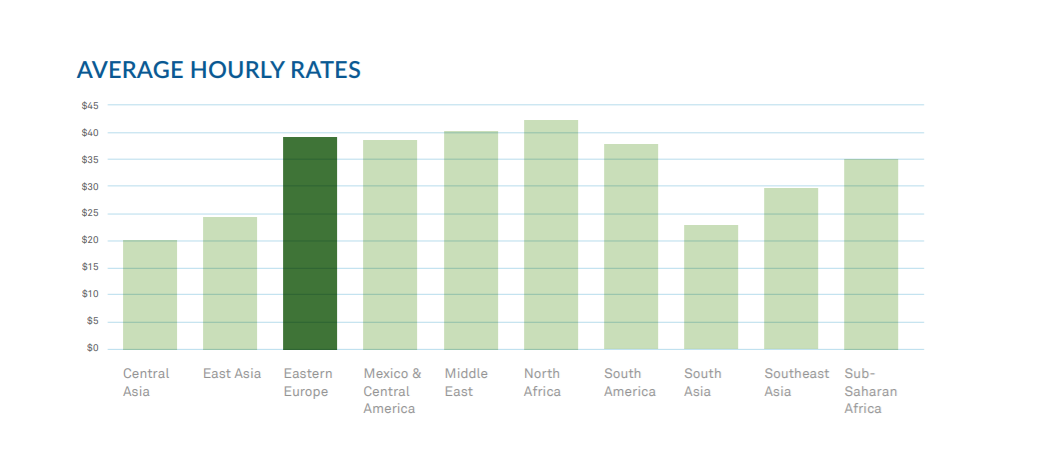
As seen in the chart above, remote team pricing is broken out into two tiers: Asia and everywhere else. In Asia, the average hourly rate is $24.62/hour, whereas the rest of the world commands higher prices averaged out around $38.67/hour.

A decade ago, there was a 400% difference in pricing from the lowest-priced region to the highest-priced region. Now the range has been cut in half. This ever-narrowing range of prices supports SourceSeek’s guiding principle that the global software market is an efficient one with enough demand to bring consistent pricing that is affected by a small set of characteristics such as location, language skill, proximity, etc.

Outliers are rare. As teams in Eastern Europe slowly set their rates higher and higher, there is enough demand to raise rates in less competitive regions accordingly and still remain competitive. The notable exception is India, where pricing trails the worldwide market due to the sheer volume of supply combined with ongoing reputation issues. There is increasing evidence that China is also beginning to see a similar trend, and will continue to have difficulty entering the global software market.

2. Software Testing Salary Based on Seniority

[/vc_column_text][/vc_column][/vc_row][vc_row][vc_column][vc_column_text]

Junior Software Tester Salary

[/vc_column_text][/vc_column][/vc_row][vc_row][vc_column width=”1/2″][vc_single_image image=”18315″ img_size=”full”][/vc_column][vc_column width=”1/2″][vc_column_text]

Junior software testers often have less than two years of experience. Within this level, Singaporean testers get paid the most with $3200 per month. It quadruples the salary of a Malaysian tester, who is paid $780. Ranking in third place, Vietnam has a monthly payment of $690, fewer than the second-place $88. The country having the lowest payment for a junior software tester is Indonesia, with $570 a month. It is five-time less than Singapore.[/vc_column_text][/vc_column][/vc_row][vc_row][vc_column][vc_empty_space height=”15px”][/vc_column][/vc_row][vc_row][vc_column][vc_column_text]

Senior Software Tester Salary

[/vc_column_text][/vc_column][/vc_row][vc_row][vc_column width=”1/2″][vc_single_image image=”18319″ img_size=”full”][/vc_column][vc_column width=”1/2″][vc_column_text]

If a tester is promoted to a higher level, their salary will be increased. The monthly salary of a QA engineer in Singapore will rise by $1700 to reach $4900. Meanwhile, the salary of a senior tester in Malaysia ranks second place at $1050 per month. Receiving $180 fewer is a Vietnamese tester with a payment of $870. Indonesian tester’s salary is the lowest, which takes employers $770 per month.[/vc_column_text][/vc_column][/vc_row][vc_row][vc_column][vc_empty_space height=”15px”][/vc_column][/vc_row][vc_row][vc_column][vc_column_text]

Software Testing Lead Salary

[/vc_column_text][/vc_column][/vc_row][vc_row][vc_column width=”1/2″][vc_single_image image=”18321″ img_size=”full”][/vc_column][vc_column width=”1/2″][vc_column_text]

To hire a software testing lead, an employer has to pay $6400 per month in Singapore. The figures in Vietnam, Malaysia, and Indonesia representatively are $990, $1460, and $1060. It is noticeable that Vietnam is the one who has the lowest salary, where the tester gets a sixth-time fewer than the highest payment.[/vc_column_text][/vc_column][/vc_row][vc_row][vc_column][vc_empty_space height=”15px”][/vc_column][/vc_row][vc_row][vc_column][vc_column_text]

Head of Software Testing Salary

[/vc_column_text][/vc_column][/vc_row][vc_row][vc_column width=”1/2″][vc_single_image image=”18320″ img_size=”full”][/vc_column][vc_column width=”1/2″][vc_column_text]

The salary of the Head of software testing in Singapore is significantly high compared with the other three countries. Tester at this level will be paid $7900 a month, four-time higher than a tester on the same level in Malaysia. Vietnamese and Indonesian testers monthly income are both in the range of $1300, but Indonesian man gets extra $60 which makes Vietnam the lowest pay country for this position.[/vc_column_text][/vc_column][/vc_row][vc_row][vc_column][vc_empty_space height=”30px”][/vc_column][/vc_row][vc_row][vc_column][vc_column_text]

3. Salary Based on Education

[/vc_column_text][/vc_column][/vc_row][vc_row][vc_column][vc_single_image image=”18322″ img_size=”full” alignment=”center”][/vc_column][/vc_row][vc_row][vc_column][vc_column_text]All four nations show a similar pattern in the chart, which is they will pay a higher salary for tester having higher education level. Besides, with the same degree, testers in Singapore get paid drastically higher than the rest. A tester who holds a certificate or diploma will gain $2660 a month in Singapore, which is eight-time higher than Vietnam and Indonesia, and a fourth-time higher than Malaysia. If the tester gets a bachelor’s degree, he or she will be paid $5100 in Singapore. This number is one-fifth in Malaysia ($1270), $720 in Indonesia, and $650 in Vietnam. Singaporean master’s degree owner will be paid $7980 a month, following by Malaysian and Vietnamese who get $2030 and $2000 representatively. The lowest-paid master’s degree holder is an Indonesian software tester, who gets $1120 per month.[/vc_column_text][/vc_column][/vc_row][vc_row][vc_column][vc_column_text]Although there are other countries in South East Asia, the four nations above are representative of the information technology center. Through the article, we showed general guidance of software tester’s salary in Singapore, Vietnam, Malaysia, and Indonesia. All the figures are collected from reliable sources, including Persol Kelly, Michael Page, and First Alliances. Hopefully, the article can be a reference when managers make their decision to hire a software tester. Nevertheless, if managers face difficulties in recruitment, there are still other alternatives such as purchasing software testing outsourcing services.

With a score of 82, Eastern European countries garnered the highest score of any region featured in this report and just edged out East Asia with a score of 80. Eastern Europe has an established reputation for having a mature and robust educational system, and many vendors in the region leverage that reputation to claim that the ‘best developers in the world’ come from Eastern Europe.

Eastern European educational excellence is focused primarily around math and science. The Organization for Economic Co-operation and Development (OECD), which measures 70 countries in reading, math, and science, found that Eastern European countries outperformed other countries featured in this report by an average of 11% in math and 10% in science.

So, while the much-touted claim of ‘best developers in the world’ may be a bit strong, Eastern Europe’s reputation for strong education is well supported by data. While a strong general education is certainly important for a successful IT education, a high score in the UN data doesn’t always result in top IT education, and vice versa.

4. Team composition

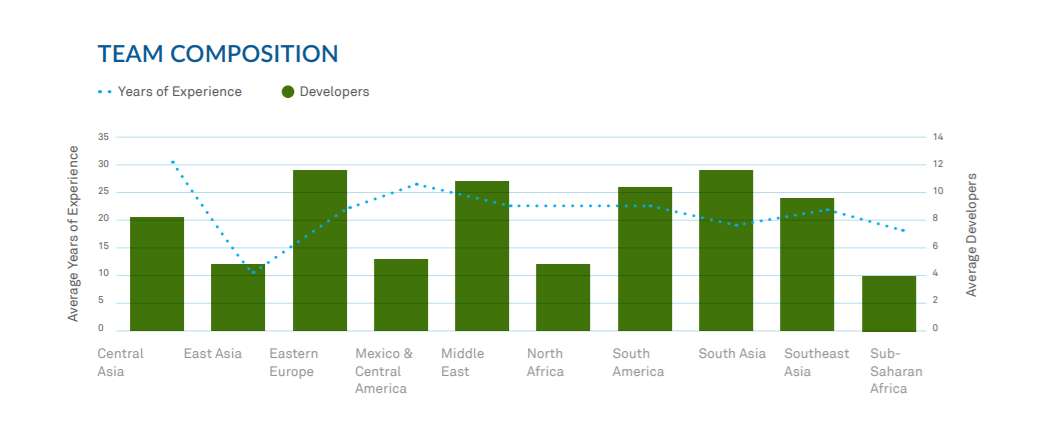
Average years of experience is a very informative metric when assessing the maturity of a region as a whole. It takes many years for developers to gain experience and move into management and leadership, making truly senior software engineers difficult to find.

This is exacerbated by brain drain in many countries since many of the most experienced engineers may move on to other more promising regions. Eastern Europe suffered from a bit of brain drain in years past, but for the most part there are adequate opportunities available for software professionals and no need to leave to find work. The presence of so many seasoned professionals also feeds the IT ecosystem, which we’ll look into later in the report.
Lotus Quality Assurance is the first independent software testing company in Vietnam. As a Silver Partner of ISTQB, we provide you a talented team of testing with international experiences. Contact us to be aided with your software testing project.[/vc_column_text][/vc_column][/vc_row]

Automated Testing

Top 5 Mobile Testing Trends in 2021

When B2C enterprises use mobile applications to attract consumers’ engagement in e-commerce, banking, and marketing; B2B firms use them to manage the company’s operations, tracking the performance of employees, and collaboration with partners. Come with the rising frequency of mobile application usage is the demand for increasing the application quality. If you want to update the latest movement in quality assurance for mobile applications, let’s look at our top 5 mobile testing trends below.

Test Automation

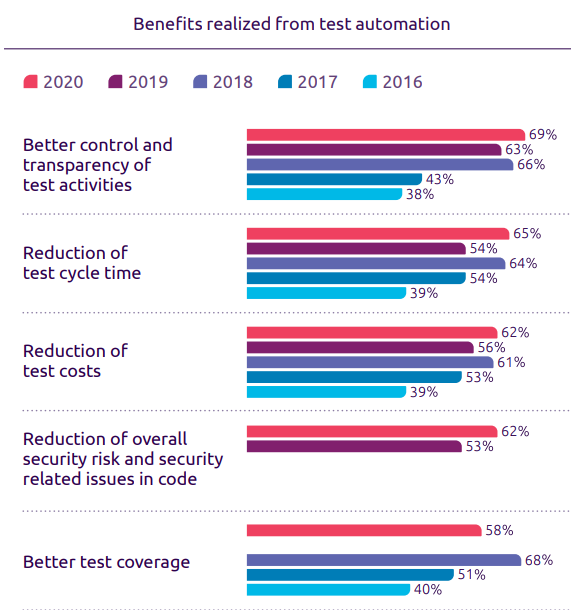
One of the characteristics of mobile applications is that the developers have to release the new version frequently to adapt to the demand of users. Due to this, numerous test cases need to run repeatedly. This is where test automation became an innovative solution. In the World Quality Report conducted by Capgemini, 57% of the companies said that test automation helps to reuse the test case. Meanwhile, 65% of them stated that the test cycle time is reduced.

mobile testing trends - automation test benefit

The greater return on investment in automation not only came from benefits in cost and efficiency but also came from achieving business objectives such as time-to-market. Moreover, it seems like this year CTO concerns more about transparency and security in testing. 69% of them responded that test automation helps them to have better control and transparency of test activities; 62% of respondents think test automation reduces the overall risk.

IoT Testing

The Internet of Things (IoT) allows us to control our assets such as smart home appliances, smart cars, or smartwatches by using a mobile application. Testers need to ensure the quality, security, connectivity, and performance of the application so the interaction between mobile apps and IoT devices is not interrupted. However, executing integration testing is not easy due to IoT devices often having a cloud-based interaction layer developed by a third party. Besides that, testers also concern about the enormous number of test cases needed to run because of the diversity of IoT devices. Testing on emulators, therefore, cannot fulfill the requirement of the QA team. As a result, testing in the cloud is becoming more popular.

Although facing many obstacles, firms are finding ways to adapt to the IoT trend. Many companies consider applying Artificial Intelligence capacity to test thoroughly and also conduct more IoT-experience testing.

Impact of 5G on Mobile Testing

Compared to the previous generation, 5G network has many innovative technologies, which greatly affect how testers conduct mobile testing. When it comes to 5G connectivity, three main technologies change the game: Enhanced mobile Broadband, Ultra-reliable Low Latency Communication, and Massive Machine Type Communication (mMCT)

5G provides greater bandwidth, which means faster data rate and better user experience. With this technology, the 5G network will allow 360-degree video streaming and VR / AR experience. Consequently, testing mobile applications in a high-speed internet office will not be efficient enough. Besides, the latency of data transfer is reduced. It allows faster information receiving within far distance, which has a huge impact on the performance of mobile applications. Meanwhile, mMCT supports connecting with a large number of IoT devices using less power; which leads to changes in battery testing for mobile devices.

Agile and DevOps Approach

Agile and DevOps has become a popular method in continuous testing. They combine the know-how and skill of both testers and developers to support each other with the ultimate goal of fastening the development and deployment of applications. Agile and DevOps approach helps enterprises to find and fix defects more efficiently and release new versions more frequently.

According to the World Quality Report, the Scale Agile Framework (SAFe) and the Dynamic Systems Development Method (DSDM) among Agile methodologies are the most favored by IT firms. From 2015 to 2017, SAFe increased from 31% to 58%; meanwhile, DSDM has grown by 31%. The same report also stated that over 88% of respondents applied DevOps principles in their IT team.

Testing Environment in Cloud

Mobile users reached 1.5 billion at the end of 2020. The mobile devices will have different OS versions, screen resolutions, and data storage. It causes obstacles in mobile testing since firms are not able to buy every kind of mobile phone. As a result, testers tend to use the cloud to test real devices.

Another reason for the increase in using cloud-based testing environments is the virtualization trend in recent years. This will push the demand for cloud and virtual testing tools higher and open more opportunities for firms to provide cloud-based testing services.

Blockchain Testing

Since the booming market of blockchain technology in the IT industry, many have predicted a new and exciting field of better security, higher authenticity and decentralized operations.

Since blockchain technology is rather an immature field of the IT industry, there is more to be explored with this. To ensure a system of decentralized, cost-effective and time-saving activities, blockchain engineers have to employ and adapt to cutting-edge technology and brand new concepts, making them more prone to mistakes.

Under this circumstance, blockchain testing is now an in-demand service that requires a thorough understanding of the blockchain architecture and full test strategy planning.

Blockchain testing should include:

  • Smart Contract testing
  • API Testing
  • Block Testing
  • Functional Testing
  • Performance Testing
  • Security Testing

Big Data testing

With the world’s economy stepping into the recovery phase after the pandemic, many enterprises are trying to revamp their performance with the adoption of big data in their operation and upcoming business plan.

The most prominent approach towards their customers is to collect and min huge data volumes and diverse data types to indicate user behaviors. From these analytical research and collection, one might categorize and analyze their behaviors to find the best matching solution to approach their customers.

To enhance the efficiency of big data in multiple fields with a bigger scope, you would want to implement big data testing, which can help to make improved decisions with accurate data validations. With big data testing facilitates the consistent application of how the datasets perform, market targeting and business manifestation are further streamlined to cope with the ever-changing market.

Cybersecurity Testing

Cybersecurity has always been at the top of the IT industry’s problem with billions of dollars stolen each year. In recent years, many companies have been applying an array of measures to assure cybersecurity within their system and products.

Especially with the fear of data breaches, cybersecurity is gaining its importance in business’ systems and becoming the foremost necessity.

This situation is common across many subdomains of the IT industry, leading to a growth in security testing of from USD 6.1 billion in 2020 to USD 16.9 billion by 2025, at a Compound Annual Growth Rate (CAGR) of 22.3% during the forecast period.

This growth of security testing has brought brighter prospects to the world’s cybersecurity. With the stronger and more effective security measures, cyberattacks, data breaches, malware, etc. will be reduced to their smallest. With this new implementation, digital transformation will be more successful than ever.

Machine Learning and Artificial Intelligence testing

Artificial Intelligence in general and Machine Learning in particular will be the omnipresent technology in the next few years.

As the need for virtual assistants, autonomous cars, etc. are more rival than ever, AI and ML will make a bigger step in the IT industry with top investment priority of CIOs in 2025. As predicted in 2020, the AI and ML market will grow to be about $6-7 billion in America. Technology for behavior prediction, speech recognition is beginning to be adopted and implemented in our daily lives, and it seems to be never enough.

The booming development of AI and ML demands better technology, bigger implementation and breakthrough advances, hence the need for a flawless operation of AI and ML. To achieve this, the most effective and viable solution is AI and ML testing. Since the AI and ML themselves are pretty new in the market, testing for them is quite challenging, yet exciting.

Scriptless automation testing

With Agile and DevOps are trending, requiring developers and testers “low-code” and “no-code” approach. With this approach, developers and testers spend less effort on programming and writing codes, making the software/delivery have a faster time to market.

Although automation testing is on the rise, many testers are struggling with the high-maintenance, script-based testing approach, not to mention the dragging training time. To make it easier and faster for testers to execute tests, many have followed scriptless automation testing.

Since it is scriptless, testers have to utilize multiple tools to acquire desirable test results.

All in all, the trends in 2021 made the QA team face many challenges. How to perform mobile testing with the right strategy remains a hard question. Knowing this constant problem, Lotus QA provides a free consultant for mobile application testing to help you enhance the quality of your product.

Software TestingSoftware TestingSoftware TestingSoftware TestingSoftware TestingSoftware TestingSoftware TestingSoftware TestingSoftware Testing

4 things every tester should know (2020 Video Series)

In this our new series, 4 things every tester should know, we will take you through the foundational knowledge of testing: Testing levels, Testing Types, Testing Processes and Principles of Testing.

We would like to contribute to the communities the take-away testing videos which are short but essential.

Hence, this series is named “Four Things Every Tester Should Know”, made for:

  • Junior testers who are building foundational knowledge in software quality assurance and testing
  • Senior testers who wants to revise their knowledge on testing
  • Business users who want to have a high-level view of the testing industry

You can watch our video series here, or read the transcription below. Turn on subtitles for English, Japanese, Korean and Vietnamese.

The series will include the following topics:

https://www.youtube.com/watch?v=1f9Ssis5SuE&list=PLI5JkQdCF-6ic2ceHiitDoIbYrZ1BYttG

Test levels

16 years ago, I came to know about some testing concepts and I think it’s very important.

Today, I want to share you one concept named “Testing Level”. So, let’s get started!

Have you ever heard about V-Model?

As you can see on our picture, there are 4 testing levels ordered from bottom to the top. Those are unit testing, integration testing, system testing, and acceptance testing.

Why do we need to distinguish those testing levels?

Because we can understand the specific objectives of each level you can integrate effectively using them to improve the qualities.

Following the timeline, we start with unit testing.

Unit testing, known as component testing,

is to verify the functional and non-functional behavior of the module in the system.

Normally the programmers do the Unit testing by isolating their module from the rest of the system.

They can do it manually or automatically by using a tool named Junit or Nunit.

The developer will base on detailed design to take the code,

data structure or the database in order to find out

if there are any data flow problems or any incorrect codes.

After finishing unit testing, we go to “Integration testing”

Integration testing is to verify the functional and non-functional interfaces

between components or systems of integration.

So, there are two types of integration.

First one is that component integration testing will be done by the programmer.

And system integration testing might be done by the independent testing team.

So, depending on each type, the input and the output,

and the system under test (SUT) might be differed.

But the objective seems to be same.

We focus on the integration between the component or the system.

The next step is system testing.

System testing focuses on the behavior and the capabilities

of a whole system or whole product as the end-to-end usage.

Independent testing team typically carry out system testing

and they will set up the test environment that is very similar to the production one.

They will produce the testing report which can be used

by stakeholders in order to make release decisions.

The typical defects could be missing the requirements or any incorrect functionalities of the system.

The last level is acceptance testing.

Acceptance testing is similar to the system testing

which will focus on the behavior and also the capabilities

of the whole system or the whole product.

But, it’s different from the system test.

It may produce information to assess

the system’s readiness for deployment and usage by the end-user.

Finding the bug is not the objective of acceptance test

because it will be too late if you find defects at this step.

The acceptance testing is the responsibility of

the customers, business user, product owner and also the operator of the system.

Normally, there are four common forms of the acceptance testing

including the user acceptance testing, the operational acceptance testing,

contractual and regulatory acceptance testing,

and the last one is the alpha and beta testing.

So, those are four important testing levels.

At the beginning of the project,

all stakeholders, including the product owner, the project manager and

also the quality assurance manager should sit together and

plan how to handle those four levels in the projects.

To ensure that, the product and software will meet the business needs and also the user requirement.

Otherwise, the product or the system will be NOT fit to use.

So if you want to see more videos, please subscribe to us.

Also, hit on the bell to receive the notification.

Thank you for watching and see you soon!

Testing types

A testing types are groups of test activities which are based on specific testing objectives. We could have different aspects to distinguish the different testing types.

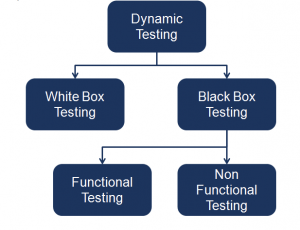
For example, following the Quality Characteristic aspect , we could have Functional testing and Non-functional testing. Following the testing method, we could have Whitebox, Greybox, Blackbox testing or Manual/automated testing. Following the testing environment, we could have the alpha, beta and staging testing and so on.

In this video, let’s distinguish just based on the quality characteristic aspect.

So, what is Software Quality Characteristics? Testers need to verify if the software has good quality or not, hence it is necessary to understand how to define the quality.

ISO/IEC 25010 is an international standard which is issued by ISO(international standard organization) for the evaluation of software quality. It defines 8 main (quality) characteristics, namely: Functionality, Performance, Security, and also Compatibility, Reliability, Usability,Maintainability, Portability.

In this video, we will just explain some popular types.

Functional testing & Non-functional testing

First of all, Functional testing. It is a testing type which focused on the completeness, correctness and appropriateness of the software systems.

It can be done manually or automatically supported by many commercial and open source tools.

Meanwhile, Non-functional testing will focus on the “how well” of the system behaves.

Performance testing

The second one is Performance. Performance testing is the process of determining the speed, responsiveness and also the stability of the software prograM, a computer, network, or device under the specific workload.
There are two main performance testing methods: load testing and stress testing.

  • Load testing will help you to understand the behavior of a system under a specific load value.
  • Stress testing will place a system under the higher-than-expected traffic loads to evaluate ‘how well’ of the system works above its expected capacity limits.

Security testing

And the next testing type is Security testing.

Security testing is to check if the software or the product is secured or not. It checks if the system is vulnerable to attacks or if someone can hack the system or login into the application without the authorization.

Some sources claim that security testing is a functional testing. Because it can be compliant with the old version ‘ ISO 9126’. But following the latest ‘ ISO 25010’ , security testing is a non-functional testing type and it is one of the quality characteristics separately.

Compatibility testing

And the last one I want to introduce today is about Compatibility Testing.

Compatibility Testing is a testing type to check if our software is capable in the different testing environments such as hardware, operating systems, applications, network, mobile or different versions of the software.

Because the compatibility testing will be repeated on the different environment, so it is highly recommended to be automated testing.

From my experience, Testing type is a significant knowledge that every tester should know in order to test correctly. When you are consulting clients and also proposing the quality assurance solution, test experts also should define the important quality characteristics for that specific system and also point out the relevant testing types.

So, that is a take away video about the testing types. It’s quite short but hopefully, it’s helpful.

Testing processes

Continuing from the previous video about testing level and testing type, today I would like to introduce you another topic about testing process. Why do you need to know about the testing process? Because you will know what you need to do at each step and how to integrate testing into the development process. As you see in our picture, there are 5 steps when you do testing.

Test Planing and Test Control

Test planning is process to output the smart testing way. I often draw out an IMOC into one paper, and then document it later.

  • I – the input means Test basic including the software specification, test requirement, software, etc. I plan How and When I can receive input.
  • M – M is test Mechanism or how I will do the testing. I should think about the test strategy, schedule, and needed resources in order to do testing. 
  • O – Output of testing. Output is a test deliverable. For example, the test result, the test log, and bug report. I will plan of who I need to send the report to, and in which kind of format.
  • C – Test constraint. One important test constraint is exit criteria. It is when I can stop testing.

Test control is the process to compare the actual progress and actual reason with the plan at the beginning. You also need to plan how you can control your progress, and how you can control the quality. 

Test Analysis and Test Design

Test Analyzing is the process to analyze all of the test basics such as the test specification, requirement specification, and all additional documentation in order to define the test conditions. Test conditions could be a piece of functionality or anything you want to verify. 

Test Designing is the step to break down the test condition into different test scenarios and cases. It is very important to use different test technique to cover all the possibilities of the test cases.

Test Implementation and Test Execution

In this step, the testers will combine the different test scenarios or test cases into the test procedures following business flows or into the test suite following the purposes of testing. Testers will prepare the test environment and make the automation script if it needs.  After they get ready, the tester will execute the test cases, test suites, test procedures that they made before and log into the testing results. If they find bugs or any incidents, they will report it. 

Evaluation and Reporting

At this step, we will evaluate whether the test implementation is satisfied with the test purpose by comparing test results with the exit criteria at the planning stage. We judge if we need additional testing or not and send reports to all stakeholders.

Test Closure

All of the Test closure activities are done when software is delivered. Tester will check all the deliverable, and archive test ware. Then, they can do any handover or needed training to the maintenance team (organization). And then, they evaluate how the testing went and learn the lessons for future projects.

Those are five steps of the testing process. If you have any suggestion, please comment below. Thank you for watching, and see you soon.

Principles of Testing

Continuing the series  “Four things every tester needs to know about testing”, today will be the last topic named “7 Principles of testing”. We hope that the series of the video will be helpful for testers, especially freshers. Also through this series of the video, the experienced testers can be reminded about the basic but important knowledge. So, let’s get started! 

Testing can only prove that the software has error

Through the testing, we can find the bug and prove that the software has error. But we can not prove that the software has absolutely no error at all. Even in the absence of errors, we cannot claim that our software has no errors in the future.

Testing the entire pattern is impossible

Testing the entire pattern (combining all conditions of testing entry) is not possible, except for some extremely simple software. Instead of testing the whole system, testers will point out some risky modules to focus on. There are some testing techniques to support us to do that.

Testing should be involved as soon as possible

Testers should be involved in the project as soon as possible to find out the bug early. So, the correction cost will be reduced. Earlier testing, cheaper correction cost.

Defect Clustering – uneven distribution of errors

Most of the errors will be concentrated in some certain modules. It is like the 80-20 principle. So, the smart tester will spend time to analyze the most risky area to focus on.

The pesticides

Have you ever heard about it? The test cases are very similar to pesticides, and can not be used repetitively to eradicate insects during farming. It will over time lead to the insects developing resistance to the pesticide.
If you perform the test case multiple times, it will fail to find the errors. So, it is necessary to review and improve test cases frequently.

Testing depends on context

For different contexts, there will be different testing methods. For example, testing for the banking system will be differed from testing for the sales website; such as different quality characteristics, different testing types and different testing approaches.

“Bug zero” pitfalls

Please do not focus on creating the system without errors, but forget the initial requirements from customers and users. Software testing is not mere finding defects, but it also addresses if the software is fit with the requirement or not.

Those are 7  principles of testing. Please comment if you have any questions. Thank you very much for watching. Have a nice day.

If you like this series, you might also want to take a look at our series on Mobile testing and visit our Youtube channel.

Interested in our Testing Services?

Book a meeting with us now!

Manual TestingManual TestingManual TestingManual TestingManual TestingManual TestingManual TestingManual TestingManual TestingManual Testing

Testing types | 4 things every tester should know (Part 2/4)

This is the second video of the series Four things every tester should know about testing. Xuan will talk about Testing types and categorize them by Software Quality Characteristics.

You can watch the previous video of the series on Test Levels to get a an bigger picture of the topic.

You can watch our video here, or read the transcription below. Turn on subtitles for English, Japanese, Korean and Vietnamese.

https://youtu.be/Oazr-CNIgpk

Hello, everyone. Welcome back to our LotusQA channel.

On recent days, corona virus is spreading in many countries and it’s impacting a lot in our lives. So, I hope you are safe, and let’s stay positive. And take the advantage of this time to improve our skill and knowledge.

It’s the series Four things every tester needs to know about testing. In the previous video, I introduced about ‘Testing Levels’. And now, I want to introduce about another information about ‘Testing Types’.

Let’s begin.

A testing types are groups of test activities which are based on specific testing objectives. We could have different aspects to distinguish the different testing types.

For example, following the Quality Characteristic aspect , we could have Functional testing and Non-functional testing. Following the testing method, we could have Whitebox, Greybox, Blackbox testing or Manual/automated testing. Following the testing environment, we could have the alpha, beta and staging testing and so on.

In this video, let’s distinguish just based on the quality characteristic aspect.

So, what is Software Quality Characteristics? Testers need to verify if the software has good quality or not, hence it is necessary to understand how to define the quality.

ISO/IEC 25010 is an international standard which is issued by ISO(international standard organization) for the evaluation of software quality. It defines 8 main (quality) characteristics, namely: Functionality, Performance, Security, and also Compatibility, Reliability, Usability,Maintainability, Portability.

In this video, we will just explain some popular types.

Functional testing & Non-functional testing

First of all, Functional testing. It is a testing type which focused on the completeness, correctness and appropriateness of the software systems.

It can be done manually or automatically supported by many commercial and open source tools.

Meanwhile, Non-functional testing will focus on the “how well” of the system behaves.

Performance testing

The second one is Performance. Performance testing is the process of determining the speed, responsiveness and also the stability of the software prograM, a computer, network, or device under the specific workload.
There are two main performance testing methods: load testing and stress testing.

  • Load testing will help you to understand the behavior of a system under a specific load value.
  • Stress testing will place a system under the higher-than-expected traffic loads to evaluate ‘how well’ of the system works above its expected capacity limits.

Security testing

And the next testing type is Security testing.

Security testing is to check if the software or the product is secured or not. It checks if the system is vulnerable to attacks or if someone can hack the system or login into the application without the authorization.

Some sources claim that security testing is a functional testing. Because it can be compliant with the old version ‘ ISO 9126’. But following the latest ‘ ISO 25010’ , security testing is a non-functional testing type and it is one of the quality characteristics separately.

Compatibility testing

And the last one I want to introduce today is about Compatibility Testing.

Compatibility Testing is a testing type to check if our software is capable in the different testing environments such as hardware, operating systems, applications, network, mobile or different versions of the software.

Because the compatibility testing will be repeated on the different environment, so it is highly recommended to be automated testing.

From my experience, Testing type is a significant knowledge that every tester should know in order to test correctly. When you are consulting clients and also proposing the quality assurance solution, test experts also should define the important quality characteristics for that specific system and also point out the relevant testing types.

So, that is a take away video about the testing types. It’s quite short but hopefully, it’s helpful.

Thank you for watching and see you in the next video. Don’t forget to share and subscribe to our LotusQA channel.

Interested in our Testing service?

Book a meeting with us now!

The psychology of testing

The psychology of testing

The following factors influence the success of testing. All of the testers should keep these in mind before they start to do testing.


Comparison of the mindset of the tester and developer

The testing and reviewing of the applications are different from the analyzing and developing of it. By this we mean to say that if we are building or developing applications we are working positively to solve the problems during the development process and to make the product according to the user specification. However while testing or reviewing a product we are looking for the defects or failures in the product. Thus building the software requires a different mindset from testing the software.


The balance between self-testing and independent testing

The comparison made on the mindset of the tester and the developer in the above article is just to compare the two different perspectives It does not mean that the tester cannot be the programmer, or that the programmer cannot be the tester, although they often are separate roles. In fact programmers are the testers, they always test their component which they built. While testing their own code they find many problems so the programmers, architect and the developers always test their own code before giving it to anyone. However we all know that it is difficult to find our own mistakes.

So, programmers, architects, business analysts depend on others to help test their work. This other person might be some other developer from the same team or the Testing specialists or professional testers. Giving applications to the testing specialists or professional testers allows an independent test of the system. This degree of independence avoids author bias and is often more effective at finding defects and failures.

There is several level of independence in software testing which is listed here from the lowest level of independence to the highest:

  1. Tests by the person who wrote the item.
  2. Tests by another person within the same team, like another programmer.
  3. Tests by the person from some different group such as an independent test team.
  4. Tests by a person from a different organization or company, such as outsourced testing or certification by an external body.


Clear and courteous communication and feedback on defects between tester and  developer

We all make mistakes and we sometimes get annoyed and upset or depressed when someone points them out. So, when as testers we run a test which is a good test from our viewpoint because we found the defects and failures in the software. At the same time we need to be very careful as to how we react or report the defects and failures to the programmers. We are pleased because we found a good bug but how will the requirement analyst, the designer, developer, project manager and customer react.

  1. The people who build the application may react defensively and take this reported defect as personal criticism.
  2. The project manager may be annoyed with everyone for holding up the project.
  3. The customer may lose confidence in the product because he can see defects.


Automated TestingAutomated TestingAutomated TestingAutomated TestingAutomated TestingAutomated TestingAutomated TestingAutomated TestingAutomated TestingEmbedded Testing

Test design techniques

1. What are the Test design techniques?

  • Basically, Test design techniques help us choose a good test set from the total number of tests possible for a given system. There are different types of software testing techniques, each with its own strengths and weaknesses.
  • Exhaustive testing is not possible, so Manual Testing Techniques helps to reduce the number of test cases while ensuring the quality of the test, helping to identify test ranges and conditions that are difficult to identify.

2. Types of Test design techniques

There are many types of Test design techniques, but there are two main types:

2.1. Static testing technique

Static testing is a type of testing technique that does not execute source code or do not run software systems, such as checking, reviewing specification documents, design documents, source code to find errors.

It is done early in the software development life cycle and so it is done in the verification process.

Most static testing techniques can be used to test any form of documentation including source code, design and model documentation, functional specifications, and required specifications.

Static testing technique usually includes the following methods:

  • Informal review: an evaluation process that does not require an archive of the meeting, nor does it need to be recorded.
  • Walkthroughs: This is a type of instruction, explained by the person who is familiar with the software logic, in order to transfer knowledge to the participants in the test cycle.
  • Technical review: This method focuses on the technical evaluation of the software. Usually led by a moderator or someone with technical knowledge with technical experts involved. This is a discussion focused on reaching consensus on technical content to make a decision
  • Inspection: This method is also operated by moderators. Its purpose is to clearly define the role of each person in the process as well as the input and output criteria of the software. Thereby finding errors as well as aggregating and analyzing to optimize processes.

2.2. Dynamic testing technique

Dynamic testing technique is a type of testing to confirm the function of the application when the code is executed / by executing the code. In short, dynamic testing is performed by actually using the application and seeing if a function works the way it is expected.

Dynamic testing includes 2 types:

+ Whitebox testing: Consider how the code works inside. For this type of test, testers need an understanding of the code.

+ Blackbox testing: Check that the function of the software application is working as expected. Blackbox testing 2 types:

  • Functional testing
  • Non-Functional testing

Test design techniques

In the next articles, we will mention types of test design techniques in detail. 

Read  Black box test design technique and White box test design technique.

For more information about Testing services, please contact us

———————————————————–

Lotus Quality Assurance (LQA)

Tel: (+84) 24-6660-7474

Email: [email protected]

Website: https://www.lotus-qa.com/

Youtube: Lotus QA channel

BlogEmbedded TestingEmbedded TestingEmbedded TestingEmbedded TestingEmbedded TestingEmbedded Testing

White box testing

White box testing

Any one software product is definitely at fault because software products are built by humans. Therefore, an independent person, group, or organization will need to be tested to see if the product has any problems or errors. For software testing, we need to have effective testing strategies and techniques for each level of testing. Software testing consists of two parts that require different skills, white-box testing and black-box testing.

In this topic, I will delve into the white box testing. To better understand the technique of white box testing (White-box testing), we take a look at the following contents:

1.What is White box testing

White box testing is a software testing method in which the internal structure, design or implementation of the item being tested is known to the tester. The tester chooses inputs to exercise paths through the code and determines the appropriate outputs. So Programming know-how and the implementation knowledge is essential.

2. Subjects of application

The object to be tested is a software component. The software component can be a function, a function module,…

3. Levels Applicable To

White Box Testing method is applicable to the following levels of software testing:

  • Unit Testing: For testing paths within a unit.
  • Integration Testing: For testing paths between units.
  • System Testing: For testing paths between subsystems.

However, it is mainly applied to Unit Testing.

4. Pros and cons of White box testing

Pros

  • Testing can be commenced at an earlier stage. 
  • Testing is more thorough, with the possibility of covering most paths.

Cons

  • Since tests can be very complex, highly skilled resources are required, with a thorough knowledge of programming and implementation.
  • Test script maintenance can be a burden if the implementation changes too frequently.

5. Common white box testing techniques

5.1. Baseline test – Line graph

  • A technique used in white box testing was first introduced by Tom McCabe. The line graph is similar to the program control flow graph.
  • Baseline test – Line graph is one of many methods of algorithm description. Besides, this is a visual method that shows us easily the components of algorithms and relationships
  • Contacts in implementing these components.
  • Basic line techniques – flow graphs can help test case designers get a degree of procedural complexity.
  • Consists of 2 types of components: nodes and arcs connecting them.
  • Types of buttons in the control line graph:

White box testing-button-control line

  • Types of structure components of line graphs:

White box testing-structure-components

Example:

If the control flow graph contains only binary decision nodes, then we call it control flow graph of a binary. Also, we can always detail any control flow graph into a binary control flow graph.

White box testing

5.2 Testing based on control flow

  • Execution path is a script to execute the corresponding software unit. In addition, it is an ordered list of commands executed for a specific run of the software unit, starting from the entry point of the software unit to the ending point of the software unit.
  • Each software component has from 1 to n (possibly very large) different implementation paths.
  • The objective of the control flow test method is to ensure that all the execution paths of the software units under test are run properly. But in reality, the effort and time to achieve the above goal is very large, even on small software units.

For example: the following code

for (i=1; i<=1000; i++) for (j=1; j<=1000; j++) for (k=1; k<=1000; k++) doSomethingWith(i,j,k);

only one execution path, but very long

For more information about Testing services, please contact us

———————————————————–

Lotus Quality Assurance (LQA)

Tel: (+84) 24-6660-7474

Email: [email protected]

Website: https://www.lotus-qa.com/

Youtube: Lotus QA channel