

Automated TestingAutomated TestingAutomated TestingBlogBlogBlogEmbedded TestingEmbedded TestingEmbedded TestingManual TestingManual TestingManual Testing

Non Functional Testing – Everything You Need To Know

Non functional testing and functional testing are both vital to ensure that your product operates as intended. Non functional testing examines aspects that go beyond functionality. It guarantees a superior level of product quality, performance, and usability, which can improve user satisfaction.

Within this blog post, we will provide a comprehensive definition of non functional testing. Furthermore, we will explore a range of examples showcasing non functional tests, shedding light on the specific areas they assess.

Additionally, we will guide you on the most effective approach to aligning non functional testing with your business objectives and user requirements, enabling your business to deliver a remarkable product that fulfills both functional and non functional testing expectations.

What Is Non Functional Testing?

Non functional testing is a critical software testing methodology that assesses an application’s non functional components, encompassing usability, performance, scalability, reliability, security, compatibility, and more.

→ Take a look at: LQA’s software testing services

Non functional testing focuses on ensuring the overall product quality rather than merely examining its features. You have to understand the significant impact that non functional testing has on a product.
Non Functional Testing - Everything You Need To Know

In the realm of software development, non functional testing has equal importance to functional testing. Without it, a system may exhibit flawless performance in a controlled environment and encounter significant failures when confronted with real-world conditions.

Why Use Non Functional Testing?

Functional and non functional testing are both crucial for any software. Functional testing ensures the correct functioning of internal features, while non functional testing evaluates how well the software performs in the external environment.

Non functional testing plays a vital role in examining various aspects such as performance, stability, responsiveness, portability, and more. It involves assessing the software’s installation, setup, and execution.

By gathering measurements and metrics, non functional testing facilitates internal research and development efforts. It provides valuable insights into the software’s behavior and the technologies employed. Moreover, it helps mitigate production risks and reduces associated software costs.

Non Functional Testing Characteristics

The essential traits of non functional testing include:

  • Non functional testing necessitates quantifiable metrics. Therefore, using subjective terms such as “good,” “better,” or “best” is not appropriate for this type of testing.
  • During the initial stages of the requirement process, it may be challenging to ascertain precise figures.
  • Giving priority to the requirements holds immense significance in non functional testing.

Non Functional Testing Types

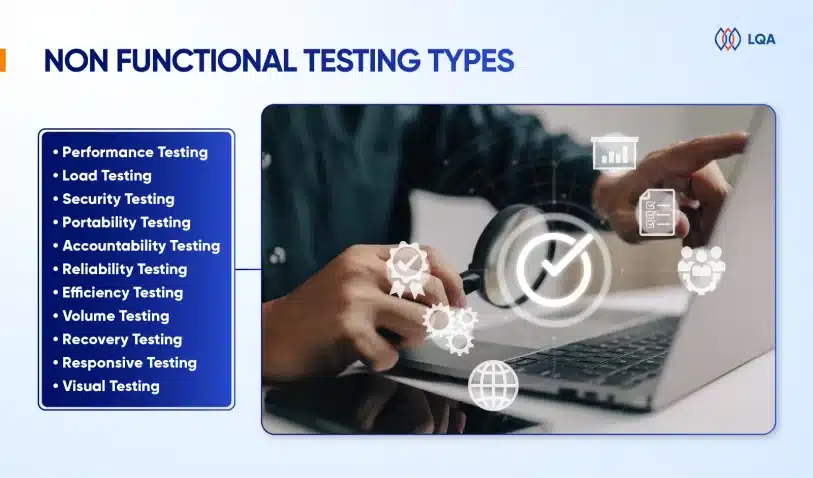
The following are the prevalent types of non functional testing:

1. Performance testing

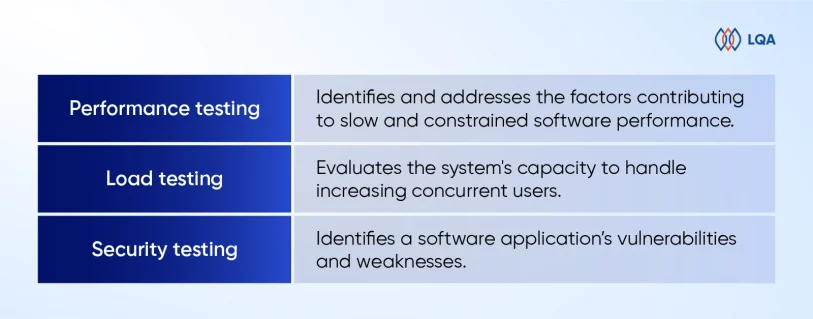
Performance testing aims to identify and address the factors that contribute to slow and constrained software performance. The software must exhibit fast response times, ensuring an efficient user experience.

To conduct effective performance testing, businesses should establish a well-defined and specific set of requirements regarding the desired speed. Without clear specifications, it’s hard to determine whether the test results indicate success or failure.

For instance, if 1000 users access an application together, the load time should not exceed 5 seconds.

Tools used: LoadRunner, Apache JMeter, WebLOAD.

2. Load testing

We use load testing to evaluate the system’s capacity to handle increasing concurrent users. It specifically assesses the system’s loading capability and its ability to cope with higher user loads. By simulating real-world scenarios, load testing helps identify potential bottlenecks and performance issues under heavy usage.

To gauge a website’s speed and performance, you can run a quick website speed test, which provides insights into the website’s speed scores. This helps measure the website’s responsiveness and overall user experience.

Tools used: Neoload, Load Multiplier.

3. Security testing

Security testing is employed to identify a software application’s vulnerabilities and weaknesses. This type of testing involves examining the system’s design and adopting the mindset of a potential attacker.

By scrutinizing the application’s code, and potential attack vectors, security testers can pinpoint areas where an attack is most likely to occur. This knowledge is then used to create targeted and effective test cases that assess the application’s resilience against potential security breaches.

Tools Used: ImmuniWeb, Vega, Wapiti
Non Functional Testing - Everything You Need To Know

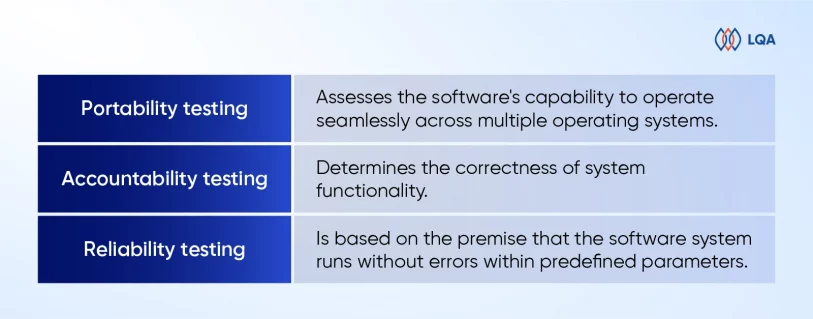
4. Portability testing

Portability testing focuses on assessing the software’s capability to operate seamlessly across multiple operating systems without encountering any bugs or compatibility issues.

Additionally, this testing also examines the software’s functionality when deployed on the same operating system but with different hardware configurations. By conducting portability testing, one can ensure that the software performs consistently and reliably across various environments, enhancing its usability and flexibility.

Tools Used: SQLMap.

5. Accountability testing

Accountability testing plays a crucial role in determining the correctness of system functionality. The primary objective is to ensure that each function in the system consistently produces the expected outcome for which it was designed.

If the system generates the desired results, it passes the accountability test; however, if it fails to do so, it indicates a potential flaw or malfunction in the system’s functionality.

By conducting thorough accountability testing, one can effectively assess and validate the system’s performance and its ability to meet the intended objectives.

Tools Used: Mentimeter.

6. Reliability testing

Reliability testing is based on the premise that the software system runs without errors within predefined parameters. It involves running the system for a specified duration and several processes to assess its reliability.

The reliability test is considered unsuccessful if the system fails under predetermined circumstances.

For instance, in the case of a website, all web pages and links should be dependable and function reliably. If the system exhibits issues or malfunctions, such as broken links or errors, during the reliability test, it indicates a failure to meet the expected reliability standards.

By conducting reliability testing, one can evaluate the system’s ability to consistently operate as intended and identify any potential weaknesses or areas for improvement in terms of reliability and error-free performance.

Tools Used: Test-retest, Inter-rater.
Non Functional Testing - Everything You Need To Know

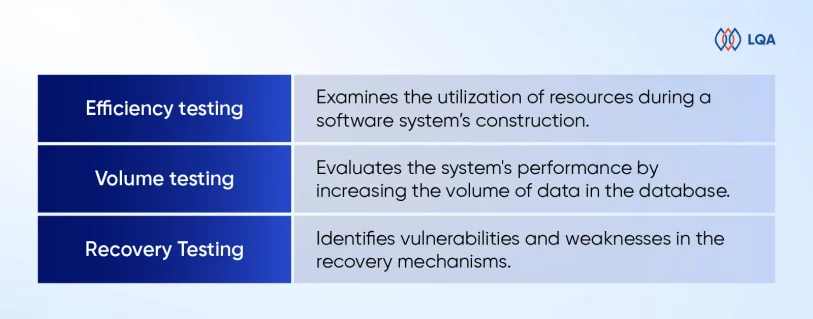
7. Efficiency testing

Efficiency testing examines the utilization of resources during a software system’s construction, assessing both the actual resources employed and the ones required. This type of testing aims to determine the efficiency and optimization of resource usage throughout the software development process.

By analyzing resource consumption, such as CPU usage, memory utilization, or network bandwidth, efficiency testing provides insights into the software system’s resource requirements and helps identify potential areas for improvement in resource allocation and utilization.

Tools Used: WebLOAD, LoadNinja.

8. Volume testing

Volume testing, also referred to as flood testing, is a type of software testing that entails subjecting the software to a substantial amount of data. Its purpose is to evaluate the system’s performance by increasing the volume of data in the database.

By simulating scenarios with a large and often excessive amount of data, volume testing helps assess the system’s ability to handle and process such data loads without compromising its performance or stability.

This type of testing ensures that the software can effectively manage and scale with growing data volumes, thus preventing any potential bottlenecks or performance issues.

Tools Used: HammerDB, JdbcSlim.

9. Recovery Testing

Recovery testing assesses an application’s resilience in recovering from crashes, hardware failures, and similar issues.

By intentionally breaking the software through simulated scenarios, recovery testing aids in identifying vulnerabilities and weaknesses in the recovery mechanisms. This type of testing helps make sure that the application can gracefully handle unexpected failures, quickly restore functionality, and minimize any potential data loss or system downtime.

Tools Used: Box Backup, Bacula.
Non Functional Testing - Everything You Need To Know

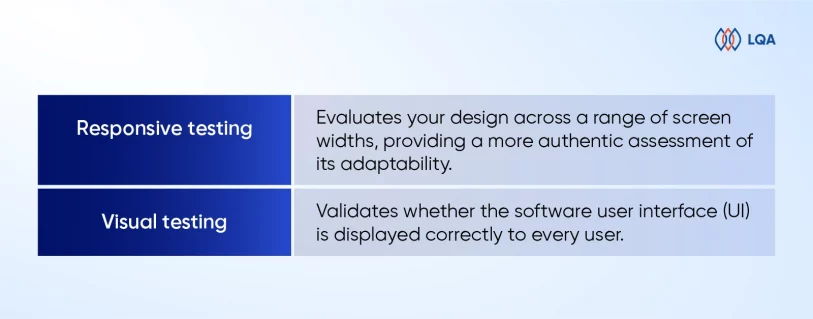
10. Responsive testing

Responsive testing enables you to evaluate your design across a range of screen widths, providing a more authentic assessment of its adaptability rather than relying solely on predetermined screen sizes.

By utilizing specialized tools, you can test your website’s responsiveness by adjusting the screen width dynamically after entering the website’s URL.

This allows you to observe how your user interface adapts and adjusts in real-time to accommodate different screen sizes.

The primary objective of evaluating responsive websites is to ensure a seamless and friendly user experience across various digital devices. By conducting responsive testing, we can ensure that websites and applications deliver a smooth and consistent experience to users, regardless of the device they are using.

Tools Used: Responsinator, Screenfly, Google DevTools Device Mode.

11. Visual testing

One way to address issues is using visual testing (or visual UI testing). This type of testing focuses on validating whether the software user interface (UI) is displayed correctly to every user.

Visual tests meticulously examine each element on a web page to ensure they have the proper shape, size, and placement as intended. By comparing the application’s visible output to the expected design outcomes, visual testing helps identify “visual bugs” that may exist, separate from functional bugs that affect the software’s overall functionality.

In essence, visual testing plays a crucial role in detecting any discrepancies or issues related to a page or screen’s appearance and presentation.

Tools Used: Percy, PhantomCSS, FBSnapshotTestCase, Gemini, Needle (Uses Python).
Non Functional Testing - Everything You Need To Know

→ Read more:

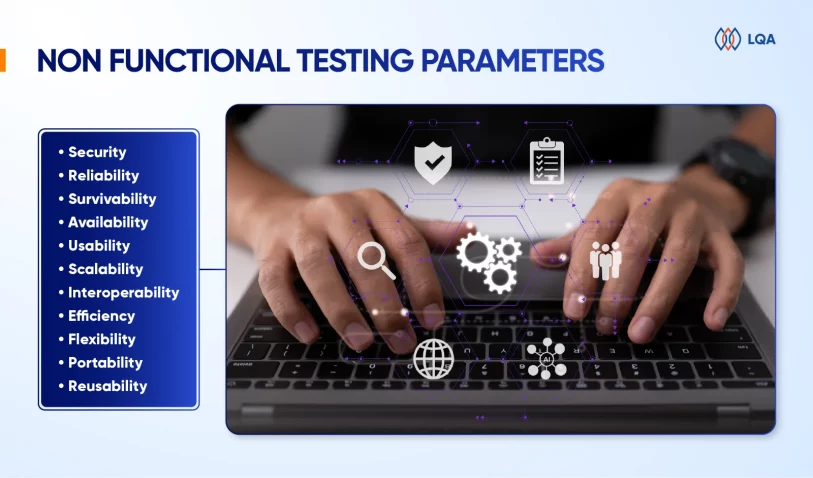
Non Functional Testing Parameters

Let’s delve into these parameters and examine them in detail:
Non Functional Testing - Everything You Need To Know

  • Security: The security parameter establishes the level of protection a system has against both intended and unintended attacks originating from internal or external sources. Security testing is conducted to assess and verify this protection.
  • Reliability: The reliability parameter examines a system’s capability to perform its intended functions consistently, without any failures over a specific duration. Using reliability testing to evaluate and validate this ability.
  • Survivability: The survivability parameter determines a product’s capacity to maintain its operation and recover from failures or disruptions. We use recovery testing to assess and validate this ability.
  • Availability: The availability parameter determines the level of reliability and consistency a user can expect from a system and its functionalities during operation. We use stability testing to measure and evaluate this parameter.
  • Usability: The usability parameter gauges the user’s ease of interaction with a product, including learning, operating, and input/output preparation. Usability testing is employed to evaluate this aspect and ensure optimal user experience.
  • Scalability: Scalability assesses a system’s capability to adjust its performance in response to varying workloads without compromising its effectiveness. Scalability testing is used to evaluate this ability and ensure optimal performance.
  • Interoperability: The interoperability parameter determines a system’s capacity to interface with other software systems smoothly. Interoperability testing is conducted to verify this ability and ensure smooth integration.
  • Efficiency: Efficiency measures the software system’s ability to handle volume, capacity, and response time effectively.
  • Flexibility: Flexibility refers to the application’s continuous operation across a wide range of hardware and software configurations. For instance, most applications have specific minimum RAM and CPU requirements to ensure proper functionality.
  • Portability: Portability refers to the ease with which an application can transit from one hardware or software environment to another.
  • Reusability: Reusability denotes a component or module in a software system that can be utilized in multiple applications.

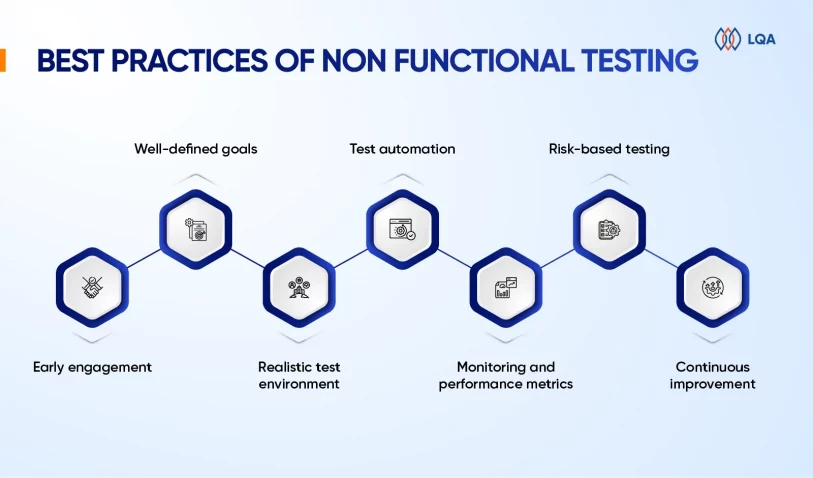
Best Practices Of Non Functional Testing

To achieve effective non functional testing, you should take certain best practices into account. 

  • Early engagement: Engage in non functional test activities starting from the early phases of the software development life cycle (SDLC). Collaborate closely with stakeholders, architects, and developers to comprehend non functional requirements and incorporate them into the system design.
  • Well-defined goals: Establish precise and measurable objectives for non functional testing. Set clear targets for performance, security, usability, and other non functional aspects to guide the testing process and provide a basis for evaluation.
  • Realistic test environment: Set up a test environment that resembles the production environment. Use representative hardware, software, network configurations, and data volumes to ensure accurate analysis of performance and behavior.
  • Test automation: Employ test automation tools and frameworks to streamline and expedite non functional testing. Automation facilitates the simulation of user loads, generation of consistent test data, and execution of repetitive tasks, resulting in more efficient and dependable testing.
Non Functional Testing - Everything You Need To Know

→ Don’t miss: 10 BEST Automation Testing Companies Worldwide in 2023

  • Monitoring and performance metrics: Implement robust monitoring mechanisms throughout testing to capture performance metrics such as response times, resource utilization, throughput, and error rates. These metrics provide valuable insights into system behavior, aid in identifying bottlenecks, and facilitate performance analysis.
  • Risk-based testing: Prioritize non functional test cases based on risk analysis and their impact on business operations. Give attention to critical functionalities, high-risk areas, and cases that are likely to lead to performance degradation, security vulnerabilities, or usability issues.
  • Continuous improvement: Foster a culture of ongoing improvement by leveraging insights from testing experiences and incorporating feedback into subsequent iterations. Capture lessons learned, update documentation, and refine testing strategies based on the knowledge gained during non functional testing.

These practices represent only a fraction of the existing methods for efficient non functional testing. By adhering to them, organizations can conduct effective non functional testing to ensure optimal performance, security, usability, and other non functional attributes of their software systems.

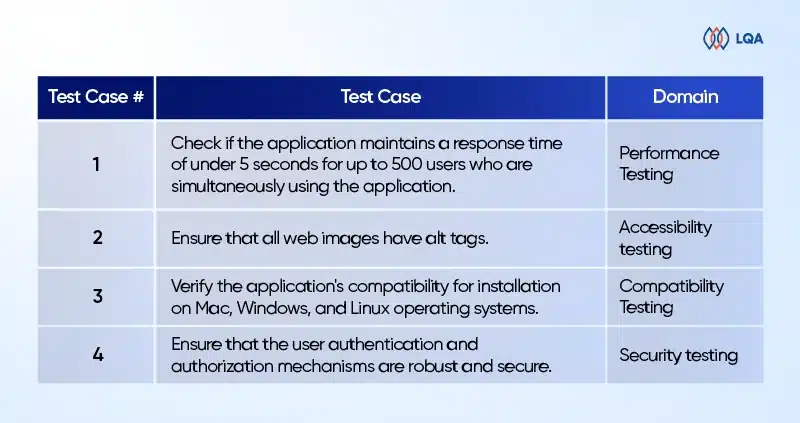
Examples Of Non Functional Testing

To gain a better understanding of this concept, let’s explore some examples of non functional testing across different types. The table below illustrates a range of non functional test cases specifically for web applications.
Non Functional Testing - Everything You Need To Know

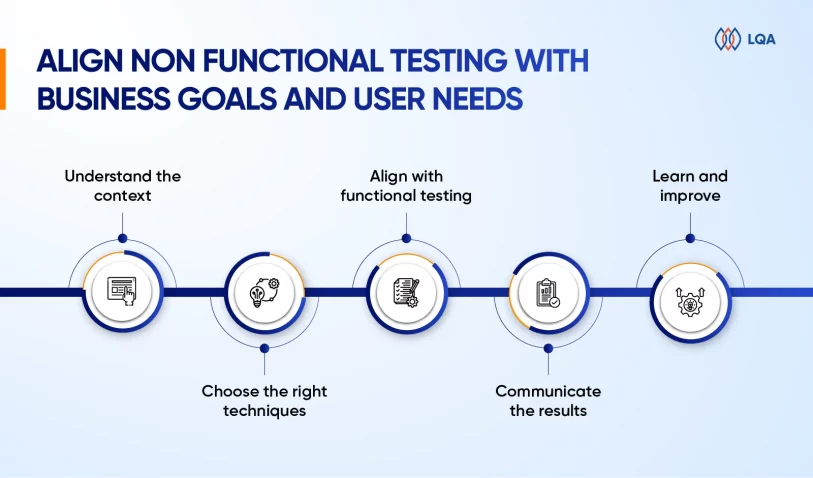
How To Align Non Functional Testing With Business Goals And User Needs?

Here are some valuable tips to seamlessly align non functional testing with your business objectives and user requirements.

Understand the context

Before commencing non functional testing, you should comprehend the project context, your intended audience, and your business goals.

What are your users’ and clients’ expectations and demands? What are your domain’s and environment’s risks and challenges? Which standards and regulations apply to your software?

Addressing these queries will assist in defining the scope, criteria, and priorities for your non functional testing.

Choose the right techniques

Non functional testing is not a one-size-fits-all approach. Depending on the context, different techniques and tools may be required to measure and evaluate the non functional aspects of your software.

For instance, we use load testing, stress testing, and endurance testing to assess system performance under varying levels of demand. Usability testing, accessibility testing, and user experience testing can be utilized to evaluate user satisfaction and convenience.

Security testing, penetration testing, and vulnerability testing can help identify and mitigate potential threats and breaches. Maintainability testing, portability testing, and compatibility testing ensure software adaptability and interoperability.
Non Functional Testing - Everything You Need To Know

Align with functional testing

Non functional testing should not be treated as a standalone or separate activity from functional testing. Instead, it should be integrated and harmonized with functional testing throughout the software development life cycle.

This approach ensures the relevance, consistency, and comprehensiveness of nonfunctional testing while avoiding duplication, confusion, and conflicts with functional testing.

For instance, leveraging test automation allows for efficient and effective execution of both functional and non functional testing.

Additionally, incorporating non functional requirements and specifications into test cases and code through test-driven development, or behavior-driven development further enhances the integration of non functional aspects.

Communicate the results

Non functional testing goes beyond simply identifying and addressing defects. It also offers valuable insights and feedback to stakeholders and users. Therefore, you should communicate the results of non functional testing in a clear, concise, and persuasive manner.

You can apply various methods and formats to present and report non functional testing results, including graphs, charts, dashboards, metrics, or narratives. Additionally, different channels and platforms can be used to share and discuss these results, such as emails, meetings, demos, or blogs.

The key is to emphasize the benefits and impacts of non functional testing on business goals and user requirements.

Learn and improve

Non functional testing is not a one-off or stagnant endeavor. It’s an ongoing and dynamic process that necessitates continual learning and improvement. Regular and frequent monitoring and measurement of software performance and quality are essential.

→ Read more:

Furthermore, you should review and update non functional testing strategies and techniques in response to the evolving needs and expectations of stakeholders and users. You can apply range of sources and methods, such as surveys, interviews, reviews, or analytics to collect and analyze feedback and data.

Additionally, leveraging various tools and frameworks, such as DevOps, Agile, or Lean, can provide support and enhance non functional testing efforts.

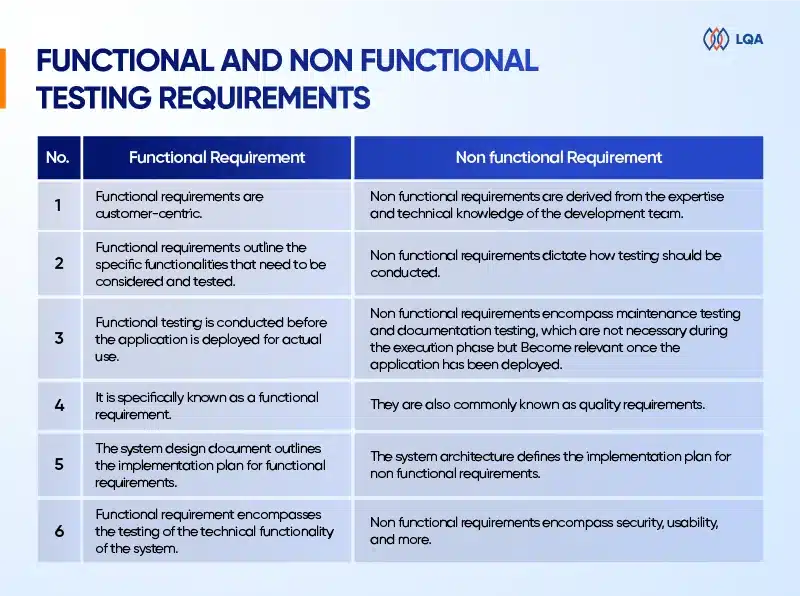
Differences Between Functional And Non Functional Testing Requirements

Let take a quick look at some differences between nonfunctional testing and functional testing:
Non Functional Testing - Everything You Need To Know

FAQ

What is functional vs non functional testing?

Functional testing ensures that the application works as intended. In contrast, non functional testing evaluates the application’s efficiency, performance, security, scalability, reliability, and portability.

What are non functional testing examples?

Non functional testing focuses on evaluating the non functional aspects of the product. To gain a clearer understanding, consider the following examples:

  • Validate that the application’s dashboard loads within 5 seconds upon login.
  • Ensure that email notifications are dispatched within 3 minutes.
  • Verify that the application supports concurrent login by 500 users simultaneously.

What are the challenges of non functional testing?

Below are several risks related to non functional testing:

  • Risk #1: Performance bottlenecks.
  • Risk #2: Security vulnerabilities.
  • Risk #3: Subpar user experience.
  • Risk #4: Compatibility issues.
  • Risk #5: Scalability challenges.

What will happen if non functional requirements are ignored?

Neglecting non functional requirements (NFRs) can significantly affect the adoption of the system, leading to various consequences.

These include the system’s inability to scale up to meet customer demands, sluggish performance resulting in unresponsiveness, security breaches compromising confidential data, and system unavailability during critical periods. Those directly impact business operations.

What is the main goal of non functional testing?

The objective of non functional testing is to enhance the usability, effectiveness, maintainability, and portability of the product. This testing process helps mitigate the manufacturing risk associated with the non functional aspects of the product.

Final Thoughts On Non Functional Testing

Non functional testing plays a crucial role in guaranteeing the overall quality and success of software systems. It extends beyond functional requirements and concentrates on pivotal aspects such as performance, security, usability, scalability, and reliability.

By conducting comprehensive non functional testing, organizations can effectively mitigate risks, elevate user satisfaction, adhere to industry standards, and optimize costs.

At LQA, we have the excellent expertise, specialized skills, and knowledge to conduct comprehensive assessments and evaluations of non-functional attributes.

Our team is highly proficient in utilizing specialized tools and techniques, enabling them to proactively identify and address potential issues.

With our proficiency in performance testing, security testing, usability testing, and compliance testing, we are adept at uncovering hidden problems, optimizing system performance, enhancing security measures, and ensuring a seamless user experience.

Our ultimate goal is to provide clients with high-quality software systems that meet performance expectations, prioritize user satisfaction, safeguard against security threats, and comply with industry standards.

If you are eager to improve the quality and reliability of your software systems, we encourage you to reach out to LQA. Contact us today to discuss your testing requirements and elevate your software to new heights.


Software Testing

Black Box Testing: Fundamentals, Techniques, and Guide

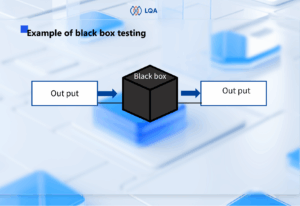
Black box testing is a popular software testing methodology. It mainly focuses on the input and output of software applications and doesn’t care about the internal code structure of the software.

In this blog, LQA will give you a fundamental guide to black box testing, covering its mechanism, types, techniques, process, and differences from white box testing and gray box testing.

Let’s dive in!

Black Box Testing Fundamentals

What is black box testing?

Black box testing is a software testing methodology in which testers know what the software is supposed to do but don’t know the internal code structure of the software.

Hence, black box test cases are built around specifications and requirements, such as how the application is expected to behave.

Black box testing can be applied to both functional and non-functional testing at every level of software testing: unit, integration, system, and acceptance. Its major objective is to evaluate the software’s functionality, identify errors, and ensure that it meets specified requirements

Example of black box testing

Consider an e-commerce web app. As a black box tester, you check if the app’s login functionality works as expected by entering valid and invalid credentials and verifying the system’s response.

Below is an example of black box test cases to test the login function of the app, in which T = true and F = false.

Decision table test case design exampleBlack box testing tools

Depending on the specific test types, we have different black box testing tools, such as:

  • Functional testing: Selenium, JUnit
  • Performance testing: Apache JMeter, LoadRunner
  • Security testing: OWASP ZAP, Burp Suite
  • Usability testing: UserTesting, Crazy Eg

Pros and cons of black box testing

So, what are the advantages and limitations of black box testing?

Pros of black box testing

The advantages of black box testing include simplicity, realistic evaluation, user focus, early bug detection, and unbiased tests. Here are why:

  • Simplicity: Black box testing doesn’t require knowledge of internal code, allowing a quick and easy start compared to white box testing and gray box testing.
  • Realistic evaluation: Black box testers focus on the output of the software application and how the software works in reality.
  • User focus: Black box testers evaluate software functionality as users, from a user perspective, hence increasing the likelihood of user acceptance.
  • Early testing: Black box test cases can be designed right after the completion of specifications and executed in the early stages of software development, allowing for early detection of functional issues.
  • Unbiased tests: Black box testers provide an unbiased, fresh perspective as they lack knowledge of the internal workings of the app.

Cons of black box testing

Black box testing also has some drawbacks, such as:

  • Dependence on documentation: Black box testing test case design relies heavily on accurate and comprehensive specifications, which may not always be available or up-to-date.
  • Limited code coverage: Black box testing may miss certain code paths and internal logic, reducing the depth of testing coverage.
  • Inefficiency for complex systems: It may not effectively pinpoint intricate code-related issues in complex software architectures, due to its inability to directly access and analyze the internal code structure.
  • Potential for redundancy: Tests can be redundant if already run by the software designer and developers.

Contact LQA

Types of Black Box Testing

Black box testing is applied to 3 major test types: functional testing, non-functional testing, and regression testing.

Functional testing

Functional testing ensures that the software functions as intended. It tests features like input validation, user interface, and data manipulation.

Some common types of functional testing include smoke testing, sanity testing, integration testing, system testing, and regression testing.

Black box testing in functional testing involves creating test cases based on external specifications, executing them to validate functionality, and ensuring that the software meets specified requirements without knowing the internal code.

Non-functional testing

Non-functional testing focuses on aspects other than functionality, including performance, security, usability, and reliability.

In other words, while functional testing checks if the software performs a specific action, non-functional testing checks how the software performs that action under different conditions.

In non-functional testing, black box tests can assess whether the software:

  • is user-friendly
  • performs well under various loads
  • is compatible with different browsers, devices, and environments
  • remains secure against common threats and vulnerabilities

Regression testing

Testers can use black box testing techniques in regression tests to verify whether new changes affect the existing functioning of the system.

Regression testing is often done when there are modifications to a system, such as developing a new function, fixing a bug, or maintenance. In apps with frequent updates, regression testing is often automated for optimal efficiency.

Also read: Software testing basics, principles, skills, phase

Black Box Testing Techniques

There are many black box testing techniques that apply to different logics within software applications. Here are the 5 major techniques.

Black box testing technique Description
Boundary value analysis (BVA) Test the boundaries between partitions.
Equivalence class partitioning Divide the input domains into equivalent classes and test one input from each class.
Decision table based testing Used when the output responds to varied combinations of input.
State transition testing Verify system behavior during state changes.
Error guessing Use testers’ intuition and experience to “guess” errors.

All the above black box testing methods can be done without knowing the internal workings of the system, hence are called black box testing. Let’s dig into them!

1. Boundary value analysis (BVA)

Boundary value analysis, short for BVA, is a black-box testing technique to test the boundaries between partitions instead of testing multiple values in the equivalence region. In BVA, testers assume that if it is true for boundary values, it is true for the whole equivalence region.

Example of BVA: 

Let’s say you’re testing a system where valid age values are between 20 and 50.

  • Test with the minimum boundary value (20). It should be valid.
  • Test with the maximum boundary value (50). It should be valid.
  • Test just below the lower boundary (19). It should be invalid.
  • Test just above the upper boundary (51). It should be invalid.

2. Equivalence class partitioning

In equivalence class partitioning, also known as equivalent partitioning, testers divide all possible inputs into various equivalence data classes (or data groups) and test only one example input from each class, assuming that data in each class behaves the same.

Example of equivalent partitioning:

Imagine you’re testing a system where valid usernames are within 5 – 20 text-only characters. You divide the inputs into 5 groups as below.

Valid input group Example input Invalid input group Example input
Inputs between 5-20 text characters 10 text characters Inputs below 5 characters 3 text characters
Inputs above 20 characters 25 text characters
Empty input (Leave blank)
Inputs contain non-text characters 10 characters contain text and numbers


Then, you pick one representative input from each group to test. For instance, if you input 10 text characters, it should be valid. But if you input 4 characters, it should be invalid.

3. Decision table based testing

Decision table, also called a cause-effect table, is a software testing technique based on cause-effect relationships. It is used to test system behavior in which the output depends on a combination of inputs, for instance:

  • Combination of inputs: all blanks/specific blanks in the log-in section are filled in by a user.
  • System behavior: navigate the user to the homepage.

Example of decision table testing: 

An app allows users to log in only when the username, password, and captcha are correct. We have the below table that represents all possible scenarios to test, in which T = true and F = false.

Decision table test case design example

4. State transition testing

In state transition black-box testing, changes in the input make changes to the state of the system and trigger different outputs. In this technique, testers execute valid and invalid cases belonging to a sequence of events to evaluate the system’s behavior.

Example of state transition testing: 

An e-commerce app will lock a user’s account if he/she enters the wrong password 3 times in a row. This means the user will be able to log in if he/she enters the correct password on the 1st, 2nd, 3rd try. Each time the password is entered correctly, the state is transitioned into “Access accepted”. Otherwise, the state turns into “Account locked” after the 3rd time entering the wrong password.

The state transition diagram below represents a sequence of events to test.

State transition diagram for test case design

State transition diagram for test case design

5. Error guessing

In error guessing, you rely on testers’ intuition and experience to anticipate and uncover possible errors or error-prone situations in the software, particularly in situations where formal test cases may be insufficient.

In error guessing, the test cases could be based on:

  • Previous experience in testing related/similar software products.
  • Understanding of the system to be tested.
  • Knowledge of common errors in such applications.
  • Prioritized functions in the requirement specification documents (to not miss them).

Contact LQA

Black Box vs. White Box vs. Gray Box Testing

Black box, white box, and grey box testing make up the three software testing methodologies to test an app as an outsider, an insider, and a partial insider. While black box testing and white box testing are opposite concepts, gray box testing stands in between the two.

Black box vs white box vs gray box testingLet’s dive into a detailed comparison between black box, white box and gray box testing.

Black box testing Gray box testing White box testing
Minimal to no knowledge of internal details Partial knowledge of internal details Full knowledge of internal details
Low-level granularity Medium-level granularity High-level granularity
Focuses on testing the functionality of the software Uncover defects, vulnerabilities, and ensure proper functioning of the software Test the internal logic, code structure, and implementation details of the software
Evaluates a product from the user’s perspective Considers both the user’s perspective and developer’s perspective Evaluation happens from the developer’s perspective
Is often done by end-users, testers and also developers Can be done by developers, testers, and end-users Is generally done by developers and testers
Test cases are designed on the functional specifications Test cases are created based on both functional specifications and some internal knowledge Test cases are designed based on the internal code and structure
Tend to consume the least time among the 3 methods Tend to consume medium time among the 3 methods Tend to consume the most time among the 3 methods
Technique:

  • Boundary value analysis
  • Equivalence class partitioning
  • Decision table testing
  • State transition testing
  • Error guessing
Technique:

  • Matrix testing
  • Orthogonal array testing
  • Pattern testing
  • Regression testing
Technique:

  • Statement coverage
  • Branch coverage
  • Path coverage
  • Condition coverage
  • Decision/Condition coverage


How To Perform Black Box Testing?

A standard black box testing process takes place as below:

  • Examine the requirements and specifications of the software
  • Define the testing scope, objectives, and create a test plan
  • Develop test cases based on specifications and user scenarios, including choosing valid inputs, invalid inputs, and expected output for each input.
  • Execute the test cases, entering inputs, observing outputs, and comparing real outputs with expected outputs.
  • Document any discrepancies or defects found during testing.
  • Re-run tests after fixes or changes to ensure existing functionality remains intact.

Frequently Asked Questions about Black Box Testing

1. What are the types of black box testing?

Black box testing is suitable for three primary types of tests: functional testing, non-functional testing, and regression testing.

2. Is black box testing illegal?

No, black box testing is not illegal. It is a legitimate and widely used software testing method where testers assess the functionality of a system without knowing its internal code.

However, it’s crucial to conduct black box testing on systems you have permission to test, respecting ethical and legal boundaries. Unauthorized testing on systems or networks without proper consent is considered illegal and can result in legal consequences.

3. Why might companies prefer black box testing over white box testing?

Black box testing is user-focused and doesn’t require knowledge of internal code. Hence, it is often simpler to start and more cost-effective to carry out compared to white box testing and gray box testing. That’s why companies may prefer black-box testing over white-box testing.

Black Box Testing with LQA

As the pioneering independent software testing company in Vietnam, Lotus Quality Assurance (LQA) stands out as a prominent software quality assurance firm with a wide range of software testing services, covering black box, gray box, and white box testing.

Are you looking for experts in conducting black box testing services? Don’t hesitate to contact LQA’s software testing team.

Contact LQARelated resources:


Software TestingSoftware TestingSoftware Testing

What is Functional Testing? Types and Comprehensive Guide

In today’s ever-evolving software development landscape, functional testing is critical to ensuring that software satisfies its intended specifications and functions seamlessly. Beyond only finding bugs, functional testing examines how well each component works together to contribute to the overall success of the application. 

In this article, we will guide you through the comprehensive exploration of functional test, including its benefits, methodology, and how to complete a successful functional test project. Let’s get cracking!


What is Functional Testing Definition?

Functional test is a type of software testing that examines the function of a software application or system. Its main goal is to ensure that the system functions in a way that meets the business demands and conforms to the stated functional criteria.

This involves evaluating the software’s user interactions, data manipulation, input and output from the software, and how it reacts to various scenarios and conditions.

what is functional testing

What is Functional Testing?


Functional vs Non-functional Testing: Key Differences

What is functional testing and non functional testing?

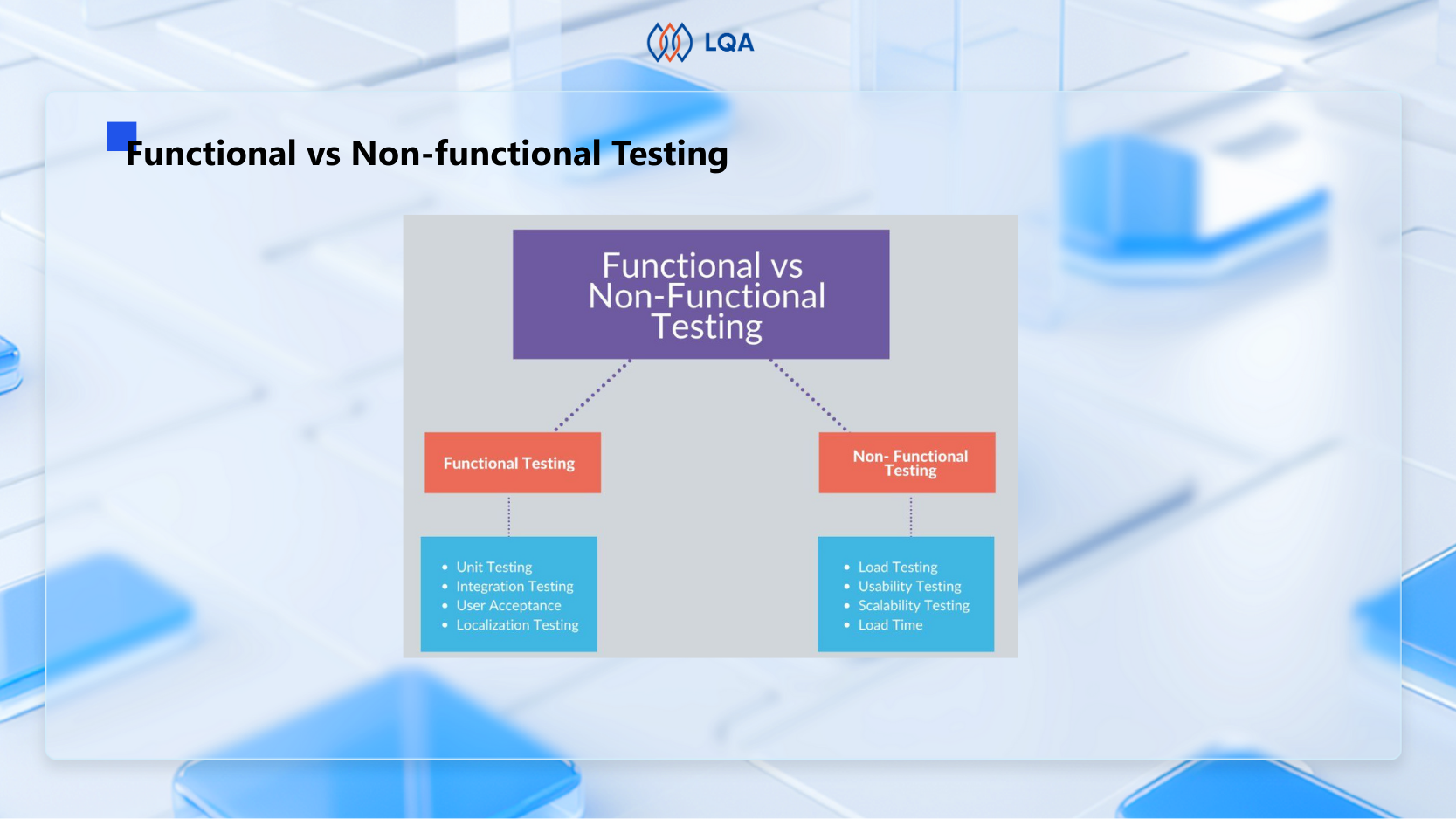
Functional and non functional testing are both popular and essential software testing types that help verify if a software’s features work correctly and assess aspects like performance and security for overall reliability.

The differences between functional and non-functional testing lie in their respective focuses. Functional tests focus on verifying if the required functions are met, whereas non-functional tests evaluate non-function aspects of any software such as performance, stability, efficiency, usability, visuals, etc.

functional testing and non functional testing key differences

Functional testing and non functional testing: Key differences

Put simply, functional test tries to answer if the software’s important functions are operating, while non-functional tests care more about how the operations occur.


What are the differences between functional and non-functional testing?

Let’s explore the key differences between functional and non-functional testing in the table below:

Aspect Functional testing Non-functional testing
Objective To evaluate if the software app meets functional requirements and operates as intended To assess non-functional aspects such as usability, security, performance, and more
Test coverage Typically concentrates on particular features or functions Covers a larger range of attributes beyond functionality
Examples User acceptance testing, unit testing,  functional system testing, integration testing Security testing, usability testing, compatibility testing, performance testing
Test criteria Criteria for passing or failing are frequently straightforward and determined by expected results Successful or unsuccessful criteria may include thresholds or benchmarks (for example, a response time of less than 2 seconds).
Tools and technologies Some examples of functional testing tools are Selenium, JUnit, TestNG, unified functional testing (UFT), etc Some examples of non-functional testing tools are JMeter, OWASP ZAP, LoadRunner, etc
Objective Measurement Frequently has binary results (pass/fail) according to the expected behavior Frequently uses benchmarks and quantitative measurements for non-functional attributes


Why is Functional Testing Important?

Software functional testing is an important phase of the software development life cycle (SDLC) for a variety of reasons:

functional testing benefits

Functional testing benefits


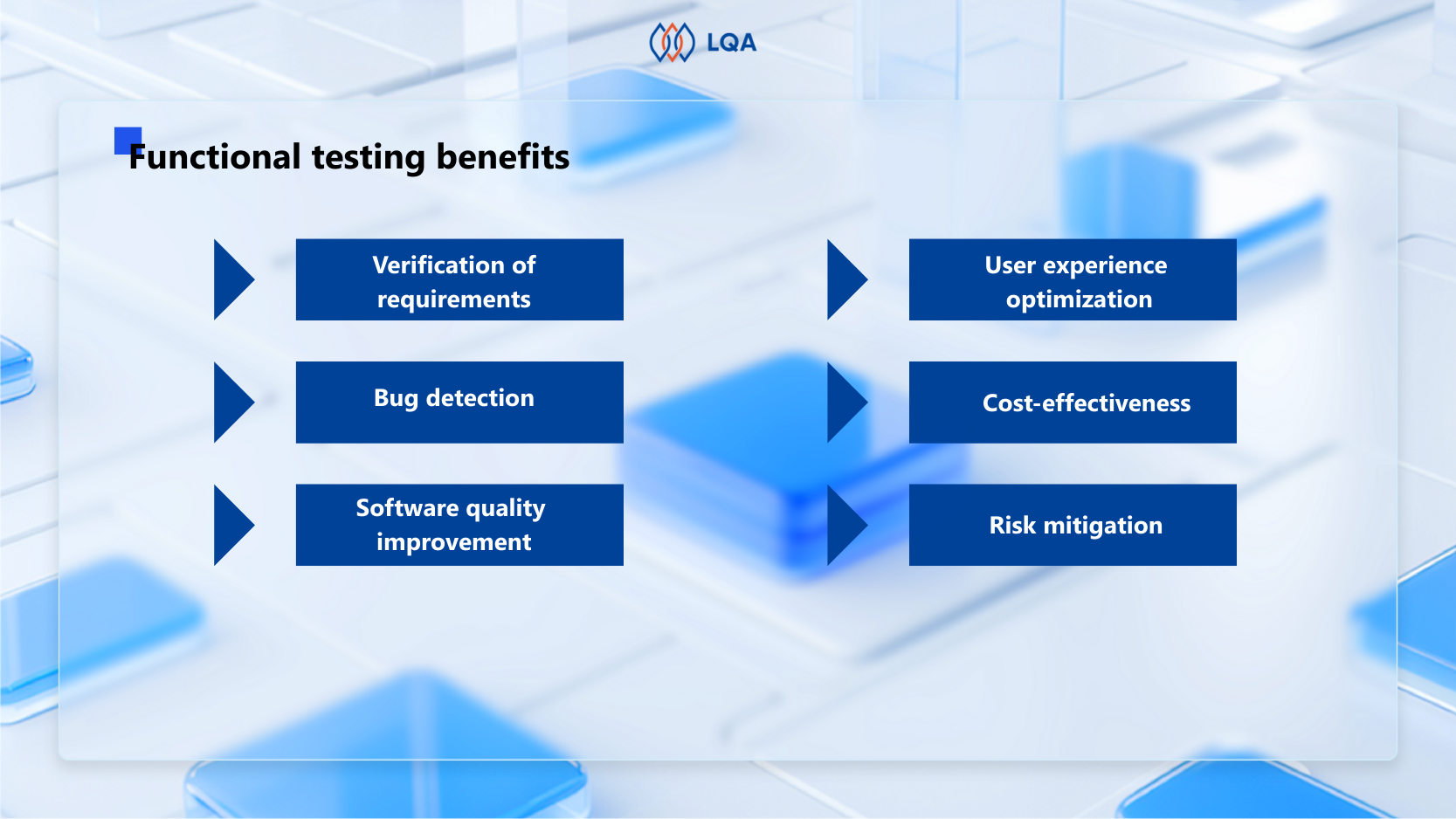
  • Verification of requirements: Functional test guarantees that the software meets the requirements. By testing each function or feature, you can ensure that the application acts as expected and meets the functional criteria.
  • Bug detection: One of the key goals of functional test is to find and disclose bugs or problems in software. It aids in identifying disparities between predicted and actual results, allowing developers to correct flaws before the software is published.
  • Software quality improvement: Functional testing helps to improve the overall quality of software by verifying that every module or component carries out its assigned task correctly.
  • User experience optimization: Functional tests improve user experience by identifying and correcting issues early in the SDLC. It helps develop a software product that satisfies users’ expectations and reduces post-release problems.
  • Cost-effectiveness: Resolving problems at a later stage of the software development life cycle or after the product has been delivered is more expensive than identifying and repairing errors early in the process. Functional test lowers the overall cost of development and maintenance by assisting in the early detection of issues.
  • Risk mitigation: Functional testing assists in reducing the risks related to software development by methodically testing the program’s functioning. It gives teams information about the application’s usability, performance, and dependability so they may proactively solve any possible problems.
streamline functional testing with lqaa

Streamline functional testing with LQA

Types of Functional Testing

What are the most common functionality testing types? Here are the most common functional testing examples:

types of functional testing

Types of functional testing

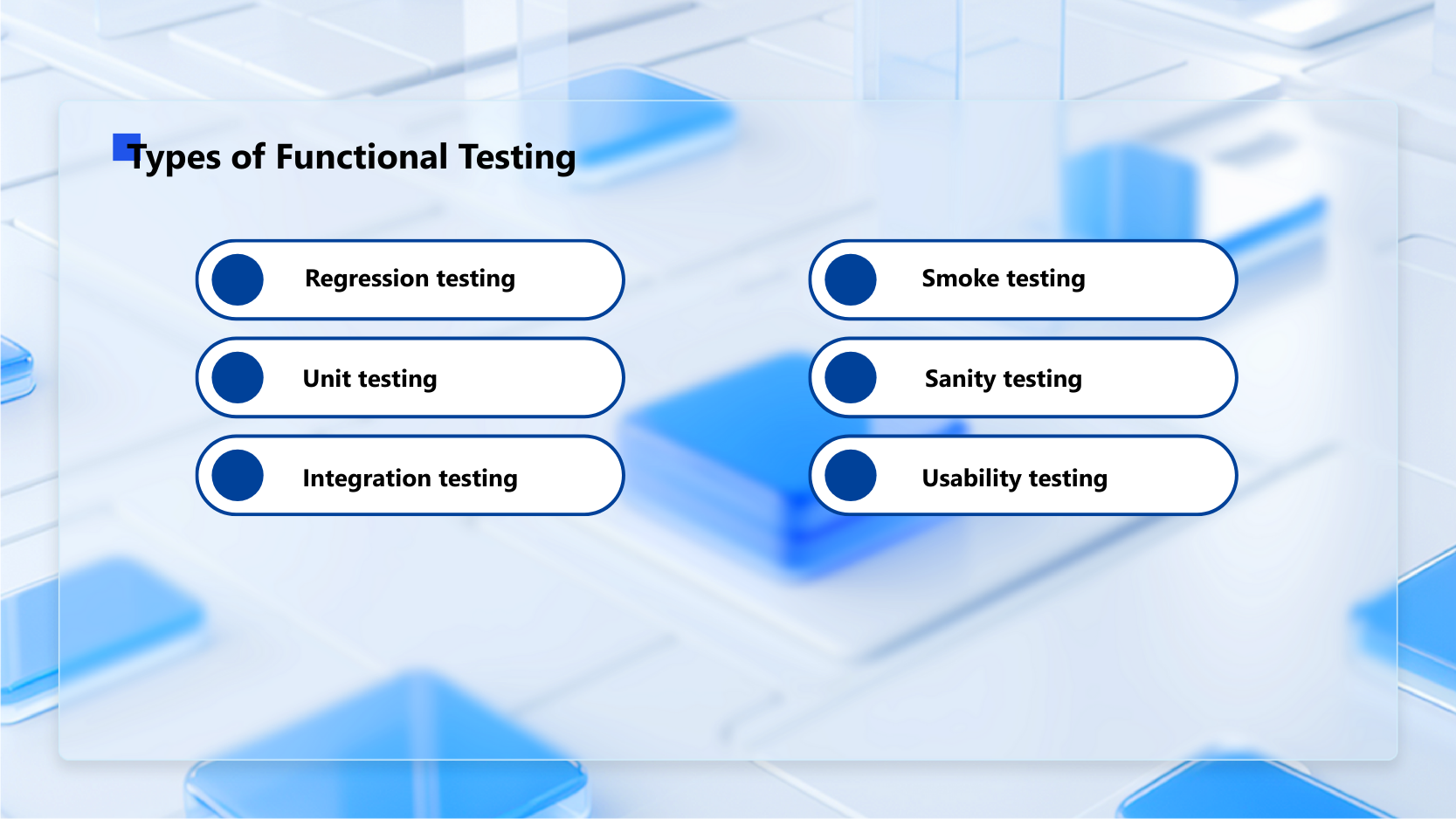
Regression testing

Regression testing ensures that new code does not break current functionality. It determines whether or not the application’s quality has deteriorated. These tests focus on the changes made and guarantee that the entire application is stable.

Unit testing

Unit testing involves breaking down the desired result into smaller units, which allows functional testers to check if a limited number of inputs, sometimes even just one, delivers the desired outcomes. By focusing on testing a specific part of the code, such as a function or method, unit testing is quick to write and run.

Integration testing

Integration testing verifies whether each software parts work properly together. This testing makes sure that the modules function properly when they are dependent on one another, even if they pass independent tests.

Smoke testing

Smoke testing is frequently used when a new build is developed. As an early-stage testing type, this method provides an additional layer of verification to determine whether the new build can move one or requires revisions. 

Sanity testing

A sanity test is executed for a new build that includes small bug fixes or new code, frequently after smoke testing. This method is to verify if every major functionality of an application operates properly both on its own and in combination with others.

Usability testing

Usability testing evaluates a software product’s user interface and overall user experience and addresses usability issues. In this testing method, real users will test the product in a production environment. Their feedback will be collected for future improvements.


How to Perform Functional Tests

QA functional testing typically includes the following essential steps:

how to perform functional test

How to perform functional test?

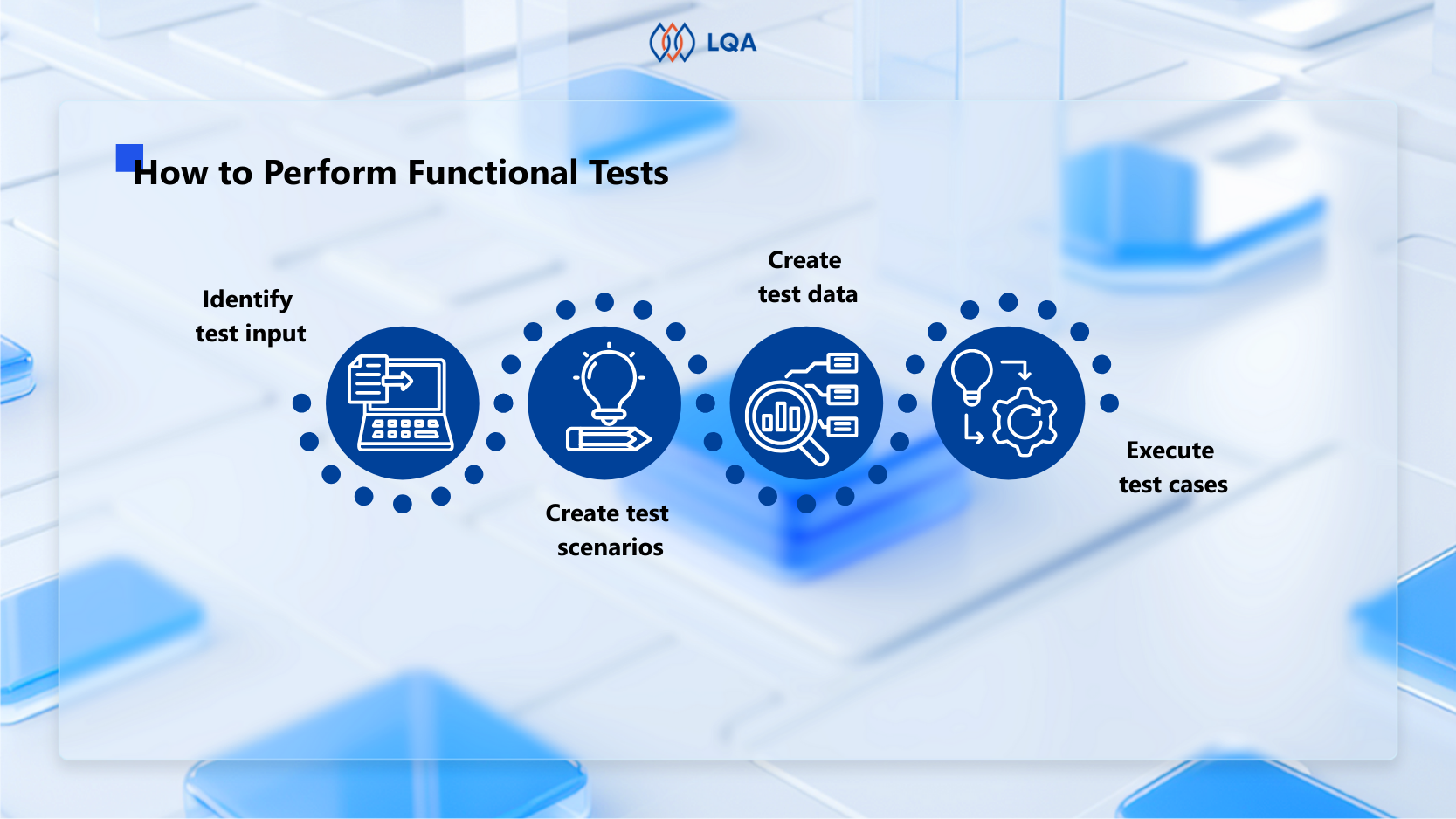
Identify test input

Before the testing phase, quality engineers need to determine the function that needs to be tested, along with its requirements, and how it operates. This essential step allows functional testers to understand the function’s goal and learn the potential user paths.

Create test scenarios

Create a list of every potential test scenario—or at least every crucial one—that may be used for a particular feature. Test scenarios demonstrate how a feature will be used in different contexts. For example, test cases for a payment module might include different currencies, managing expired or invalid card numbers, etc.

Create test data

Based on the test scenarios that you selected, create test data that replicates typical use situations. Input the test data manually with tools like MS Excel, or automatically with a script or testing tool that retrieves data from sources such as a database, flat file, XML, or spreadsheet. Make sure that each input data has relevant information specifying the expected outcome it should produce.

Execute test cases

In this stage, the created test cases are run and the results are recorded. After that, compare the expected and real output. The actual output produced after running the test cases is compared to the predicted output to determine the level of variance in the results. This stage indicates whether or not the system is operating as intended.

streamline functional testing with lqaa

Streamline functional testing with LQA

Why Automate Functional Testing?

There are various advantages of functional testing automation during the SDLC. The following are some reasons why organizations decide to automate functional testing:

why automate functional testing

    Why automate functional testing?


  • Efficiency and speed: Automated functional test can be completed faster than manual tests. This leads to more rapid feedback on the software’s quality, which allows more frequent updates and faster release cycles.
  • Reusability: Automated functional tests can be repeated without extra work and reusable at various phases of the development process. This allows consistent testing across different builds and releases, cutting down on redundancy.
  • Improved test coverage:  Automated functional test offers wider coverage of test scenarios and data variances. This leads to higher test coverage, ensuring that all of the application’s components are carefully tested.

In summary, automated functional test improves the software development process’s effectiveness, consistency, and dependability, which leads to better products and quicker release cycles.


Improve Your Functional Testing with LQA

Enhancing functional testing involves engaging a specialized software QA & testing firm to ensure a comprehensive evaluation and optimal testing performance.

With over 7 years of experience as the pioneering independent software QA in Vietnam, LQA stands out as a leading IT quality and security assurance organization, providing a comprehensive variety of software QA & testing services to fulfill our clients’ diversified needs.

At LQA, we stay up-to-date on the latest functional testing methodologies and employ industry-leading tools.

lqa software testing tools

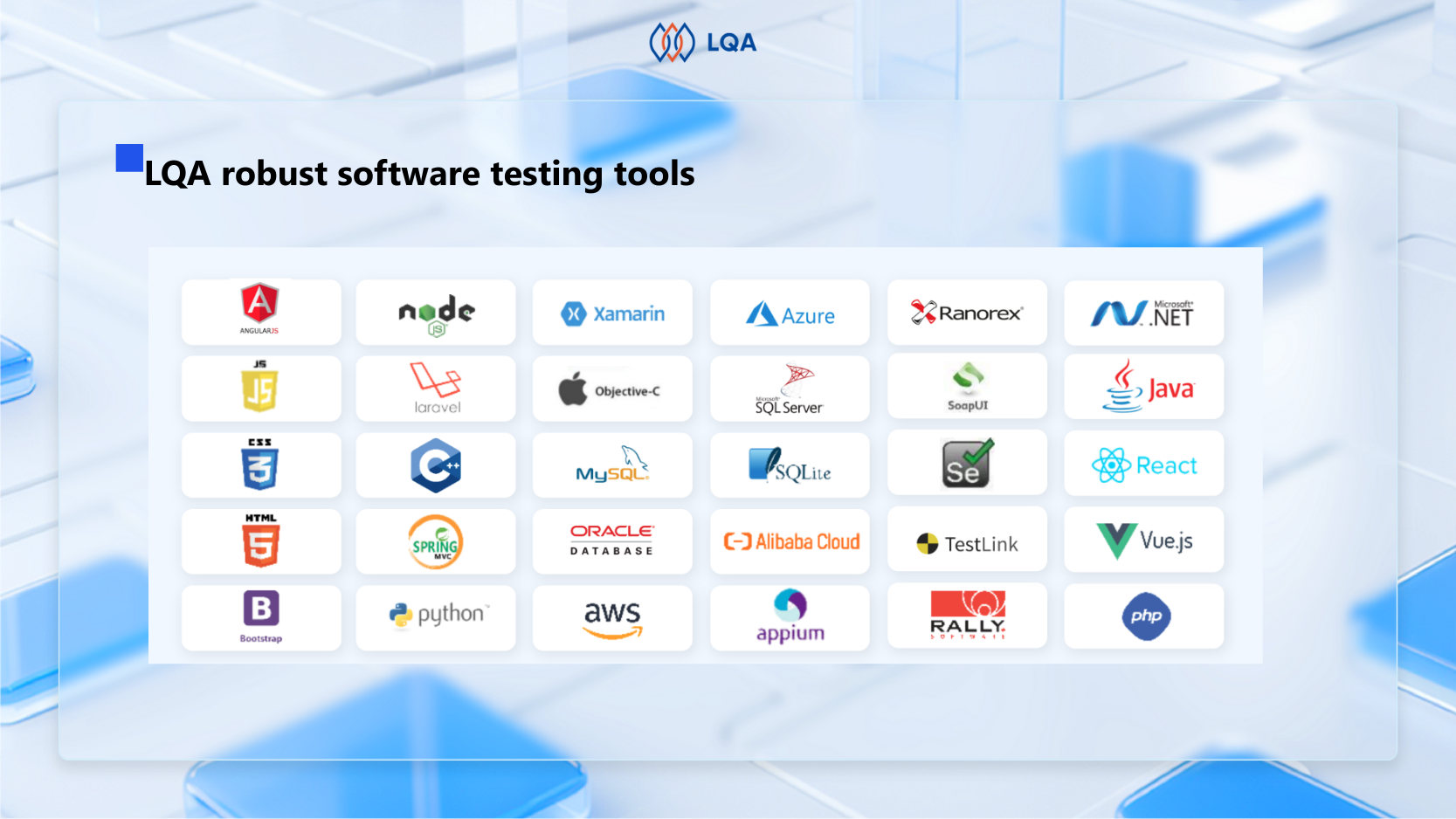
LQA robust software testing tools


In addition to functional tests, LQA offers full software testing services such as white box, black box, web application, mobile application, API, manual, and automation testing.

Key features of LQA’s functional test solution:

  • Comprehensive software QA solutions include consultation, strategy, execution, and ongoing support.
  • Ensured bug rate of less than 3% for devices, mobile, and web applications.
  • Quick delivery enabled by a wide range of experienced testers.
  • Optimal price-to-quality ratio, leveraging cost savings and the knowledge of Vietnamese IT professionals.
  • Tailored solutions based on industry expertise.
  • Maximum security assured via a Non-disclosure Agreement (NDA) and optimal security procedures during database access.

Connect with LQA’s professionals to improve your functional test experience, ensuring outstanding software quality, bug-free applications, quick project delivery, cost-effective solutions, industry-specific precision, and maximum security.

streamline functional testing with lqaa

Streamline functional testing with LQA


Frequently Asked Questions About Functional Testing

1. What is functional testing in software engineering?

Functional testing is a type of software testing that aims to ensure that a software application performs as planned. It entails testing the system’s functionality by providing input and inspecting the output to ensure that the software satisfies the defined requirements and works as intended.


2. What is non-functional testing?

In contrast to functional testing, non-functional testing assesses factors including scalability, performance, usability, and dependability. Rather than focusing on particular features or functionalities, it evaluates the system’s non-functional characteristics, such as reaction time, load management, and security.


3. What is the difference between unit testing vs functional testing?

Unit testing is a type of functional testing in which the validity of individual modules or components is verified by testing them separately. More broadly, functional testing evaluates the system’s functionality as a whole.


4. What is the difference between functional vs regression testing?

Regression testing makes sure that new features don’t negatively affect already-existing functionalities, while functional test confirms that the program operates as intended. Although being one of the functional test types, regression testing focuses on potential problems with new changes, whereas functional test validates features.


5. What is the difference between functional vs integration testing?

While integration testing evaluates the connections between various systems or components, the functional test looks at specific functions on their own. Both are a component of functional testing; integration testing makes sure these features work together seamlessly, whereas functional testing concentrates on features.


Final Thoughts About Functional Testing

In conclusion, functional test is the key to ensuring software reliability and user satisfaction. Its comprehensive examination of each function not only addresses and fixes possible issues but also guarantees a seamless alignment with user expectations.

Adopting a strong functional test approach is essential since it will protect against bugs and errors in advance, and increase software dependability, and user confidence.

We hope that with our comprehensive guidelines above, you can approach functional tests with confidence, creating software that not only meets but even surpasses user expectations in functionality and performance.

If you are looking for experts in conducting function testing for your software projects, contact LQA’s expert team today for top-notch functional testing services and consultancy. Let’s ensure your software stands out for all the right reasons.

Automated TestingBlogEmbedded TestingManual Testing

Gray Box Testing: Process, Techniques, Pros and Cons

Gray box testing, also spelled grey box testing, is a common method in software testing. The purpose of gray box testing is to search for defects due to improper structure or improper usage of applications.

In this blog, LQA will give you a comprehensive guide to gray box testing and the differences between black box, gray box, and white box testing.

What is Gray Box Testing?

Gray box testing is a software testing method in which testers have partial knowledge of the internal workings of an application.

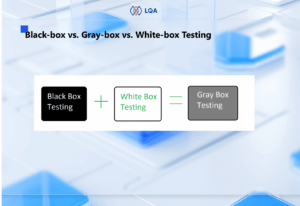
The major objective of gray box testing is to combine the advantages of black box testing and white box testing to test the product from a user perspective and improve overall user acceptance of the product.

When doing gray box testing, the testing process is guided by the specifications or requirements set for the software. Testers create test cases based on what the software is supposed to do, hence they are called requirement test cases.

Example of gray box testing: Consider testing a mobile banking app. As a gray box tester, you may have some knowledge about the backend server communication. You design test cases to simulate various network conditions, like low connectivity, to observe how the app handles these situations.

Black-box vs. Gray-box vs. White-box Testing

We all know about the three common software testing methods: black box testing, gray box testing, and white box testing.

Black box vs white box vs gray box testing

In black-box testing, testers have no idea about the system’s internal workings, while in white-box testing, testers have full knowledge of the application’s internal workings. Gray box testing is like a mix of black box and white box testing.

Let’s dive into a detailed comparison between black box, white box and gray box testing.

Black box testing Gray box testing White box testing
Minimal to no knowledge of internal details Partial knowledge of internal details Full knowledge of internal details
Low-level granularity Medium-level granularity High-level granularity
Evaluates a product from the user’s perspective Considers both the user’s perspective and developer’s perspective Evaluation happens from the developer’s perspective
Is often done by end-users, testers and also developers Can be done by developers, testers, and end-users Is generally done by developers and testers
Test cases are designed on the functional specifications Test cases are created based on both functional specifications and some internal knowledge Test cases are designed based on the internal code and structure
Tend to consume the least time among the 3 methods Tend to consume medium time among the 3 methods Tend to consume the most time among the 3 methods


Also read: Software testing basics, principles, skills, phase

Advantages and Disadvantages Of Gray Box Testing

So, what are the advantages and limitations of gray box testing?

Advantages of gray box testing

In short, gray box testing in software engineering combines the benefits of black box testing and white box testing.

  • Testing accounts for user perspective to improve overall user acceptance of the product.
  • Testers do not need to have programming expertise or extensive internal knowledge of the target system to start.
  • Less chance of introducing bias compared to white-box testing, as testers don’t know the internal details fully.
  • More comprehensive test scenario design than black-box testing thanks to partial knowledge of the internal mechanisms.
  • Is non-intrusive because it doesn’t require full access to the internal code.

Disadvantages of gray box testing

Due to its partial access to the internal code of the system, gray box testing imposes certain limitations.

  • Less test comprehensiveness compared to white-box testing. Due to limited access to complete code path coverage, testers might overlook critical vulnerabilities in the system.
  • Difficult to associate defects with root causes in distributed systems. Distributed systems involve various components and interactions, but testers don’t have full visibility into them.
  • Algorithm testing is impossible as the lack of access to the complete logic of the algorithms.

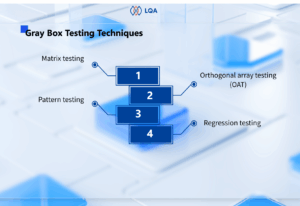
Gray Box Testing Techniques

When performing gray box testing, there are various techniques you can choose from.

Gray box testing techniques

Matrix testing

Matrix testing is a testing approach that examines all variables in an application, evaluating all business and technical risks associated with them and ensuring their correct and efficient utilization.

In matrix testing, test cases are systematically designed and executed based on a testing matrix structure. The matrix typically represents different combinations of inputs, conditions, or variables that need to be tested.

Orthogonal array testing (OAT)

Orthogonal array testing, or OAT, is basically a systematic and statistically-driven black-box testing technique. It systematically selects specific combinations of inputs to test the system instead of testing every possible combination of inputs.

Imagine you are dealing with a large number of inputs. Now, testing every possible combination of inputs would take a long time. So, you pick a subset of combinations to test from an orthogonal array, which is a structured grid ensuring coverage of various combinations of factor levels.

This method helps achieve a balance between thorough testing and minimizing the number of test cases required.

Pattern testing

Pattern testing in gray box testing involves analyzing historical defects to recognize recurring patterns associated with defects. Then, you can apply those insights to detect anomalies or deviations in coding practices that may lead to errors or vulnerabilities in apps with similar structures.

Example of pattern testing: Checking for consistent coding practices in naming conventions throughout the application.

Regression testing

Regression testing is a technique that verifies whether new changes affect the existing functioning of the system. Common regression test strategies are retest all, retest risky use cases, and regression test selection.

Regression testing is often done when there are modifications to a system, such as developing a new function or fixing a bug. In apps with frequent updates, regression testing is often automated for optimal efficiency.

Contact LQA

The Gray Box Testing Process

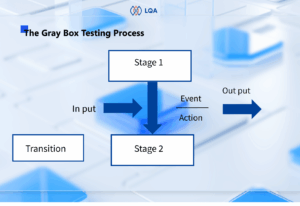
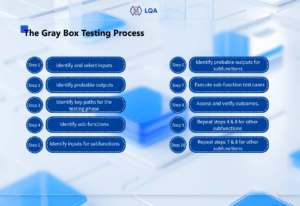
A standard gray-box testing process comprises 10 steps as below:

#Step 1: Identify and select inputs

Choose inputs for testing from both white and black box testing methods, considering both external user interactions (black box) and partial knowledge of internal workings (white box).

#Step 2: Identify probable outputs

Determine expected outcomes corresponding to the selected inputs to establish criteria for successful testing.

#Step 3: Identify key paths for the testing phase

Recognize critical paths within the system that need to be tested to ensure comprehensive coverage.

#Step 4: Identify sub-functions

Break down the system into sub-functions for more focused and in-depth testing.

#Step 5:  Identify inputs for subfunctions

Determine inputs specific to each sub-function, tailoring tests to assess individual components.

#Step 6: Identify probable outputs for subfunctions

Anticipate expected outputs corresponding to inputs for each identified sub-function.

#Step 7: Execute sub-function test cases

Perform tests on isolated sub-functions to observe how they respond to various inputs.

#Step 8: Assess and verify outcomes.

Evaluate test results to verify whether the system behaves as expected and meets specified criteria.

#Step 9: Repeat steps 4 & 8 for other subfunctions

#Step 10: Repeat steps 7 & 8 for other subfunctions

Frequently Asked Questions about Gray Box Testing

1. What is gray box penetration testing?

Gray box penetration testing is a cybersecurity assessment approach where the tester is provided with some information, such as system architecture or design details, to simulate the perspective of an attacker with limited insider knowledge.

Gray box penetration testing alongside black box penetration testing and white box penetration testing make up the 3 common penetration testing methods in security testing.

2. What is the difference between gray-box and black-box testing?

The fundamental difference between gray box testing and black box testing is how much testers know about the internal workings of a system, which can be a web app, a mobile app, or a desktop app.

Gray box testers have partial knowledge of the internal details of the system, hence testing the system from both a user perspective and developer perspective.

Black box testers have no idea about the internal details of the system, hence testing the system from a user perspective completely.

3. What is gray box testing also known as?

According to the National Institute of Standards and Technology (NIST), gray box testing is also known as focused testing.

Gray Box Testing by LQA

Gray-box testing is beneficial because it merges the benefits of black box testing and white box testing, combining the simplicity of the black-box approach with the code-specific approach of the white-box approach.

As the pioneering independent software testing company in Vietnam, LQA stands out as a prominent software quality assurance firm with a wide range of software testing services, covering gray box, white box, and black box testing.

Are you looking for experts in conducting gray box testing services? Don’t hesitate to contact LQA’s software testing team.

Contact LQA

Contact LQA at: