Automated TestingMobile App

Three common challenges in Mobile Application Testing

The booming of the smartphone has opened the door for global businesses to interact with consumers more effectively and frequently through thousands of applications. Since mobile apps became a significant channel to connect with consumers, executives of firms have spent more effort on enhancing the quality of applications. However, firms have to face many mobile application testing challenges.

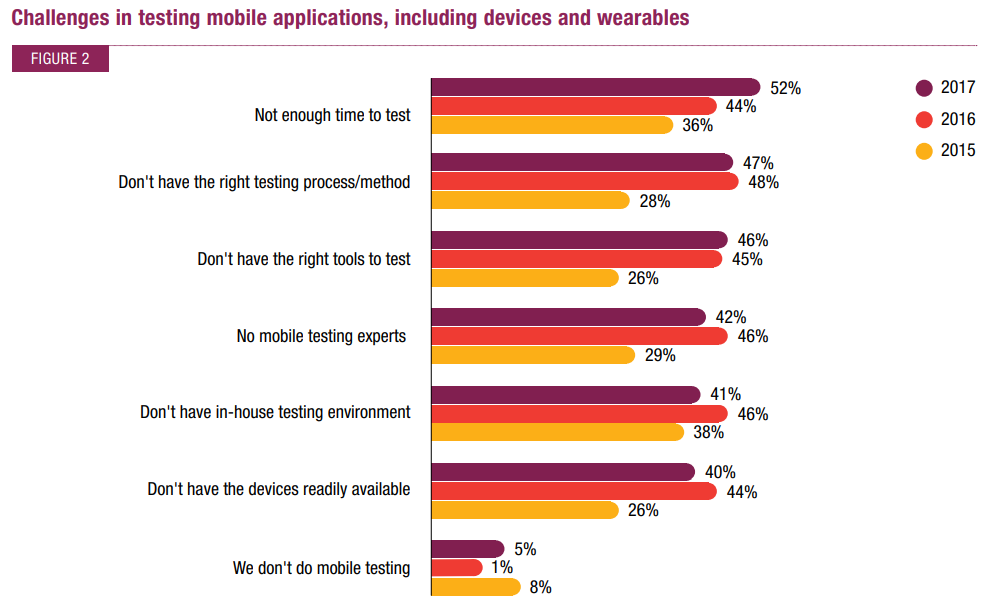
According to a report of Capgemini about Quality Assurance and Testing in 2017-18, 47% of the respondents stated that they lack an appropriate testing process or method. Meanwhile, 46% of the companies surveyed don’t know which are the right tools to perform mobile testing. Shortage in testing devices is also a crucial issue that occupies 40%. 

3 Common mobile application testing challenges

1. Lack of efficient testing process

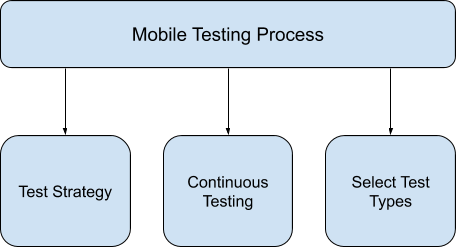
What is the effective testing process for mobile applications in such a high-competitive market like smartphone apps? There are three factors you need to consider, let’s take a look at them below:

Test Strategy

A thorough strategy for your testing project is significant. Some of the aspects that you should plan are Test methodology, Automation testing, and Test environment.

Firstly, when it comes to testing methodology, one of the most favored ones is the Agile approach. In Agile, the development process breaks into repetitive loops, and testing goes in parallel with development.

The second factor you should think about is how to set up the test environment. You can choose from setting up on real mobile devices, on simulators, or clouds. 

The final thing is automation testing. Although test automation can reduce the time and effort to perform repetitive test cases such as regression testing; some of the tests still need to be run manually. One of the efficient ways to apply automation test is when you run one test case on various devices, like in this video: [Demo video] Automation test on 10 mobile devices at the same time

Continuous Testing

Mobile applications are built and updated regularly. As a result, traditional manual testing cannot keep up with the pace of releasing new versions. Continuous testing will run automation tests regularly to get immediate feedback after new updates are released. Moreover, testing apps in parallel with the development process will decrease the risk of failing at the end of the project.

Select Test Types

For mobile application testing, you should execute both functional and non-functional tests. Functional testing includes testing the function of the apps (path testing, boundary values, data lifecycle), application lifecycle, network, and display. Non-functional testing requires testers to perform some special testing, such as: Typical Interrupts Testing, Testing for Power Consumption, Testing for Different Displays, Testing for Device Input Sensors, and Testing for Screen Orientation Change.

2. Choosing from numerous testing tools

What makes mobile testing more complicated is the complexity of mobile testing tools in the market. Each tool has different features that can test a certain type of mobile apps. Companies have to know exactly what they are looking for in the testing tool to choose the one that has appropriate features, such as:

  • Fees: Open-source tools and paid tools
  • Type of application that the tools can test: Native apps, Web, hybrid apps
  • The operation system: iOS, Android, Windows

3. Shortage in testing devices

In 2019, the shipment of smartphones around the world reached 1,375 billion units, in which Android devices accounted for 76% market share and iOS devices took 13%.  Each operating system has various versions, which means mobile apps have to run in numerous environments. This leads to obstacles in setting up mobile testing devices because the testing team cannot access all types of devices available. The solution is you can combine using different test environments such as Real Devices, Emulators / Simulators, and Clouds to perform testing. Each type has its advantages and drawbacks:

Environment

Advantages

Drawbacks

Real devices
  • Show how the app actually works
  • Can do specific testing for mobile such as Interrupt testing
  • Not all the target devices are available
Emulators
  • No need to look for rare devices
  • Simulate hardware and software
  • Time-consuming to adjust
  • No testing of mobile-specific factors (battery consumption, interrupts, etc.)
  • Not suitable for all types of testing (e.g. UI testing)
Clouds
  • Unlimited availability of devices
  • Not always suitable due to security concerns

Nevertheless, the quality assurance team cannot guarantee that if a tested application works well on a given device, it will work 100% on another device. Even though it’s from the same product family, the screen resolution, CPU, Memory, and hardware could be different.

If you want to have more advices about how to improve the efficiency of mobile application testing, you can contact us for a mobile application testing service

Automated TestingAutomated TestingEmbedded TestingManual Testing

Top 5 Mobile Testing Trends in 2021

When B2C enterprises use mobile applications to attract consumers’ engagement in e-commerce, banking, and marketing; B2B firms use them to manage the company’s operations, tracking the performance of employees, and collaboration with partners. Come with the rising frequency of mobile application usage is the demand for increasing the application quality. If you want to update the latest movement in quality assurance for mobile applications, let’s look at our top 5 mobile testing trends below.

Test Automation

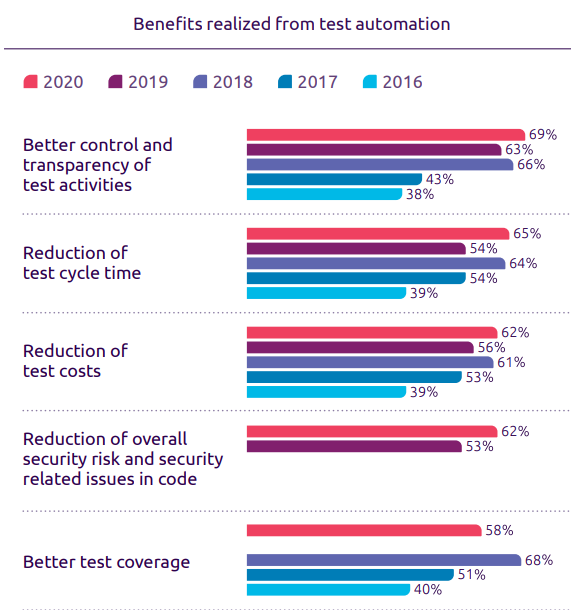
One of the characteristics of mobile applications is that the developers have to release the new version frequently to adapt to the demand of users. Due to this, numerous test cases need to run repeatedly. This is where test automation became an innovative solution. In the World Quality Report conducted by Capgemini, 57% of the companies said that test automation helps to reuse the test case. Meanwhile, 65% of them stated that the test cycle time is reduced.

mobile testing trends - automation test benefit

The greater return on investment in automation not only came from benefits in cost and efficiency but also came from achieving business objectives such as time-to-market. Moreover, it seems like this year CTO concerns more about transparency and security in testing. 69% of them responded that test automation helps them to have better control and transparency of test activities; 62% of respondents think test automation reduces the overall risk.

IoT Testing

The Internet of Things (IoT) allows us to control our assets such as smart home appliances, smart cars, or smartwatches by using a mobile application. Testers need to ensure the quality, security, connectivity, and performance of the application so the interaction between mobile apps and IoT devices is not interrupted. However, executing integration testing is not easy due to IoT devices often having a cloud-based interaction layer developed by a third party. Besides that, testers also concern about the enormous number of test cases needed to run because of the diversity of IoT devices. Testing on emulators, therefore, cannot fulfill the requirement of the QA team. As a result, testing in the cloud is becoming more popular.

Although facing many obstacles, firms are finding ways to adapt to the IoT trend. Many companies consider applying Artificial Intelligence capacity to test thoroughly and also conduct more IoT-experience testing.

Impact of 5G on Mobile Testing

Compared to the previous generation, 5G network has many innovative technologies, which greatly affect how testers conduct mobile testing. When it comes to 5G connectivity, three main technologies change the game: Enhanced mobile Broadband, Ultra-reliable Low Latency Communication, and Massive Machine Type Communication (mMCT)

5G provides greater bandwidth, which means faster data rate and better user experience. With this technology, the 5G network will allow 360-degree video streaming and VR / AR experience. Consequently, testing mobile applications in a high-speed internet office will not be efficient enough. Besides, the latency of data transfer is reduced. It allows faster information receiving within far distance, which has a huge impact on the performance of mobile applications. Meanwhile, mMCT supports connecting with a large number of IoT devices using less power; which leads to changes in battery testing for mobile devices.

Agile and DevOps Approach

Agile and DevOps has become a popular method in continuous testing. They combine the know-how and skill of both testers and developers to support each other with the ultimate goal of fastening the development and deployment of applications. Agile and DevOps approach helps enterprises to find and fix defects more efficiently and release new versions more frequently.

According to the World Quality Report, the Scale Agile Framework (SAFe) and the Dynamic Systems Development Method (DSDM) among Agile methodologies are the most favored by IT firms. From 2015 to 2017, SAFe increased from 31% to 58%; meanwhile, DSDM has grown by 31%. The same report also stated that over 88% of respondents applied DevOps principles in their IT team.

Testing Environment in Cloud

Mobile users reached 1.5 billion at the end of 2020. The mobile devices will have different OS versions, screen resolutions, and data storage. It causes obstacles in mobile testing since firms are not able to buy every kind of mobile phone. As a result, testers tend to use the cloud to test real devices.

Another reason for the increase in using cloud-based testing environments is the virtualization trend in recent years. This will push the demand for cloud and virtual testing tools higher and open more opportunities for firms to provide cloud-based testing services.

Blockchain Testing

Since the booming market of blockchain technology in the IT industry, many have predicted a new and exciting field of better security, higher authenticity and decentralized operations.

Since blockchain technology is rather an immature field of the IT industry, there is more to be explored with this. To ensure a system of decentralized, cost-effective and time-saving activities, blockchain engineers have to employ and adapt to cutting-edge technology and brand new concepts, making them more prone to mistakes.

Under this circumstance, blockchain testing is now an in-demand service that requires a thorough understanding of the blockchain architecture and full test strategy planning.

Blockchain testing should include:

  • Smart Contract testing
  • API Testing
  • Block Testing
  • Functional Testing
  • Performance Testing
  • Security Testing

Big Data testing

With the world’s economy stepping into the recovery phase after the pandemic, many enterprises are trying to revamp their performance with the adoption of big data in their operation and upcoming business plan.

The most prominent approach towards their customers is to collect and min huge data volumes and diverse data types to indicate user behaviors. From these analytical research and collection, one might categorize and analyze their behaviors to find the best matching solution to approach their customers.

To enhance the efficiency of big data in multiple fields with a bigger scope, you would want to implement big data testing, which can help to make improved decisions with accurate data validations. With big data testing facilitates the consistent application of how the datasets perform, market targeting and business manifestation are further streamlined to cope with the ever-changing market.

Cybersecurity Testing

Cybersecurity has always been at the top of the IT industry’s problem with billions of dollars stolen each year. In recent years, many companies have been applying an array of measures to assure cybersecurity within their system and products.

Especially with the fear of data breaches, cybersecurity is gaining its importance in business’ systems and becoming the foremost necessity.

This situation is common across many subdomains of the IT industry, leading to a growth in security testing of from USD 6.1 billion in 2020 to USD 16.9 billion by 2025, at a Compound Annual Growth Rate (CAGR) of 22.3% during the forecast period.

This growth of security testing has brought brighter prospects to the world’s cybersecurity. With the stronger and more effective security measures, cyberattacks, data breaches, malware, etc. will be reduced to their smallest. With this new implementation, digital transformation will be more successful than ever.

Machine Learning and Artificial Intelligence testing

Artificial Intelligence in general and Machine Learning in particular will be the omnipresent technology in the next few years.

As the need for virtual assistants, autonomous cars, etc. are more rival than ever, AI and ML will make a bigger step in the IT industry with top investment priority of CIOs in 2025. As predicted in 2020, the AI and ML market will grow to be about $6-7 billion in America. Technology for behavior prediction, speech recognition is beginning to be adopted and implemented in our daily lives, and it seems to be never enough.

The booming development of AI and ML demands better technology, bigger implementation and breakthrough advances, hence the need for a flawless operation of AI and ML. To achieve this, the most effective and viable solution is AI and ML testing. Since the AI and ML themselves are pretty new in the market, testing for them is quite challenging, yet exciting.

Scriptless automation testing

With Agile and DevOps are trending, requiring developers and testers “low-code” and “no-code” approach. With this approach, developers and testers spend less effort on programming and writing codes, making the software/delivery have a faster time to market.

Although automation testing is on the rise, many testers are struggling with the high-maintenance, script-based testing approach, not to mention the dragging training time. To make it easier and faster for testers to execute tests, many have followed scriptless automation testing.

Since it is scriptless, testers have to utilize multiple tools to acquire desirable test results.

All in all, the trends in 2021 made the QA team face many challenges. How to perform mobile testing with the right strategy remains a hard question. Knowing this constant problem, Lotus QA provides a free consultant for mobile application testing to help you enhance the quality of your product.

Infographic – A Comprehensive List of Data Annotation Tools

We summarized a list of data annotation tools in an infographic which helps you to understand:

  • How many types of data annotation tools there are
  • The best tools in each type
  • What kind of data that the tools can label


[Infographic] A Comprehensive List of Data Annotation Tools


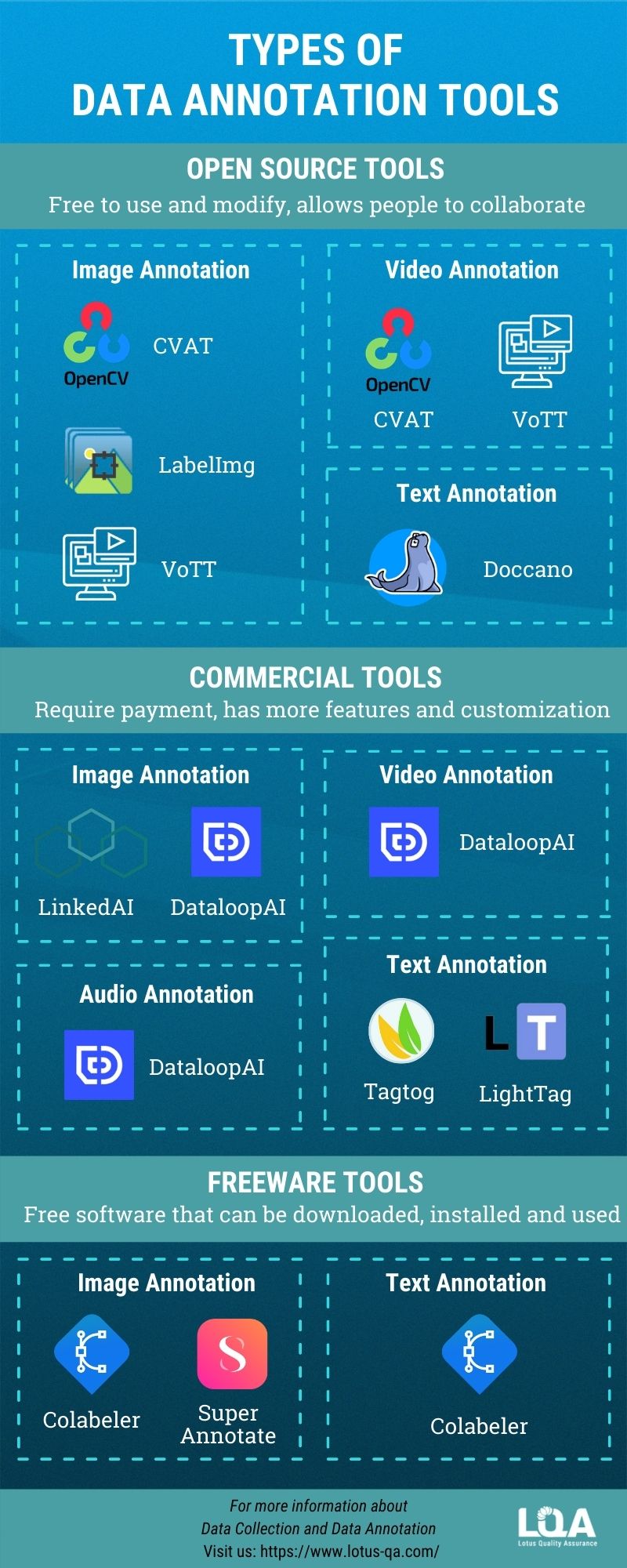
Infographic - Types of Data Annotation Tools


Types of data annotation tools


Open source tools

The open source tools are free to use and it allows people to modify the source code. Some of the open source tools for data annotation are: CVAT, LabelImg, Doccano, VoTT.


Commercial tools

Using this type of tool will require payment, however, it allows users to customize the functions to suit their need. The best commercial tools can be named: LinkedAI, Dataloop AI, Tagtog, LightTag.


Freeware tools

Similar to open source tools, freeware tools do not charge any fees. You can download and use freeware but cannot modify them. An example of this type of tool is Colabeler, SuperAnnotate


You can walk through our video guidance series about AI Data Labeling Tools if you still wonder how to choose the best tools for your data labeling project.


Want to improve the efficiency of the data labeling process? Book a meeting with us!

LQA News

LQA celebrating 4th Anniversary – our path to deliver Quality

October 18th 2020 marks the 4th anniversary of the founding of Lotus Quality Assurance. After 4 years, we have built ourselves a strong foundation; constantly improving our services and earned ourselves a competitive position in the IT outsourcing market.

Let’s take a look at our main achievements in our 4th year delivering quality to our clients:

In terms of human resources, we are now having 200+ members, ensuring quality workforce for projects under tight deadlines.

The biggest asset of Lotus Quality Assurance is HUMAN” – Xuan Phung | CEO and Founder of LQA

In terms of technology, we have now successfully added more management features to our in-house developed tools – LQA Annotation, heightening the labeling quality for clients projects. Incremental changes are constantly added to improve team productivity.

In terms of expansion, despite the Covid 19 pandemic, we have successfully established our first subsidiary in Japan – Lotus Japan (LJP). Choosing the land of rising sun as our next destination, we aim to deepen our understanding of international clients; while also learning from the strict quality regulations.
Other than amplifying our international presence, LQA also decided to spend more efforts on the domestic market. So far, we have worked with leading clients in Vietnam from several fields: telecommunications, F&B and insurance etc.
We are trying hard to win in our home country, to be the number one QA firm in Vietnam.

In terms of awards and recognitions, we are pleased to be included in several listings:

In the BOD speech, Xuan Phung, CEO, shared:

As we are heading towards the new normal, the time could be the hardest for everyone. However, we are all in this together. We strive to become a world-class Quality Assurance Firm

Today, our entire company would like to take this opportunity to thank all of you, our Lotusians and our customers, for your continued support over the years. LQA would not be the like it is today without your support.

Once again, THANK YOU for your support from all of us here at Lotus QA.

Cheers for the years to come!

Embedded TestingManual TestingSoftware TestingSoftware TestingSoftware Testing

4 things every tester should know (2020 Video Series)

In this our new series, 4 things every tester should know, we will take you through the foundational knowledge of testing: Testing levels, Testing Types, Testing Processes and Principles of Testing.

We would like to contribute to the communities the take-away testing videos which are short but essential.

Hence, this series is named “Four Things Every Tester Should Know”, made for:

  • Junior testers who are building foundational knowledge in software quality assurance and testing
  • Senior testers who wants to revise their knowledge on testing
  • Business users who want to have a high-level view of the testing industry

You can watch our video series here, or read the transcription below. Turn on subtitles for English, Japanese, Korean and Vietnamese.

The series will include the following topics:

https://www.youtube.com/watch?v=1f9Ssis5SuE&list=PLI5JkQdCF-6ic2ceHiitDoIbYrZ1BYttG

Test levels

16 years ago, I came to know about some testing concepts and I think it’s very important.

Today, I want to share you one concept named “Testing Level”. So, let’s get started!

Have you ever heard about V-Model?

As you can see on our picture, there are 4 testing levels ordered from bottom to the top. Those are unit testing, integration testing, system testing, and acceptance testing.

Why do we need to distinguish those testing levels?

Because we can understand the specific objectives of each level you can integrate effectively using them to improve the qualities.

Following the timeline, we start with unit testing.

Unit testing, known as component testing,

is to verify the functional and non-functional behavior of the module in the system.

Normally the programmers do the Unit testing by isolating their module from the rest of the system.

They can do it manually or automatically by using a tool named Junit or Nunit.

The developer will base on detailed design to take the code,

data structure or the database in order to find out

if there are any data flow problems or any incorrect codes.

After finishing unit testing, we go to “Integration testing”

Integration testing is to verify the functional and non-functional interfaces

between components or systems of integration.

So, there are two types of integration.

First one is that component integration testing will be done by the programmer.

And system integration testing might be done by the independent testing team.

So, depending on each type, the input and the output,

and the system under test (SUT) might be differed.

But the objective seems to be same.

We focus on the integration between the component or the system.

The next step is system testing.

System testing focuses on the behavior and the capabilities

of a whole system or whole product as the end-to-end usage.

Independent testing team typically carry out system testing

and they will set up the test environment that is very similar to the production one.

They will produce the testing report which can be used

by stakeholders in order to make release decisions.

The typical defects could be missing the requirements or any incorrect functionalities of the system.

The last level is acceptance testing.

Acceptance testing is similar to the system testing

which will focus on the behavior and also the capabilities

of the whole system or the whole product.

But, it’s different from the system test.

It may produce information to assess

the system’s readiness for deployment and usage by the end-user.

Finding the bug is not the objective of acceptance test

because it will be too late if you find defects at this step.

The acceptance testing is the responsibility of

the customers, business user, product owner and also the operator of the system.

Normally, there are four common forms of the acceptance testing

including the user acceptance testing, the operational acceptance testing,

contractual and regulatory acceptance testing,

and the last one is the alpha and beta testing.

So, those are four important testing levels.

At the beginning of the project,

all stakeholders, including the product owner, the project manager and

also the quality assurance manager should sit together and

plan how to handle those four levels in the projects.

To ensure that, the product and software will meet the business needs and also the user requirement.

Otherwise, the product or the system will be NOT fit to use.

So if you want to see more videos, please subscribe to us.

Also, hit on the bell to receive the notification.

Thank you for watching and see you soon!

Testing types

A testing types are groups of test activities which are based on specific testing objectives. We could have different aspects to distinguish the different testing types.

For example, following the Quality Characteristic aspect , we could have Functional testing and Non-functional testing. Following the testing method, we could have Whitebox, Greybox, Blackbox testing or Manual/automated testing. Following the testing environment, we could have the alpha, beta and staging testing and so on.

In this video, let’s distinguish just based on the quality characteristic aspect.

So, what is Software Quality Characteristics? Testers need to verify if the software has good quality or not, hence it is necessary to understand how to define the quality.

ISO/IEC 25010 is an international standard which is issued by ISO(international standard organization) for the evaluation of software quality. It defines 8 main (quality) characteristics, namely: Functionality, Performance, Security, and also Compatibility, Reliability, Usability,Maintainability, Portability.

In this video, we will just explain some popular types.

Functional testing & Non-functional testing

First of all, Functional testing. It is a testing type which focused on the completeness, correctness and appropriateness of the software systems.

It can be done manually or automatically supported by many commercial and open source tools.

Meanwhile, Non-functional testing will focus on the “how well” of the system behaves.

Performance testing

The second one is Performance. Performance testing is the process of determining the speed, responsiveness and also the stability of the software prograM, a computer, network, or device under the specific workload.
There are two main performance testing methods: load testing and stress testing.

  • Load testing will help you to understand the behavior of a system under a specific load value.
  • Stress testing will place a system under the higher-than-expected traffic loads to evaluate ‘how well’ of the system works above its expected capacity limits.

Security testing

And the next testing type is Security testing.

Security testing is to check if the software or the product is secured or not. It checks if the system is vulnerable to attacks or if someone can hack the system or login into the application without the authorization.

Some sources claim that security testing is a functional testing. Because it can be compliant with the old version ‘ ISO 9126’. But following the latest ‘ ISO 25010’ , security testing is a non-functional testing type and it is one of the quality characteristics separately.

Compatibility testing

And the last one I want to introduce today is about Compatibility Testing.

Compatibility Testing is a testing type to check if our software is capable in the different testing environments such as hardware, operating systems, applications, network, mobile or different versions of the software.

Because the compatibility testing will be repeated on the different environment, so it is highly recommended to be automated testing.

From my experience, Testing type is a significant knowledge that every tester should know in order to test correctly. When you are consulting clients and also proposing the quality assurance solution, test experts also should define the important quality characteristics for that specific system and also point out the relevant testing types.

So, that is a take away video about the testing types. It’s quite short but hopefully, it’s helpful.

Testing processes

Continuing from the previous video about testing level and testing type, today I would like to introduce you another topic about testing process. Why do you need to know about the testing process? Because you will know what you need to do at each step and how to integrate testing into the development process. As you see in our picture, there are 5 steps when you do testing.

Test Planing and Test Control

Test planning is process to output the smart testing way. I often draw out an IMOC into one paper, and then document it later.

  • I – the input means Test basic including the software specification, test requirement, software, etc. I plan How and When I can receive input.
  • M – M is test Mechanism or how I will do the testing. I should think about the test strategy, schedule, and needed resources in order to do testing. 
  • O – Output of testing. Output is a test deliverable. For example, the test result, the test log, and bug report. I will plan of who I need to send the report to, and in which kind of format.
  • C – Test constraint. One important test constraint is exit criteria. It is when I can stop testing.

Test control is the process to compare the actual progress and actual reason with the plan at the beginning. You also need to plan how you can control your progress, and how you can control the quality. 

Test Analysis and Test Design

Test Analyzing is the process to analyze all of the test basics such as the test specification, requirement specification, and all additional documentation in order to define the test conditions. Test conditions could be a piece of functionality or anything you want to verify. 

Test Designing is the step to break down the test condition into different test scenarios and cases. It is very important to use different test technique to cover all the possibilities of the test cases.

Test Implementation and Test Execution

In this step, the testers will combine the different test scenarios or test cases into the test procedures following business flows or into the test suite following the purposes of testing. Testers will prepare the test environment and make the automation script if it needs.  After they get ready, the tester will execute the test cases, test suites, test procedures that they made before and log into the testing results. If they find bugs or any incidents, they will report it. 

Evaluation and Reporting

At this step, we will evaluate whether the test implementation is satisfied with the test purpose by comparing test results with the exit criteria at the planning stage. We judge if we need additional testing or not and send reports to all stakeholders.

Test Closure

All of the Test closure activities are done when software is delivered. Tester will check all the deliverable, and archive test ware. Then, they can do any handover or needed training to the maintenance team (organization). And then, they evaluate how the testing went and learn the lessons for future projects.

Those are five steps of the testing process. If you have any suggestion, please comment below. Thank you for watching, and see you soon.

Principles of Testing

Continuing the series  “Four things every tester needs to know about testing”, today will be the last topic named “7 Principles of testing”. We hope that the series of the video will be helpful for testers, especially freshers. Also through this series of the video, the experienced testers can be reminded about the basic but important knowledge. So, let’s get started! 

Testing can only prove that the software has error

Through the testing, we can find the bug and prove that the software has error. But we can not prove that the software has absolutely no error at all. Even in the absence of errors, we cannot claim that our software has no errors in the future.

Testing the entire pattern is impossible

Testing the entire pattern (combining all conditions of testing entry) is not possible, except for some extremely simple software. Instead of testing the whole system, testers will point out some risky modules to focus on. There are some testing techniques to support us to do that.

Testing should be involved as soon as possible

Testers should be involved in the project as soon as possible to find out the bug early. So, the correction cost will be reduced. Earlier testing, cheaper correction cost.

Defect Clustering – uneven distribution of errors

Most of the errors will be concentrated in some certain modules. It is like the 80-20 principle. So, the smart tester will spend time to analyze the most risky area to focus on.

The pesticides

Have you ever heard about it? The test cases are very similar to pesticides, and can not be used repetitively to eradicate insects during farming. It will over time lead to the insects developing resistance to the pesticide.
If you perform the test case multiple times, it will fail to find the errors. So, it is necessary to review and improve test cases frequently.

Testing depends on context

For different contexts, there will be different testing methods. For example, testing for the banking system will be differed from testing for the sales website; such as different quality characteristics, different testing types and different testing approaches.

“Bug zero” pitfalls

Please do not focus on creating the system without errors, but forget the initial requirements from customers and users. Software testing is not mere finding defects, but it also addresses if the software is fit with the requirement or not.

Those are 7  principles of testing. Please comment if you have any questions. Thank you very much for watching. Have a nice day.

If you like this series, you might also want to take a look at our series on Mobile testing and visit our Youtube channel.

Interested in our Testing Services?

Book a meeting with us now!

Data AnnotationData Annotation

5 Important Data Annotation Tool Features

Without a Data Annotation Tool, the AI Data Processing is impossible. Some might choose the open source tool, some might come for the vendor source tool or even develop their own tool. With either of these, it is essential for businesses to consider top 5 annotation tool features to find the most suitable one for their products:

  • Dataset management
  • Annotation Methods
  • Data Quality Control
  • Workforce Management
  • Security

What’s a data annotation tool?

A data annotation tool is a cloud-based, on-premise, or containerized software solution that can be used to annotate production-grade training data for machine learning. Cloud-based data annotation tool (SaaS) is a tool built on top of a cloud platform. With objects being stored in the cloud, training data is reliably secured. A team can easily simultaneously annotate multiple datasets in real-time without any glitches. On-Premise data annotation tool is a tool used within the premise of a business. On-Premise tools are favoured due to the data security and the quick response whenever issues occur. This kind of tool often requires licenses to use and higher costs for maintenance and management.

 Common AI data processed include image annotation, video annotation, voice annotation, and text data annotation. You can either buy/lease a data annotation tool or build it yourself. It depends on how you want to manage your datasets and your requirements regarding security and frequency of customization. No matter what approach you choose, you always have to go through the phase of analyzing your projects.

These are some requirements you need to clarify before going into any AI Data Processing project:

  • You want to begin a machine learning project. You already have the data you want to clean and annotate to train, test, and validate your model.
  • You have to work with a new data type and need to understand the best tools available for annotating that data.
  • In the production stage, it is a must to verify models using human-in-the-loop.

After clarifying these three requirements for your annotation process, businesses can easily identify which annotation tool is the best for their firm by going through five features of any annotation tool.

Also read

[Infographic] A Comprehensive List of Data Annotation Tools

Fundamental guide to ensure Data Labeling quality

5 Important Data Annotation Tool Features

Annotation Tools play a vital role in the success of the whole annotation process. They not only help boost up the speed and output quality, but also assist businesses in management and security. By the way, the features below may also help you to understand the whole process if you are interested in a job as a data specialist.


1. Dataset management

Annotation begins and ends with a comprehensive way of managing the dataset you plan to annotate, which is a critical part of your workflow.

Therefore, you need to ensure that the tool you are considering will actually import and support the high volume of data and file types you need to label. This includes searching, filtering, sorting, cloning, and merging of datasets.

Different tools can save the output of annotations in different ways, so you’ll need to make sure the tool will meet your team’s output requirements.

Your annotated data must be stored somewhere, so it is necessary for one to confirm support-file storage targets.

Another thing to consider when forming dataset management is the share and connect ability of the tool. Annotation specifically and AI data processing generally are sometimes done with offshore agencies, therefore the need for quick access and connectivity to the datasets.


2. Annotation methods

This is considered the core feature of data annotation tools – the methods and capabilities to apply labels to your data.

Depending on your current and anticipated future needs, you may wish to focus on specialists or go with a more general platform.

The common types of annotation capabilities provided by data annotation tools include building and managing ontologies or guidelines, such as label maps, classes, attributes, and specific annotation types.

Moreover, an emerging feature in many data annotation tools is automation, or auto-labeling. Using AI, many tools will assist your annotators to improve their skills in labeling data or even automatically annotating your data without a human touch.

Some tools can learn from the actions taken by your human annotators to improve auto-labeling accuracy.

If you use pre-annotation to tag images, a team of data labellers can determine whether to resize or delete a bounding box. This can shave time off the process for a team that needs.

Still, there will always be exceptions, edge cases, and errors with automated annotations, so it is critical to include a human-in-the-loop approach for both quality control and exception handling.


3. Data quality control

The performance of your machine learning and AI models will only be as good as your data, whereas Data annotation tools can help manage the quality control (QC) and verification process. Ideally, the tool will have embedded QC within the annotation process itself.

For example, real-time feedback and initiating issue tracking during annotation are important. Additionally, these can support workflow processes such as labeling consensus. Many tools will provide a quality dashboard to help managers view and track quality issues, and assign QC tasks back out to the core annotation team or to a specialized QC team.


4. Workforce management

Every data annotation tool is meant to be used by a human workforce, even those tools that may lead with an AI-based automation feature. You still need humans to handle exceptions and quality assurance as noted before.

Hence, leading tools will offer workforce management capabilities such as task assignment and productivity analytics measuring time spent on each task or sub-task.


5. Security

Whether annotating sensitive protected personal information (PPI) or your own valuable intellectual property (IP), you want to make sure that your data remains secure.

Tools should limit an annotator’s viewing rights to data not assigned to her, and prevent data downloads. Depending on how the tool is deployed, via cloud or on-premise, a data annotation tool may offer secure file access (e.g., VPN).

Choosing an annotation tool is seemingly an easy task, perhaps because there are plenty of choices on the market.

However, no matter how many annotation tools there are to offer, your businesses are still under the risk of choosing the unsuitable one. To prevent this, you need to know the fundamentals of how to choose the right annotation tool, and necessary data annotation tool features to be put into consideration are security, HR management, data quality control, annotation methods, and dataset management.


Too busy to list these features out? Get consults from LQA to come up with data annotation services for your business. Contact us now for full support from experts.

BlogMobile AppSoftware Testing

Mobile Application Testing Tools: Choosing the right solution

Smartphone applications are now capable of acting as sources of entertainment (gaming, music, movies), social media updates and even personal management tool. This means mobile apps are expected to perform much more complicated tasks; leading to focus on several areas in mobile application testing. With this trend, mobile application testing tools are also getting more and more diverse in scope.

Therefore, it is crucial to understand the strengths and weaknesses of each of these tools in order to choose the suitable one for specific tasks.


Appium

Mobile application testing tools | Appium


Appium is an open source testing tool for assessing Android and iOS applications. Developers can test mobile applications, web mobile, and hybrid applications by using this software.

To run the test, Appium uses the WebDriver interface which supports C#, Java, Ruby and many other languages that belong to the WebDriver library. The tester is also able to check initial applications written with the Android and iOS SDKs, mobile web apps, and hybrid apps that contain web views. As a cross-platform tool, it allows developers to reuse the source code between Android and iOS.


Robotium

Mobile application testing tools | Robotium


Robotium is an open source tool that allows testing Android applications of all versions; it supports the testing of native and hybrid applications. It uses JavaScript to prepare and execute test scripts. Therefore, Robotium is really popular in the case of automated black box testing for Android applications.

Moreover, it automates many of Android’s operations and creates solid test cases in a minimum of time.


Special Features

Multiple Android activities can be handled in parallel.

Robotium can create powerful test scripts in minimal time, without having a deep knowledge of the project.

You can even run test cases on pre-installed applications.


Espresso

Mobile application testing tools | Espresso


Espresso is one of the most popular mobile testing frameworks. Created by Google and integrated with Android Studio, this mobile application testing tool is familiar with anyone who develops native Android applications. Like TestComplete, this framework has several options for test script generation, but with Espresso, you can create Android UI tests only.


Special Features

A platform-specific solution

Supports all Android instrumentation

Supports manual creation of tests using Kotlin and Java

Has a simple and flexible API

Espresso UI tests can be executed on emulators as well as real devices


MonkeyTalk

Mobile application testing tools | MonkeyTalk


Next, MonkeyTalk automatically tests the functionality of Android and iOS applications.

Even non-technical people can run tests on this application because it requires no in-depth knowledge of programming and scripting. The scripts of MonkeyTalk are easy to understand, therefore, tester can also generate XML and HTML reports. Besides, it takes screenshots when the failure occurs. In addition, MonkeyTalk supports emulators, network devices and tethered.


EarlGrey

Mobile application testing tools | Earl Grey


EarlGrey is a native iOS UI automation test framework that enables developers to write clear and concise tests, developed and maintained by Google.

With this framework, testers have access to advanced synchronization features. For example, EarlGrey automatically synchronizes with the UI, network requests, and various queues; while still allows the developer to manually implement customized timings.


Special Features

Synchronization: From run to run, EarlGrey 2.0 ensures that you will get the same result in your tests, by making sure that the application is idle. These tasks are executed by automatically tracking UI changes, network requests, and various queues. In addition, EarlGrey 2.0 also allows you to manually implement custom timings.

White-box: EarlGrey 2.0 allows you to query the application under test from your tests.


Conclusion

Test automation is a complex process, and its adoption requires all the team members to put in a great deal of effort and time. The success of automated tests, however, mainly depend on the mobile testing tools you choose.

While looking for the right tool or framework for writing test scripts, pay attention to its features. Be sure to pick a reliable solution that allows different options for test creation, supports multiple scripting languages and mobile platforms.

LQA News

Lotus Japan (LJP) – LQA/LTS Japanese subsidiary was officially opened

We gladly announce that, on April 3rd, 2020, the first offshore branch of LQA/LTS named Lotus Japan (LJP) was officially established in Japan; after much expectation of both Lotusians and Japanese clients. The new subsidiary marks an important milestone in LQA’s international expansion.

Mighty ambition in Japan

The presence of LQA/LTS in Japan has been part of our strategy since the first day; as this is one of our main markets. Thus, opening a Japanese branch is our effort to respond to the rising demand on Testing and Annotation service in Japan.

Also, we want to have more chance to understand clients better by meeting directly with them instead of pure online communication.

Lots of hope and expectation

LJP is in Kanagawa prefecture – an ideal place for foreign companies in Japan. Last November, in a business event between Vietnam and Kanagawa, Mr. Yuji Kuroiwa (黒岩 祐治), the Governor of Kanagawa Prefecture, expressed his delightment to LQA’s existence in Kanagawa and the Government’s willing to help LQA/LTS for more years of growth in Japan.

This establishment could not have been successful if it were not for the help of the “Select Kanagawa Next” program and JETRO (Japan External Trade Organization); giving us infrastructural and legal support.

CONTACT:

Meet us at 2F, Industry & Trade Center, 2 Yamashitacho, Naka Ward, Yokohama, Kanagawa 231-0023, Japan or contact us here.

LJP will provide both Testing Services and AI Data Annotation Services respectively.

Data Quality | 5 Essentials of AI Training Data Labeling work (Part 1/5)

This is the first video of the series 5 Essentials of AI Training Data Labeling work. Ngoc will talk about data quality and its determinants.

You can watch our video here, or read the transcription below. Turn on subtitles for English, Japanese, Korean and Vietnamese


Hello everyone, my name is Bich Ngoc from Sales Department of Lotus Quality Assurance. You can also call me Hachi.

Welcome to LQA channel. Our channel is aimed at sharing information about testing and data annotation for AI development. If you want to see more helpful videos from our channel, please like and subcribe to our channel.

You are…

  • Dealing with massive amounts of data you want to use for machine learning?
  • Doing most of the work in-house but now you want your team to focus on more strategic initiative?
  • Thinking about outsourcing the data annotation work but still have a lot of concerns?

These video series are totally for you.

With 5 videos in the series, we will take you through the essential elements of successfully outsourcing this vital but time consuming work.

Our sharing is not only from the perspective of a data labelling service provider but also a quality assurance company. So I hope you guys will find it fresh and helpful.

  • Data Quality
  • Scale – What happens when my data labeling volume increases
  • Tools – Do I need a tooling platform for data labeling
  • Cost
  • Security – How will my data be protected

Today I will introduce you to one aspect you have to consider when you prepare a data set for your AI: DATA QUALITY.

What is Data Quality?

First of all, let’s get to know what Data Quality is.

Simply put, data quality is an assessment whether the given data is fit for purpose.

Why is there even a question of quality when it comes to data for AI?

Isn’t having access to huge amounts of data enough?

The answer is no.

Not every kind of data, and not every data source, is useful or of sufficiently high quality for the machine learning algorithms that power artificial intelligence development – no matter the ultimate purpose of that AI application.

To be more specific, the quality of data is determined by accuracy, consistency, completeness, timeliness and integrity.

  • Accuracy: It measures how reliable a dataset is by comparing it against a known, trustworthy reference data set.
  • Consistency: Data is consistent when the same data located in different storage areas can be considered equivalent.
  • Completeness: the data should not have missing values or miss data records.
  • Timeliness: the data should be up to date.
  • Integrity: High-integrity data conforms to the syntax (format, type, range) of its definition provided by e.g. a data model

Why is data quality important?

For example, if you train a computer vision system for autonomous vehicles with images of mislabelled road lane lines, the results could be disastrous.

In order to develop accurate algorithms, you will need high-quality training data labelled by skilled annotators.

3 Workforce Traits that Affect Quality in Data Labelling

In our years of experience providing managed data labelling teams for start-up to enterprise companies, we’ve learned three workforce traits affect data labelling quality for machine learning projects: knowledge and context, agility and communication.

Knowledge and context

Firstly, for highest quality data, labelers should know key details about the industry you serve and how their work relates to the problem you are solving.
For example, people labeling tomato images will pay more attention to the size, color and the condition of each tomato if they know the data they are labeling will be used to develop AI system supporting tomato harvest.

Agility

Secondly, your data labeling team should have the flexibility to incorporate changes that adjust to your end users’ needs, changes in your product, or the addition of new products.

A flexible data labeling team can react to changes in data volume, task complexity, and task duration.

Communication

Last but not least, you need data labelers to respond quickly and make changes in your workflow, based on what you’re learning in the model testing and validation phase.

To do that kind of agile work, you need direct communication with your labeling team.

To conclude, high-quality training data is necessary for a successful AI initiative.

Before you begin to launch your AI initiative, pay attention to your data quality and develop data quality assurance practices to realize the best return on your investment.

You can watch our next video on Scaling Data Annotation, or other videos in the series.

Also, try out our series on Data Annotation Tools and visit our Youtube Channel

Interested in our Annotation service?

Book a meeting with us now!

BlogBlogBlogBlog

AI in Agriculture: Transforming the future of farming

Agriculture is one of the oldest and most significant professions in the world. As the population continues to grow and land becomes scarce, people needed to get more efficient farming practices.

AI (Artificial Intelligence) is now one of the best solution for the problem of the sector, helping farmers to organize farm data, plant healthier crops, monitor growth, and supports a wide range of farming-related tasks. This could bring about a significant shift in how our food is produced respectively.

AI helps organize agriculture data

First, farmers can get data such as temperature, soil conditions or water usage from their farm to better make their decisions with the support of AI.

There is a term, “precision agriculture”, which means technology (including AI) being applied to get better crop outcome. For example, through the study of historical crop data and external sources, AI systems can give exact recommendations of what crops to plant, how much irrigation to have, how much fertilizer is needed etc.

In terms of risk management, they can detect diseases in plants, insects, and poor plant nutrition. AI-powered sensors can detect and decide which herbicides to apply within the right buffer zone. This helps to minimize amount of herbicides and residue that remains in food.

Application of Computer Vision in Farming

Nowadays, farmers can get a better “view” of their crops from above thanks to drones powered with algorithms. This allows them to identify troubles and potential improvements as soon as possible.

According to several reports, a few large industrial farms tried applying those previously mentioned Computer Vision to find and confiscate sicks pigs at the outset of an African swine fever epidemic which adversely influenced Chinese economy. Hence, drones give more potential savings in time within a larger area than humans.

Forecasting Weather data

Helping farmers to remain updated with the data related to weather forecasting is an efficient application of AI. Then, these predicted data help farmers increase yields and profits without risking the crop. After that, analysis of those data could help the farmer to take the precaution by understanding and learning with AI. By implementing such practice helps to make smart decisions on time.

Monitoring Crop and Soil Health

In an advanced way, utilizing AI helps farmers to monitor nutrient deficiencies in the soil and identifies possible defects. Using image recognition, AI identifies possible defects through images captured by the camera. With the help of Al, flora patterns in agriculture can now be . Such AI-enabled applications are supportive in understanding plant pests, soil defects and diseases.

Indoor Farming

There is an evolutionary trend that is indoor farming which means a method of growing crops or plants, usually on a large scale, entirely indoors. This method of farming often implements growing methods such as hydroponics and utilizes artificial lights to provide plants with the nutrients and light levels required for growth. AI-powered indoor farming is creating a future generation of farmers now. Last year, for example, 80 Acres Farms, who produced indoor growing movement, launched the first fully-automated indoor growing manufacturer in the world. The enterprise’s AI-driven technologies control all critical stages of the commercial development.

In conclusion, with the application of AI in agriculture, farmers around the world could run more efficiently, enabling farms of all sizes to operate and function with keeping the world fed. The future of AI in agriculture is way ahead in offering radical transformation with advanced approaches.

As mentioned throughout the article, good input data is vital in developing meaningful AI algorithms.

You can refer to AI labeling, the foundation for AI here or join our webinar this July below: